
GitHub Copilot CLI vs Claude Code: Which One to Use
By CodeAgentSwarm · Updated October 31, 2026
GitHub Copilot CLI vs Claude Code at a glance

GitHub Copilot CLI is the copilot command from GitHub. Claude Code is the claude command from Anthropic. If you have not installed Copilot yet, start with how to install and use GitHub Copilot CLI.
| Question | GitHub Copilot CLI | Claude Code |
|---|---|---|
| Command | copilot | claude |
| How you pay | Monthly AI credits from a GitHub Copilot plan | Claude subscription, Claude Console (API billing) or a cloud provider |
| Models | Claude, GPT, Gemini, Grok and others, depending on plan and policy | Claude models |
| Personal instructions | ~/.copilot/copilot-instructions.md | ~/.claude/CLAUDE.md |
| Project instructions | AGENTS.md and related files | CLAUDE.md, or AGENTS.md when there is no CLAUDE.md |
| Resume | copilot --resume or --continue | claude --resume or --continue |
| ACP server | copilot --acp --stdio (public preview) | Not described in the official docs |
Neither tool wins in every case. Copilot CLI fits when your team already pays for GitHub Copilot and wants to switch between model vendors. Claude Code fits when your work and your rules already live around Anthropic and CLAUDE.md.
Pricing: AI credits vs a Claude subscription
Copilot CLI spends the AI credits of your GitHub Copilot plan. Pro costs $10 per month with 1,500 credits, Pro+ $39 with 7,000 and Max $100 with 20,000. Copilot Free has no AI credits: the CLI runs with automatic model selection inside a limited monthly Chat allowance. Credits reset at 00:00 UTC on the 1st of each month, unused credits are lost, and extra usage costs $0.01 per credit if you set a budget. Source: GitHub billing for individuals, checked October 8, 2026. The full breakdown is in GitHub Copilot CLI models and AI credits.
Claude Code signs in with a Claude Pro or Max subscription, a Claude for Teams or Enterprise seat, a Claude Console account billed through the API, or a cloud provider such as Amazon Bedrock, Google Cloud's Agent Platform or Microsoft Foundry. Source: Claude Code authentication docs, checked October 8, 2026. Plan details are in Claude Code plans and pricing.
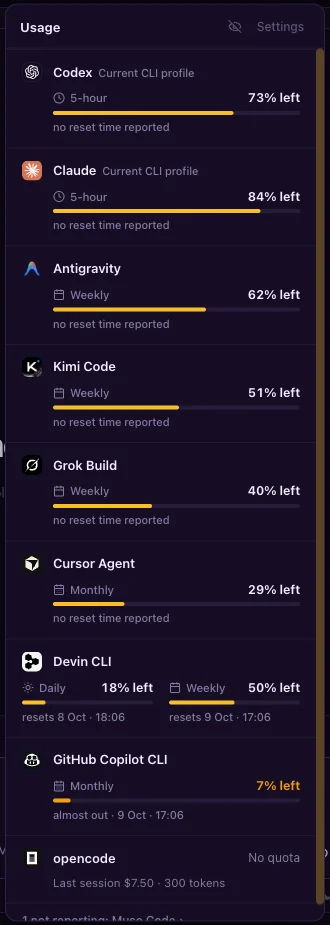
The two pools are separate. Running out of Copilot credits does not touch your Claude usage, and the other way round.
Models: one vendor or several
Copilot CLI routes requests to models from several providers. On October 8, 2026, GitHub's supported models page listed Anthropic Claude, OpenAI GPT, Google Gemini, xAI Grok, Moonshot AI Kimi and Microsoft MAI models as available in Copilot CLI. What you see depends on your plan and your organization's policy. Pick one with --model or /model, or use auto and let Copilot choose.
Claude Code runs Claude models. You choose one with --model and an alias such as sonnet, opus or haiku, or a full model name, and set the effort level with --effort. Source: Claude Code CLI reference, checked October 8, 2026. In Copilot CLI, reasoning effort is a launch option, --reasoning-effort.
Permissions and approval modes
Copilot CLI asks before it acts, and file access starts limited to the current folder, its subfolders and the system temp folder. You can allow or deny tools by pattern with --allow-tool and --deny-tool, for example shell(git:*). A deny rule always wins, even over --allow-all. --yolo equals allowing all tools, paths and URLs. Copilot also has Plan and Autopilot modes.
Claude Code uses permission modes that you cycle with Shift+Tab or set with --permission-mode: Manual (default), acceptEdits, plan, auto, dontAsk and bypassPermissions. Deny rules block in every mode, including bypassPermissions. Source: Claude Code permission modes, checked October 8, 2026.
Skipping every prompt is risky in both tools. Read GitHub Copilot CLI yolo mode and Claude Code yolo mode explained before you turn it on.
MCP, instruction files and skills
| What | GitHub Copilot CLI | Claude Code |
|---|---|---|
| User MCP servers | ~/.copilot/mcp-config.json | ~/.claude.json (user or local scope) |
| Project MCP servers | .mcp.json or .github/mcp.json | .mcp.json in the project root |
| Add a server | copilot mcp add | claude mcp add |
| Personal instructions | ~/.copilot/copilot-instructions.md | ~/.claude/CLAUDE.md |
| Project instructions | AGENTS.md and related files from the git root and current folder | ./CLAUDE.md or ./.claude/CLAUDE.md |
| Project skills | .github/skills/, .agents/skills/ or .claude/skills/ | .claude/skills/ |
Some files carry over. Copilot reads skills from .claude/skills/, and both tools look for a project .mcp.json. Claude Code reads AGENTS.md only when there is no CLAUDE.md in the folder or above it, and only from version 2.1.277. A home AGENTS.md is not loaded by Copilot. Sources: Claude Code memory docs and Claude Code MCP docs. More on Copilot's side in GitHub Copilot CLI MCP and history.
History, resume and ACP
Copilot keeps each session in ~/.copilot/session-state/<id>/. Resume with copilot --resume and an id, name or prefix, or take the latest with --continue.
Claude Code stores transcripts as JSONL in ~/.claude/projects/<project>/ and keeps them for 30 days unless you change cleanupPeriodDays. claude --continue reopens the latest conversation in the folder and claude --resume opens a picker or takes an id or name. Source: Claude Code session docs, checked October 8, 2026.
The Agent Client Protocol (ACP) lets another app drive an agent over a standard channel. Copilot CLI has an ACP server, copilot --acp --stdio, which GitHub labels a public preview. Commands that need a picker, such as /login, /resume and /diff, are not available over ACP. We found no ACP server mode in the official Claude Code docs on October 8, 2026; for scripts, Claude Code offers claude -p with JSON output and the Agent SDK.
Where Gemini CLI and Codex CLI fit
Copilot CLI vs Gemini CLI
Gemini CLI is Google's terminal agent, installed with npm install -g @google/gemini-cli. It reads GEMINI.md files, and the context.fileName setting can add AGENTS.md. MCP servers go in ~/.gemini/settings.json, gemini --resume reopens a session, and gemini --acp starts ACP mode. The official docs note that for unpaid tier and Google One users, Gemini CLI was replaced by Antigravity CLI on June 18, 2026. Sources: Gemini CLI docs and the Gemini CLI repository, checked October 8, 2026. See Antigravity CLI vs Gemini CLI for that change.
Copilot CLI vs Codex CLI
Codex CLI is OpenAI's terminal agent. It signs in with a ChatGPT account or with an OpenAI API key billed at API rates, and OpenAI's pricing page lists the CLI on plans from Plus up. It reads AGENTS.md from ~/.codex and from the project, stores MCP servers in ~/.codex/config.toml (added with codex mcp add) and reopens chats with codex resume. We found no ACP server mode in its official docs. Sources: Codex CLI docs, Codex pricing and Codex MCP docs, checked October 8, 2026. Plan details are in Codex plans and pricing.
The main difference stays the same as with Claude Code: Copilot CLI lets one GitHub plan reach models from several vendors, while Gemini CLI and Codex CLI each center on their own provider.
Run Copilot CLI and Claude Code side by side in CodeAgentSwarm
You do not have to pick one. CodeAgentSwarm lets you choose the agent per session, so Copilot can take one task while Claude Code works on another, each in its own project or git worktree. In Chat, every session shows its own status and sends its own notifications.
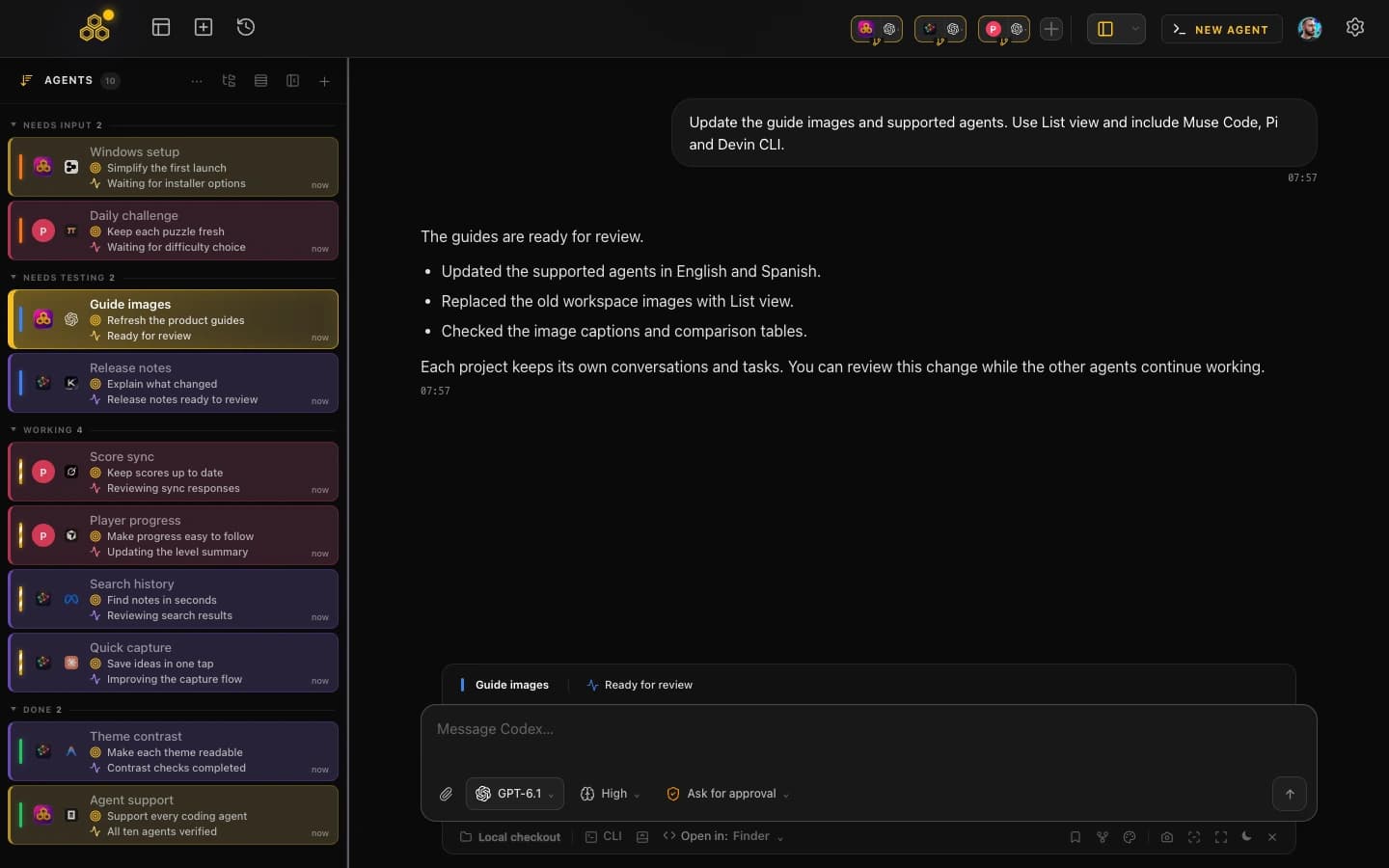
- Install Copilot from the agent picker or Settings > Providers. The app downloads the official release, checks its SHA-256 and installs it, or uses your npm, Homebrew or WinGet copy.
- Sign in from Chat with a device code. Chat runs Copilot over ACP with model choice, Agent, Plan and Autopilot modes, and permission requests.
- Conversation History lists Copilot and Claude Code sessions together, filtered by agent and project, and reopens them in Chat or the terminal.
- The usage panel shows Copilot's monthly allowance next to your other agents.
GitHub Copilot CLI support arrives in CodeAgentSwarm 2.5.0, in beta. With Copilot, Chat has no reasoning selector and the app cannot generate conversation titles or commit messages, so pick another provider for those, such as Claude Code (see AI commit messages with Claude Code). To split work between parallel sessions, read the GitHub Copilot CLI agent swarm guide.
How to choose
- Choose Copilot CLI if your team already pays for GitHub Copilot or wants Claude, GPT and other models under one plan.
- Choose Claude Code if your projects already use
CLAUDE.md, Claude Code skills and Anthropic billing. - Choose Codex CLI if you already have a ChatGPT plan, and look at Antigravity CLI if you used Gemini CLI on the free tier.
- Look at Cline if you want an open source agent and your own choice of model provider: see Cline vs Claude Code.
- Use more than one when separate tasks fit different tools and you can review the parallel output.
Try each tool on a real task from your repository. Compare the permission flow, the review work and the final diff, not just the first answer.
FAQ
Is GitHub Copilot CLI the same as Claude Code?
No. Copilot CLI is GitHub's agent and spends GitHub Copilot AI credits across models from several providers. Claude Code is Anthropic's agent and runs Claude models under a Claude subscription, Console account or cloud provider.
Can GitHub Copilot CLI use Claude models?
Yes. GitHub's supported models page lists Claude models as available in Copilot CLI. Which ones you see depends on your Copilot plan and your organization's policy, and they spend Copilot AI credits, not Claude usage.
Does Copilot CLI read CLAUDE.md?
Yes, from the repository, alongside AGENTS.md and GEMINI.md. Personal instructions go in ~/.copilot/copilot-instructions.md. It does read skills from .claude/skills/. If you want one shared file, AGENTS.md works in Copilot, Codex and in Claude Code when no CLAUDE.md is present.
Which one supports ACP?
Copilot CLI has an ACP server, copilot --acp --stdio, in public preview. Gemini CLI has gemini --acp. We found no ACP server mode in the official Claude Code or Codex docs on October 8, 2026.
Can I run Copilot CLI and Claude Code at the same time?
Yes. In CodeAgentSwarm you pick the agent per session and run them side by side, each in its own project or worktree. Copilot support arrives in 2.5.0, in beta.