
AI Commit Messages: Generate a Good Commit From Your Claude Code Diff
By CodeAgentSwarm · Updated September 29, 2026
What the AI commit message generator does
Short version: CodeAgentSwarm reads the changes you have staged, looks at the actual diff, and writes a commit message that describes what changed. You review it, tweak it if you want, and commit. No copy-pasting diffs into a chat window, no switching to a separate Git client.
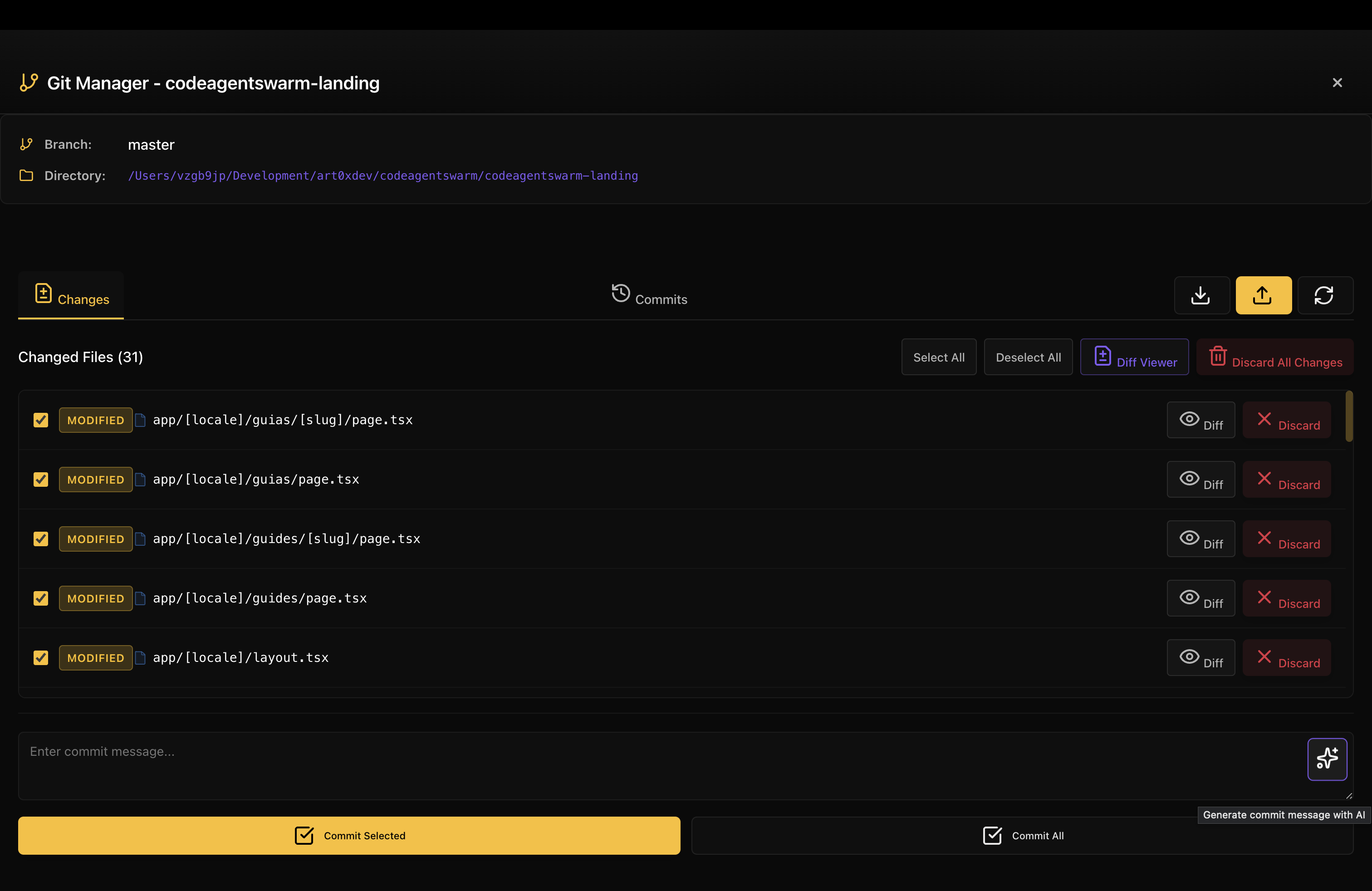
The whole point is to remove the friction at the end of a session. The AI did the heavy lifting in the code, and now writing a decent commit message is one click instead of a chore you skip. If you are new to Claude Code, it is Anthropic's agentic coding tool that runs in your terminal and edits files across your project.
How it works: from changed files to a committed message
The Git Manager works on top of your real repository, so what you see is what Git sees. The flow looks like this:
- Open the Git Manager for the project you are working on.
- Review the list of changed files. You can stage the ones you want to include and leave the rest out.
- Click the control to generate the commit message with AI.
- It reads the staged changes and the diff, then writes a message that summarises what changed.
- Read it, edit it if something is off, and commit. From there you can push too.
Because it reads the actual diff and not just the file names, the message reflects what the code does, not a generic "updated files". If you renamed a function, added a guard clause, or fixed an off by one, that tends to show up in the message.
Stage only what belongs in this commit before generating. The AI writes the message from what is staged, so a clean staging area gives you a clean, focused message instead of one trying to summarise ten unrelated things.
Concise or detailed: pick the message you need
Not every commit deserves the same treatment. Sometimes you want a single tidy line. Sometimes the change is big enough that future you will want a paragraph explaining why.
CodeAgentSwarm lets you get either one:
- Concise: a short, single line summary. Good for small, self explanatory changes and for repos that like a clean one line history.
- Detailed: a subject line plus a body that explains what changed and, where it can infer it, why. Good for bigger refactors, features, or anything you might have to justify in a review.
My rule of thumb: concise for the small stuff, detailed when a single line would lie about how much actually changed. Either way you can edit the result before committing, so treat it as a strong first draft rather than something you have to accept verbatim.
Why this matters when several agents are working
This feature earns its keep when you are running things in parallel. With one terminal, writing a commit by hand is not a big deal. With several agents, each one having touched a different module, the diff at the end can be large and spread across the repo.
Reading all of that and condensing it into a sentence is exactly the kind of summarisation the AI is good at. Instead of scrolling through the whole diff to remember what happened, you let it draft the message and you spend your attention on whether it is accurate. If you want to learn how to run those sessions in the first place, see this guide: How to run multiple Claude Code sessions in parallel.
There is a natural order here that works well: review first, then commit. You look at what changed using the diff viewers, confirm it is what you wanted, then generate the message and commit. If you have not seen how the diff side works, read this: How to view Claude Code changes in real time.
A generated message is a draft, not gospel. Always read it before committing, especially for detailed messages where the AI infers intent. If it claims you did something you did not, fix the line. It is faster than rewriting from scratch, but it is not a substitute for a quick read.
Stage, commit, push and pull without leaving the app
The Git Manager is not just a commit message generator bolted onto the side. It covers the everyday Git loop so you do not have to bounce to a terminal or a separate client for the common operations:
- Stage and unstage files from the changed files list.
- Commit with the message you generated or wrote.
- Push your commits to the remote.
- Pull to bring in changes before you start, or before you push.
Keeping it in one place matters more than it sounds. When you are juggling several terminals, every context switch costs you a little focus. Doing the commit right where the changes happened, next to the agents that made them, keeps you in the flow instead of alt tabbing to wrangle Git somewhere else.
This works on macOS, Windows and Linux, on top of your existing Git setup. The AI message generation is available on the Pro plan, and it runs on top of the subscriptions you already pay for, so there is no separate model key to manage just for commits.
FAQ
How do I generate a commit message with AI?
Open the Git Manager in CodeAgentSwarm, stage the files you want in the commit, then click the control to generate the commit message with AI. It reads the staged diff and writes a message you can review, edit and commit.
Does CodeAgentSwarm have Git integration?
Yes. It has a built-in Git Manager that lets you stage and unstage files, review changes, commit, push and pull without leaving the app, plus AI commit message generation on top.
Can it write the commit message from my diff?
Yes. The generator reads your staged changes and the actual diff, not just the file names, so the message reflects what the code does rather than a generic placeholder.
Can I commit and push from the app?
Yes. After generating or editing the message you can commit and push directly from the Git Manager, and you can pull to bring in remote changes too. No separate Git client needed for the everyday loop.
Concise vs detailed commit messages: which should I use?
Use a concise single line for small, self explanatory changes. Use a detailed message with a body for bigger refactors and features where you want to explain what changed and why. You can edit either result before committing.
Is the AI commit message generator available on macOS, Windows and Linux?
Yes, CodeAgentSwarm runs on macOS, Windows and Linux. The Git Manager and the AI message generation work on all three, on top of your existing Git installation. The AI generation is part of the Pro plan.