
Codex scheduled tasks: what they do and how to schedule Codex CLI
By CodeAgentSwarm · Updated October 31, 2026
codex exec, and scheduling Codex CLI in CodeAgentSwarm.Can I schedule Codex?

Yes, three ways:
- Scheduled tasks in the ChatGPT desktop app. Runs locally in your project or a new worktree, with the computer on and the app running.
- cron plus
codex exec. Works with the CLI alone; you get a log. - CodeAgentSwarm. Schedules the Codex CLI you already use, in a Chat you can continue, with the same editor you use for your other agents.
Codex scheduled tasks in the ChatGPT app
You manage them under Scheduled in the ChatGPT desktop app or the web. In the desktop app a task runs in your local project or in a new worktree, and OpenAI asks you to keep the computer on and the app running when the task needs local files. Web tasks cannot reach a folder on your computer. Team Tasks, set up by workspace admins, run in the cloud. Availability depends on your plan and workspace settings.
The docs say it plainly: the Codex CLI and the IDE extension do not provide the Scheduled management interface. OpenAI: scheduled tasks
If you work in the ChatGPT app all day, its scheduled tasks are the natural choice. If you use Codex from the terminal, or next to Claude Code and other agents, CodeAgentSwarm schedules the CLI directly.
A Codex cron job with codex exec
codex exec runs one task without the interactive UI. By default it uses a read-only sandbox; add --sandbox workspace-write only when the job must edit files.
# crontab -e: every day at 07:00
0 7 * * * cd ~/code/my-app && codex exec "List failing tests and the likely cause. Do not edit files." >> ~/logs/codex-cron.log 2>&1
For CI, OpenAI recommends its GitHub Action. Non-interactive mode
Schedule Codex in CodeAgentSwarm
- Open Scheduled in the top bar and press New schedule. Or type the prompt in a Codex Chat and pick Schedule this prompt… from the send menu.
- Pick the Project and choose Codex CLI as the agent. Model, reasoning and permissions are optional: leave them on Default or set them like in the Chat composer.
- Write the prompt the agent should run every time.
- Under When, choose At set times (up to 24 a day), Every few hours (1, 2, 3, 4, 6, 8 or 12) or When I run it, and the days.
- Choose Visible (opens a Chat) or Headless (no tab, result in Scheduled), and whether each run continues the same conversation or starts a new one. Press Create schedule.
Prompts worth scheduling with Codex
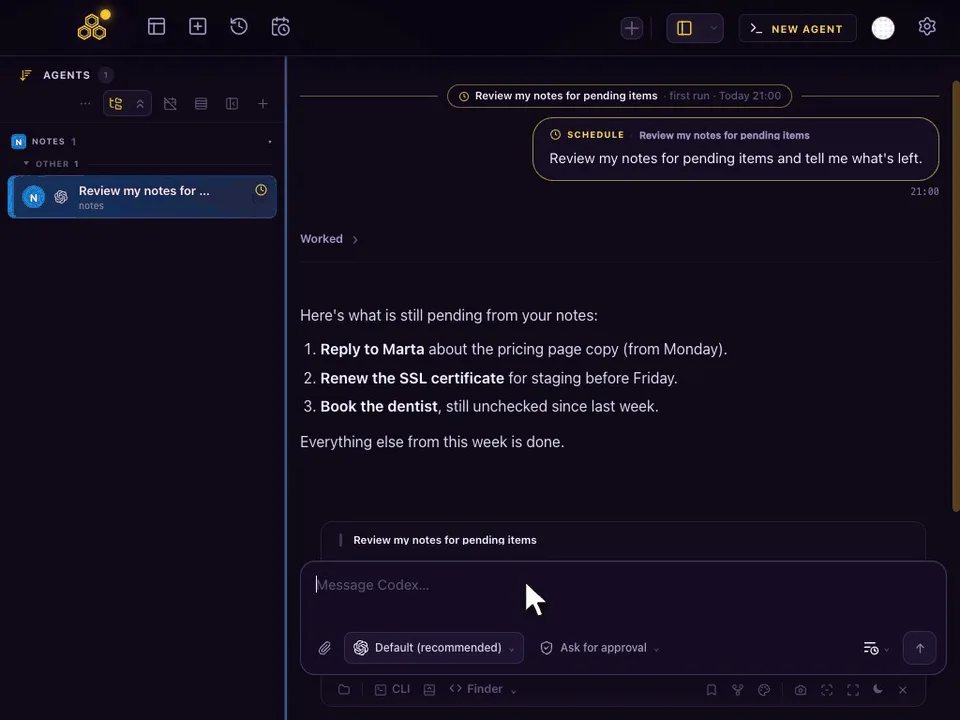
Every day at 21:00
Review my notes for pending items and tell me what's left.- Every weekday at 09:00: summarise the pull requests waiting for review in this repo.
- Every 6 hours: run the linter and the type checker, and fix only formatting issues.
- Mondays at 08:00: list TODO comments added last week with the file and line.
The first prompt is the one in the capture above. Codex reads the notes folder of that project and answers in the same Chat every evening.
What happens on each run
- With Continue the same conversation, a visible run goes to the Codex agent that already holds the conversation, and never opens a second copy. With Start a new conversation, each run opens a fresh agent. If it is busy, Skip if still working (on by default) skips that slot; turn it off and the prompt waits in the queue.
- The Chat marks every scheduled run, so you can tell your own messages from the scheduled ones and reply to a run like any other message.
- If CodeAgentSwarm was closed or the computer asleep at the set time, If missed, run when the app opens runs it once, late. A week away gives one run, not seven.
- Schedules run on your computer, so CodeAgentSwarm has to be open. Your phone can list, edit and run them from the Scheduled tab.
FAQ
Where are Codex scheduled tasks?
Under Scheduled in the ChatGPT desktop app and on the web. They were called automations before. The Codex CLI has no scheduling interface.
Do Codex scheduled tasks run locally?
Desktop app tasks run in your local project or a new worktree, with the computer on and the app running. Web tasks cannot access local folders; Team Tasks run in the cloud.
How do I run Codex CLI on a cron?
Call codex exec with your prompt from a crontab line, after changing to the project folder. It runs read-only unless you pass a sandbox that allows writes.
Can CodeAgentSwarm schedule Codex with a specific model?
Yes. A schedule can set the model, reasoning and permissions, or leave them on Default to follow your Codex configuration.