
How to Find and Resume Your Codex CLI Conversation History
By CodeAgentSwarm · Updated August 11, 2026
What is Codex CLI conversation history
Quick answer: Codex CLI saves your sessions locally as you work, and you can resume a past session to continue it with its previous context intact. The rest of this guide shows how to resume natively, and how to make every Codex conversation searchable across all your projects.
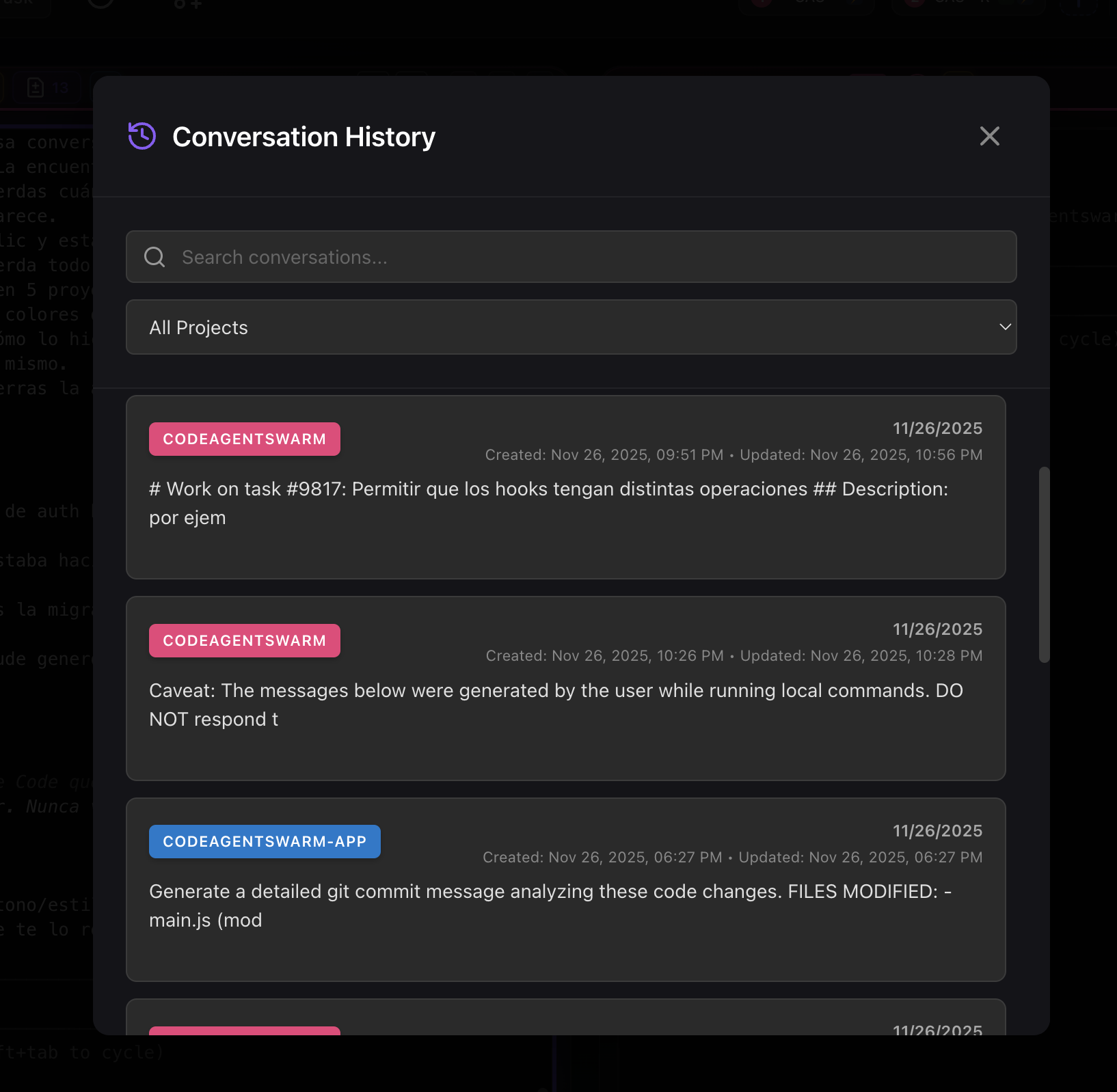
Codex CLI conversation history is the record of your past sessions with the agent: what you asked, what Codex did, and the context that built up along the way. Because each Codex session is its own process with its own conversation, that history is what lets you come back to a piece of work later instead of re-explaining everything from scratch.
If you already use the Codex CLI, you have probably resumed a previous session at least once. That native resume is genuinely useful, but it is built for the simple case: get back into a recent conversation. Once you accumulate many Codex sessions across multiple projects, you need a way to actually find the right one, and that is where this guide goes next.
Native Codex CLI history and resume
Codex CLI stores your sessions on your machine as you work, so a conversation is not lost the moment you close the terminal. The core capability you get out of the box is the ability to resume a previous session: instead of opening a fresh conversation, you continue an existing one with its accumulated context.
In practice that means you can:
- Resume your most recent Codex session and keep going where you stopped
- Pick an earlier session to continue, rather than always starting over
- Keep the context a session built up - decisions, explanations, the shape of the code you discussed
Resume flags and storage paths change between Codex CLI versions, so check codex --help and the official Codex docs for the exact command in your version. The capability is consistent: Codex keeps your sessions and lets you continue a past one.
This is the same idea as resuming a Claude Code conversation, just for Codex. If you also run Claude Code, the companion guide on Claude Code conversation history covers the equivalent flow for that agent.
Where native Codex history starts to hurt
Native resume is perfect when the conversation you want is your last one or close to it. The friction starts when it is not. Once you are running Codex seriously, across several projects and many sessions, the limitations stack up fast:
- No full-text search. You cannot search for "that database migration session from last week" across your Codex history. You are left scrolling a list or remembering which session it was.
- No content preview. A list of sessions tells you little about what each one actually contained, so you open the wrong one and back out more than once.
- No cross-project view. History is anchored to where the session ran. Finding work from another project means going there first.
- No filtering. You cannot narrow down by project, by date, or by what the conversation was about.
- No view across agents. If you also run Claude Code or Antigravity CLI, each agent keeps its own history in its own place, so there is no single place to look.
If you use Codex on one project now and then, none of this matters. If Codex is part of your daily workflow across many repositories, you start spending real time just trying to find the conversation you want to resume.
Searchable Codex history across agents with CodeAgentSwarm
CodeAgentSwarm runs your Codex CLI agents in a desktop workspace and records every conversation automatically: what you wrote, what Codex did, which project you were in, and when it happened. That record becomes a searchable history that works across every project and, crucially, across every agent. The same view holds your Codex, Claude Code, and Antigravity CLI conversations together.
Full-text search across every Codex conversation
Type what you remember - a module name, a bug, a technology - and CodeAgentSwarm searches inside the content of all your conversations, not just titles. Results show the conversation title, the project, the date, and the matching messages, so you can confirm it is the right Codex session before you open it.
Filter by project
Conversations are organized by project, each with its own color, so a long history stays readable. When you work across several repositories at once you can filter to a single project and see only the Codex sessions that belong to it, instead of one giant flat list.
Works across agents, not just Codex
Because CodeAgentSwarm lets you pick the agent per terminal, your history is not siloed by tool. Search "auth refactor" and you see the Codex session where you started it and the Claude Code session where you finished it, side by side. For the broader picture of running mixed agents, see the AI CLI agent swarm overview, and for Codex specifically the Codex agent swarm guide.
Resume from any terminal
Found the conversation you need? Open it and CodeAgentSwarm brings it back with its previous context, in any terminal, regardless of which project it started in. You do not navigate to a directory and remember a session id by hand. You search, select, and keep working.
How to open your Codex history from any terminal
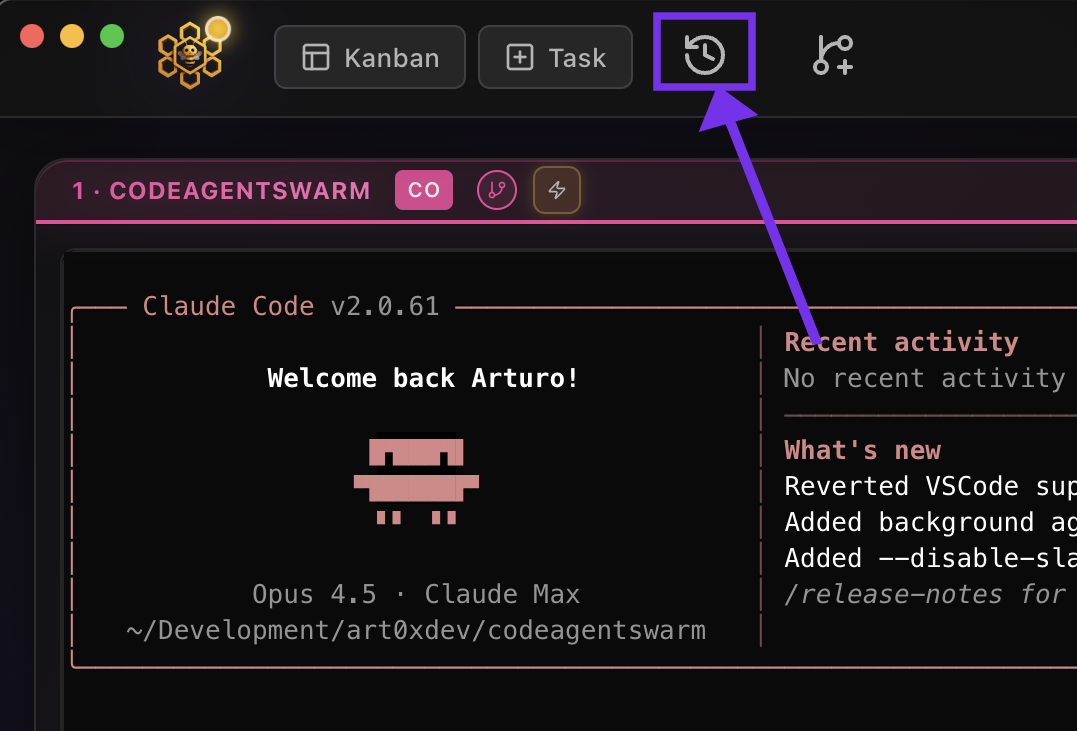
No matter which Codex terminal you are in, the history is one click away:
- In any terminal, click the "History" button.
- A modal opens with your recent conversations across projects and agents.
- From there you can search the content, filter by project, and open any conversation.
How to resume a past Codex conversation
When you open a project in CodeAgentSwarm you can choose resume mode instead of starting a blank conversation. In resume mode you see all your recent conversations for that project and pick exactly which Codex session to continue.
From that view you can:
- See all your previous conversations organized by date
- Search the content to find a specific session, not just scroll
- Choose exactly which Codex conversation to continue
- Or start a fresh conversation if that is what you want
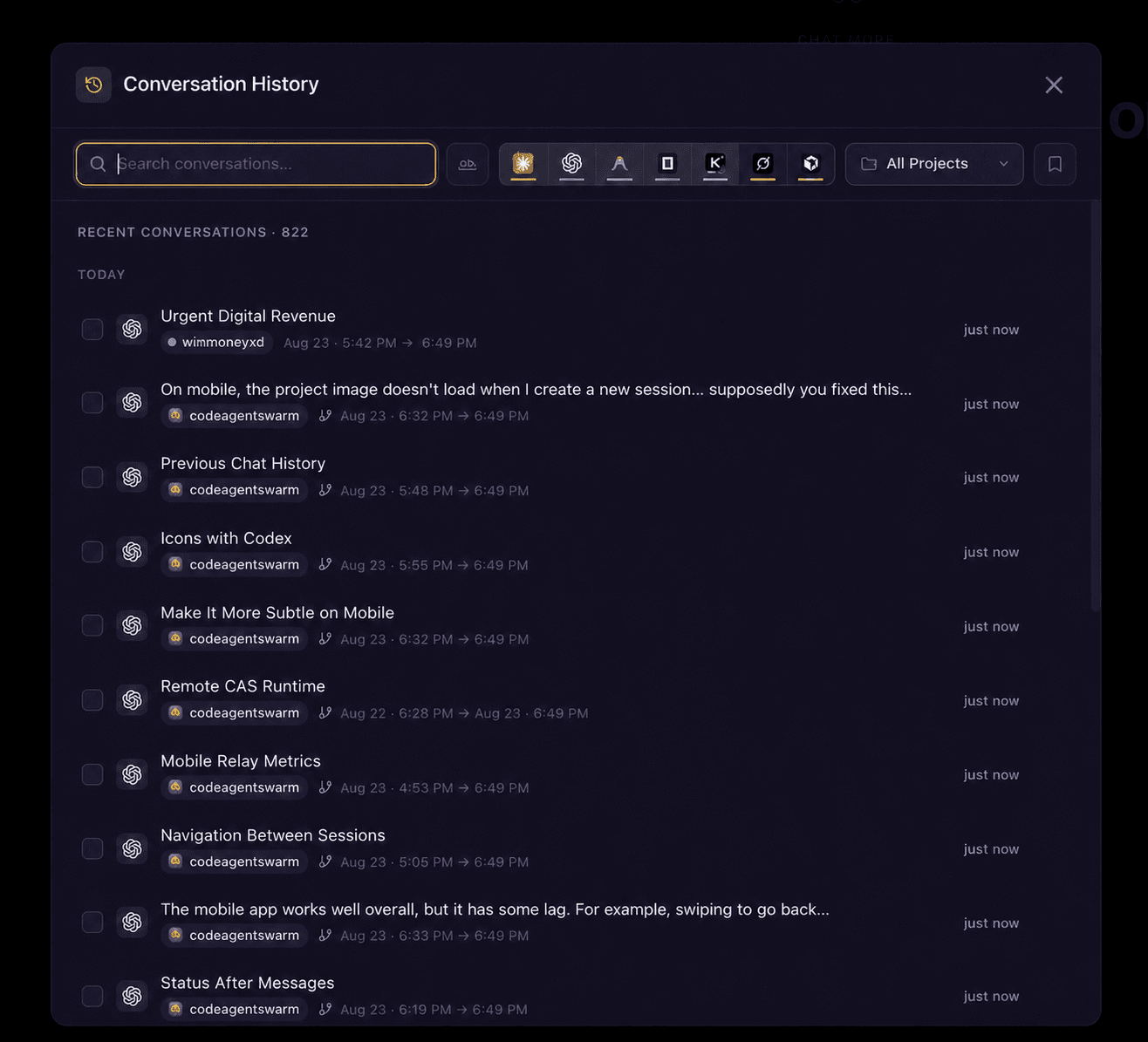
If you searched first, selecting a conversation shows the messages where your search terms appear, so you confirm it is the right one before opening it. Once you choose it, CodeAgentSwarm reopens it with the prior context so Codex remembers what you decided and what you built, and you continue as if no time had passed.
Why Codex conversation history changes how you work
Treating your Codex history as a searchable memory, rather than a pile of old sessions, has a direct effect on day-to-day work:
- Stop re-explaining modules. If you spent fifteen minutes giving Codex context on your auth layer, resume that session instead of explaining it again from zero.
- Keep decisions consistent. Architecture choices pile up across sessions. Resuming the right one keeps you from contradicting a decision you made days ago.
- Save tokens and time. Re-explaining context burns both. Continuing a session that already has the context is cheaper and faster.
- Handle many projects calmly. When you can search and resume any Codex conversation from any project, switching repositories stops being a context-switching tax.
- Never lose a fix. That clever solution from late last night is in your history. Search for it, resume it, reuse it.
History pays off even more when you run several Codex agents at once. If that is your setup, the guide on running multiple Codex sessions covers how to keep a swarm organized.
Native Codex resume vs CodeAgentSwarm history
Both let you resume a past Codex conversation. The difference is how easily you find the right one once you have many of them:
- Resuming your last session: Native Codex handles this well on its own.
- Finding an older session by keyword: Native has no full-text search; CodeAgentSwarm searches inside the content.
- Working across projects: Native history is anchored to where the session ran; CodeAgentSwarm gives you one cross-project view.
- Working across agents: Each CLI keeps its own history; CodeAgentSwarm holds Codex, Claude Code and Gemini conversations together.
- Resuming from anywhere: Native means navigating to the right place; CodeAgentSwarm resumes any conversation from any terminal.
If you only ever bounce back into your most recent Codex session, native resume is all you need. The moment you are hunting for "which session did I fix that in," searchable history is the better answer.
FAQ
Yes. Codex CLI keeps your sessions locally as you work, so a conversation is not lost when you close the terminal. You can resume a past session to continue it with its previous context. Check codex --help and the official Codex docs for the exact resume command in your version.
Natively, Codex CLI lets you resume a past session so you continue it instead of starting fresh. The exact flag depends on your Codex version, so check codex --help. In CodeAgentSwarm you open the History view or resume mode, find the conversation, and reopen it in any terminal with its previous context loaded.
Codex CLI stores sessions locally on your machine, and the exact location can change between versions, so confirm it in the official Codex documentation for your install. CodeAgentSwarm records its own searchable copy of every conversation so you can search and resume across projects and agents without depending on raw file paths.
Native Codex history has no full-text search, so you scroll or remember. CodeAgentSwarm provides instant full-text search across every Codex conversation, in every project, with message previews so you can confirm the right session before opening it.
Native Codex history is anchored to where each session ran, so finding work from another project means going there first. CodeAgentSwarm organizes conversations by project, lets you filter to one, and resumes any of them from any terminal.
Yes, in CodeAgentSwarm. Because you pick the agent per terminal, history is not siloed by tool. The same searchable view holds your Codex, Claude Code and Antigravity CLI conversations, so you can trace and resume work no matter which agent did it.