
How to Use Multiple Claude Code Accounts and Codex Accounts
By CodeAgentSwarm · Updated August 25, 2026
Multiple accounts are not multiple sessions
Running three Claude Code sessions does not mean you are using three Claude accounts. It means three processes are drawing from the quota of whichever account they share. Multiple accounts solve a different problem: keeping personal, work or separate subscription identities signed in at the same time.
If your goal is parallel work under one login, use the multiple Claude Code sessions guide or the multiple Codex sessions guide. You can also combine both ideas, for example by running two work conversations on one account and a personal conversation on another.
Account means identity and quota. Session means conversation and running process. You can use either feature independently or combine both.
How to add a Claude Code or Codex account
CodeAgentSwarm uses each provider's normal sign-in flow. Give each account a local label so you can recognize it in conversations and quota views.
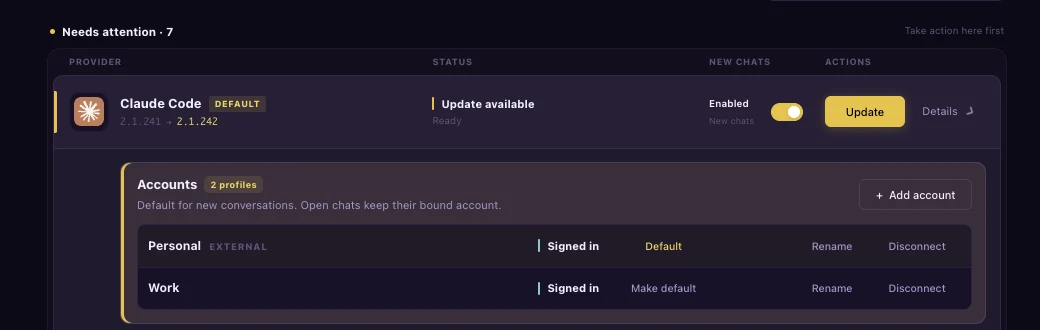
- Open Settings, then Providers.
- Expand Claude Code or Codex.
- Click Add account and give the login a recognizable name, such as Work or Personal.
- Finish the provider sign-in in your browser.
- Click Make default if new conversations should use this account automatically.
- Repeat for each account you want to keep available.
Current CLI profile is not replaced. It remains available beside the managed accounts.
How CodeAgentSwarm keeps the logins separate
Each managed Claude Code or Codex account gets its own CLI credential directory. CodeAgentSwarm launches the provider with the directory that belongs to the conversation, so one login does not overwrite another. Provider tokens remain in those isolated CLI profiles instead of being copied into CodeAgentSwarm settings.
Claude Code uses its supported configuration-directory boundary and Codex uses its supported home-directory boundary. The selected directory belongs to the provider process, not to the whole app, so two conversations can use different accounts side by side.
Only connect accounts you own or are authorized to use. Each provider's subscription terms and usage limits still apply.
Choose an account for new and existing conversations
Set the default for new conversations
New conversations use the account marked Default. Once the provider creates the native conversation id, CodeAgentSwarm binds that account to the conversation. Reopening it later uses the same account instead of whichever login happens to be the current default.
Switch the account on an existing Chat
Wait until the current response finishes. Open the account selector in the quota popover and choose another account, or press Cmd+P and run Switch current conversation to <label>. CodeAgentSwarm stops the idle provider process and resumes the same native conversation id with the selected account.
CodeAgentSwarm restarts the idle provider process with the original native conversation id and shared history store. Codex has passed a live cross-account resume check. Claude uses the same restart path, but still needs the same live check with two distinct accounts.
You cannot switch accounts while the provider is answering. Wait for the turn to finish so the conversation can restart safely on the same id.
Native history follows the conversation; quota follows the account
Managed profiles isolate credentials while preserving the provider's native conversation store. Exact-id resume keeps the real Claude Code transcript or Codex thread instead of rebuilding it from exported text. For more detail, read the Claude Code history guide or the Codex conversation history guide.
CodeAgentSwarm also keys quota by provider and account. Work Claude, Personal Claude and Work Codex do not collapse into one reading. The Claude Code plans guide and Codex plans guide explain what each provider's limits mean.
Which providers support managed accounts?
Managed accounts currently work for Claude Code and Codex. The other providers still use their current machine login inside CodeAgentSwarm.
| Provider | Managed accounts | Current behavior |
|---|---|---|
| Claude Code | Yes | Add, label, set a default and switch idle Chats |
| Codex | Yes | Add, label, set a default and switch idle Chats |
| Grok, Kimi Code and OpenCode | Not yet | Uses Current CLI profile |
| Cursor and Antigravity | Not yet | Uses Current CLI profile |
Settings does not show Add account for a current-profile-only provider. Its existing CLI login still works normally.
FAQ
Can I use multiple Claude Code accounts on one computer?
Yes. Add each Claude Code login under Settings, Providers. CodeAgentSwarm gives every managed account an isolated credential profile and keeps your existing Current CLI profile available.
How do I switch Claude Code accounts without logging out?
Add both accounts first. You can assign a managed account to a new Chat. Switching an existing Claude Chat uses the same idle restart path as Codex, but has not yet been live-verified with two distinct Claude accounts.
Does switching accounts start a new conversation?
CodeAgentSwarm restarts the provider with the original native conversation id and shared history store instead of creating a replacement conversation. Codex has passed a live cross-account resume check; Claude still needs the same check with two distinct accounts.
Can I use multiple Codex accounts at the same time?
Yes. Add separate managed Codex accounts, choose a default for new conversations and bind different conversations to different accounts.
Are quotas combined across accounts?
No. CodeAgentSwarm keeps quota readings separate by provider and account, matching the account bound to each conversation.
Does this work with Grok, Kimi Code, OpenCode, Cursor or Antigravity?
Not as managed accounts yet. Those providers remain current-profile-only. Claude Code and Codex are supported in the current release.