
Claude Code Dashboard: Manage Every Session From One Window
By CodeAgentSwarm · Updated October 5, 2026
The status problem: many sessions, zero visibility
Picture a normal parallel afternoon. One Claude Code session is refactoring the auth module, another is writing tests, a third is migrating a database schema. In a plain terminal, all three look identical: a tab named "claude" with text scrolling past. To know the state of any of them, you have to click into it, read the last screen of output, and reconstruct what happened.
Meanwhile the failure modes pile up quietly. The test session finished eight minutes ago and has been idle since. The migration session hit a permission prompt right after you switched away, so it has been waiting for a yes from you the whole time. You do not find out about either until you happen to click the right tab. Running agents in parallel was supposed to save time, and instead you spend it polling tabs.
The useful questions are concrete: what is each session doing, which ones are ready for review, and which need an answer? Anthropic also offers parallel sessions in Claude Code Desktop. CodeAgentSwarm adds a workspace for supervising agents from several providers with shared project tasks and history.
If what you are actually looking for is an explanation of graphical interfaces for the CLI in general, that is a different question, and it has its own page: the Claude Code GUI guide. This one assumes you already run sessions and focuses on overseeing them at scale.
What the dashboard shows you
CodeAgentSwarm puts the whole answer on one screen. Here is what the dashboard surfaces, capability by capability.
Every terminal in one window, each with its own status
All your sessions run as terminals inside a single workspace, so there is no tab hunting. Each terminal carries a dynamic title that reflects what the agent is doing ("Refactoring Auth", "Writing API Tests") plus a visual status: still working, finished, or waiting for your input. One second of looking at the grid tells you which terminals need attention. The setup itself is covered in running multiple Claude Code sessions.
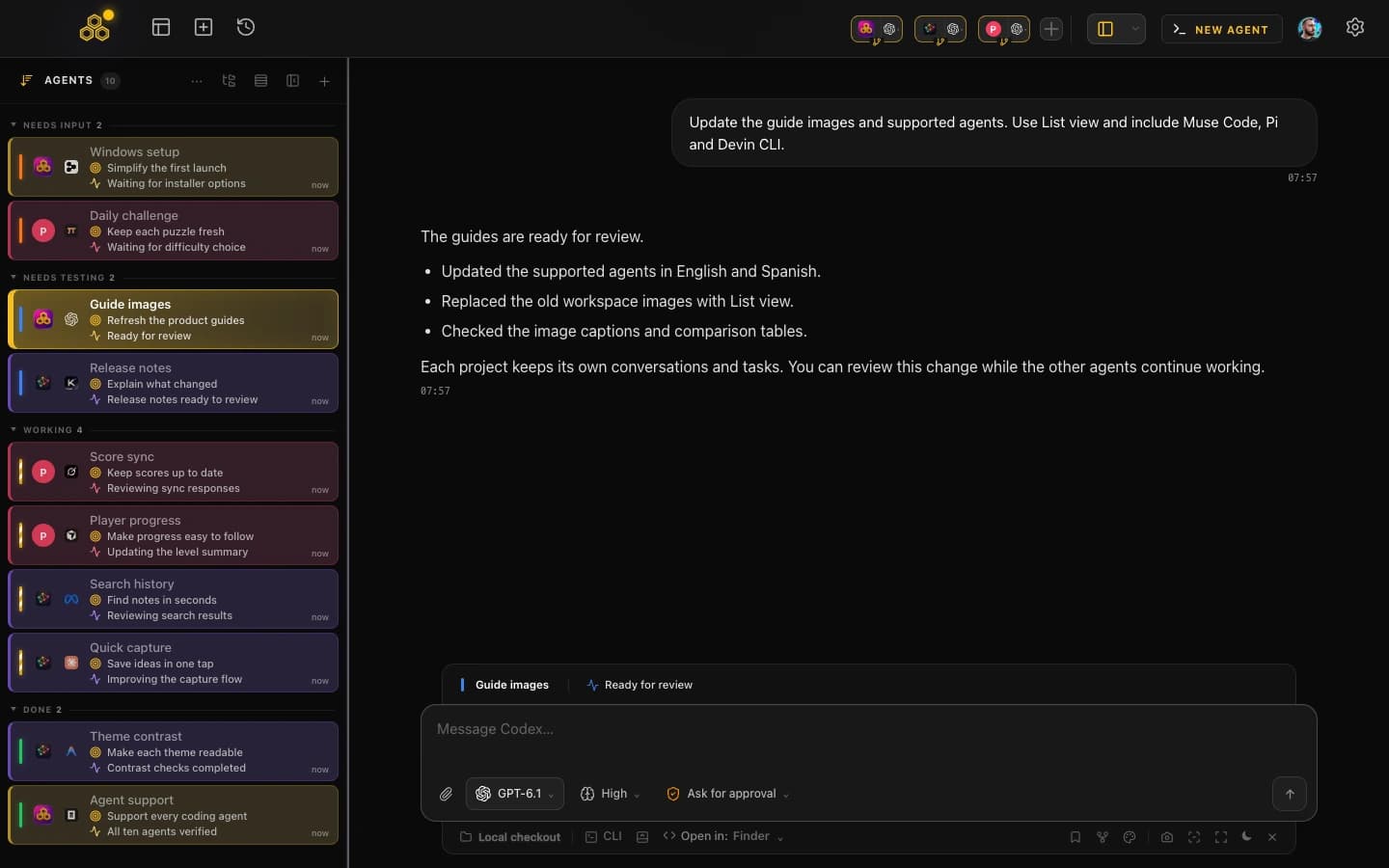
A task board wired to your terminals
The Agent Task Board is a kanban board with four columns: Pending, In Progress, In Testing, and Completed. You create tasks and assign them to terminals, and the agents themselves move the cards over MCP as they work: they write a plan when they start, drop an implementation summary when they finish, and park the card in In Testing for your review. The board is your project-level view of the swarm, and the task management guide covers it in depth.
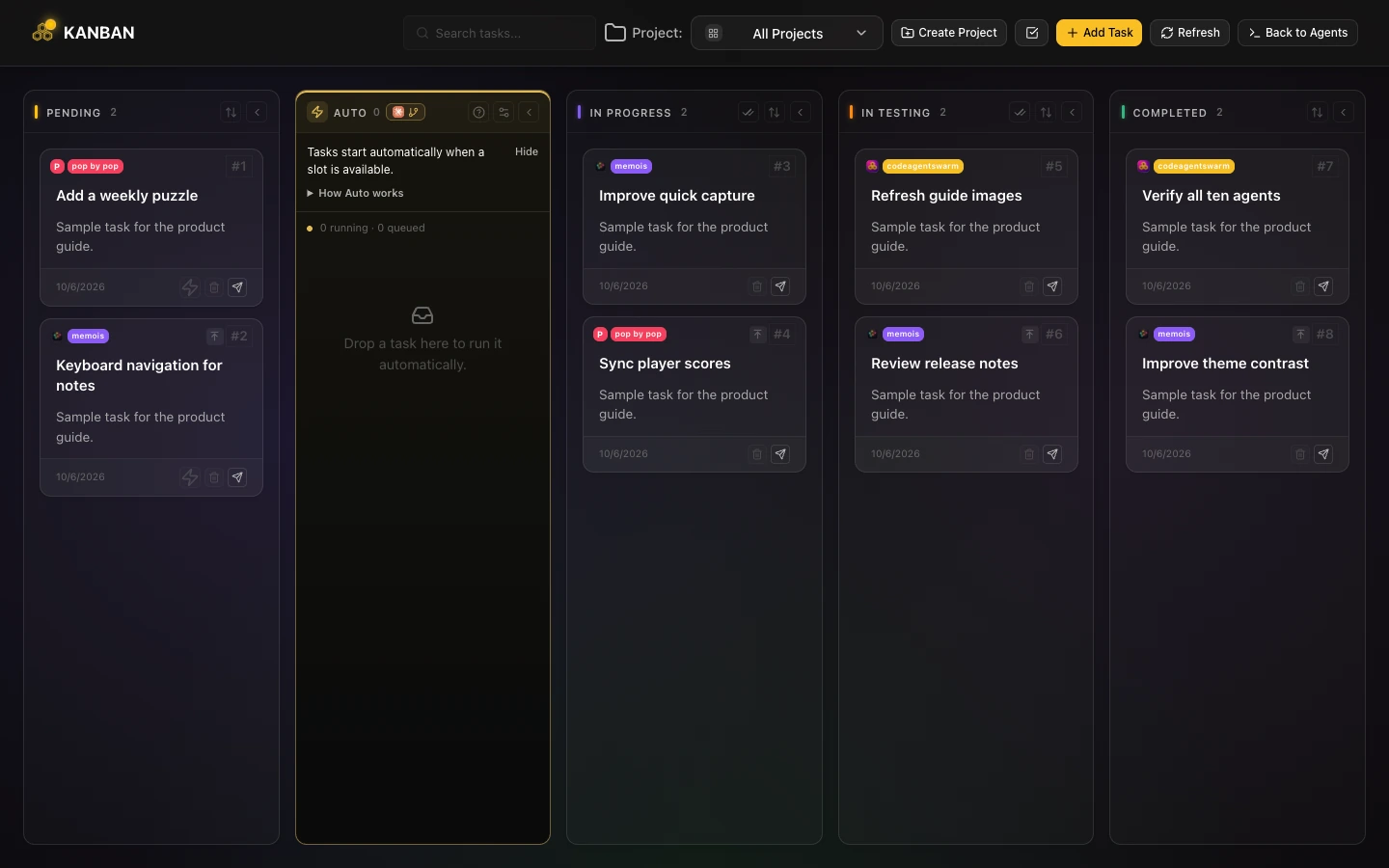
Notifications when an agent finishes or gets stuck
When a session completes its task or stops to ask you something, you get a native desktop notification. This flips the management model: instead of you polling the sessions, the sessions ping you. You can give one terminal your full attention and trust the rest to raise a hand when they are done or blocked.
Searchable history of every conversation
Every conversation from every terminal is saved and searchable in one place. When you need to know which session touched the payment flow last Tuesday, you search for it, read the conversation, and resume it if you want to continue. A manager is only useful if it also covers what happened yesterday, and the conversation history guide shows how far that goes.
File changes at a glance
Each terminal exposes the file changes its session is making, in diff format, per terminal and at project level. When two sessions work near each other in the same repo, you can see the overlap forming instead of discovering it at commit time.
One-click project switching
Project shortcuts in the navbar open a new terminal already inside a given project, with the agent and launch settings you saved for it. Managing sessions across several repos stops meaning "navigate to the folder and retype the command" and becomes a single click per project.
Managing a real working session from the dashboard
Here is what a concrete stretch of work looks like with the dashboard in front of you, rather than a feature list.
- You open CodeAgentSwarm and click two project shortcuts: one terminal opens in your API repo, another in the web app. You add a third terminal in the API repo for tests.
- You create three tasks on the Agent Task Board and assign one to each terminal. All three start in Pending.
- The agents pick up their tasks, move the cards to In Progress, and each writes its plan. The terminal titles update to reflect the work.
- You focus on the web app terminal. Twenty minutes later a notification tells you the tests terminal finished: its card sits in In Testing with an implementation summary of what it changed.
- Another notification: the API terminal is waiting for a confirmation. Its status shows blocked, so you jump in, answer, and it continues. No time lost idling.
- Before reviewing the test work, you check the file changes for that terminal to see exactly which files it touched.
- The result looks good, so you move the card to Completed. The board now reads: one Completed, two In Progress, and you know exactly where both of those stand.
Nothing in that flow required reading terminal scrollback to figure out state. The status came to you: from the terminal indicators, from the board, from the notifications. That is the difference between running sessions and managing them.
The dashboard is not Claude-only. Each terminal has an agent picker, so the same board and the same statuses work when some of your sessions run Codex, Antigravity CLI or opencode alongside Claude Code.
Dashboard vs juggling plain terminals
Terminal tabs and tmux panes can hold multiple sessions. What they cannot do is manage them, because they were never built to know what an AI agent is doing. The honest comparison is about oversight, not about running.
What tabs and tmux leave on you
- Status: you are the status system. Knowing if a session is done means clicking in and reading output.
- Blocked sessions: a permission prompt in a background tab waits silently until you find it.
- Task tracking: which session owns which piece of work lives in your head or a separate tool.
- History: Claude Code saves its sessions, while conversations from other agents have their own histories.
- Changes: figuring out what an agent modified means reading its output or running git yourself.
What the dashboard takes over
- Per-terminal status and dynamic titles answer "what is each one doing" at a glance.
- Notifications surface finished and blocked sessions the moment it happens.
- The task board ties every session to a card, with a plan and a summary written by the agent.
- History is saved and searchable across every terminal, and conversations can be resumed.
- File changes are visible per terminal and per project, as diffs.
For one occasional session, your existing terminal or provider app may be enough. Consider CodeAgentSwarm when you want shared project tasks, history and session status across providers. Parallel agents can still edit the same files: use separate Git worktrees when you need isolated working copies, and review the results before merging.
Getting started with the dashboard
CodeAgentSwarm is free during the open beta, with every Pro feature included. It installs locally on macOS, Windows and Linux and runs the official Claude Code CLI in standard terminals using your existing Anthropic account. CodeAgentSwarm adds a dashboard and supervision layer; Anthropic still provides the model and sets your plan and usage limits.
Getting to a managed setup takes a few minutes: open the app, point a terminal at your project, and start Claude Code in it. Add more terminals as you need them, create tasks on the board, and turn on notifications. From there, the oversight is ambient: statuses, cards and pings instead of tab checking.
And because every terminal has an agent picker, the same dashboard manages Codex, Antigravity CLI and opencode sessions too. One window, every agent, every status.
FAQ
Is there an official Anthropic Claude Code dashboard?
Yes. Anthropic provides Claude Code in its desktop app, including parallel sessions and visual diff review. CodeAgentSwarm is an independent workspace for supervising Claude Code alongside other coding agents, with shared project tasks, history and notifications.
Can I manage multiple Claude Code sessions from one dashboard?
Yes, that is exactly what CodeAgentSwarm is for. All your sessions run as terminals in a single workspace, each with a dynamic title and a visible status. You assign tasks to terminals on the kanban board, get notified when a session finishes or needs input, and search the history of every conversation from one place.
Does the dashboard show Claude Code usage or token costs?
CodeAgentSwarm can display provider quota and usage-window information where the selected account and integration expose it. That indicator is separate from a billing report: check the provider account for authoritative charges and plan limits.
Does the dashboard change how Claude Code works?
No. Underneath, it is the same Claude Code CLI running in a real terminal, with the same model and your own Claude subscription. The dashboard adds visibility and control around it: statuses, tasks, notifications, history and diffs. You can go back to a bare terminal at any time, nothing gets locked in.
Can the same dashboard manage agents other than Claude Code?
Yes. Each terminal in CodeAgentSwarm has an agent picker, so the same workspace can run Claude Code, Codex, Antigravity CLI and opencode side by side. The task board, statuses, notifications and history work the same regardless of which agent a terminal runs.
How does the dashboard tell me a session needs my input?
Two ways. The terminal itself shows a waiting status, so a glance at the workspace reveals which session is blocked. And a native desktop notification fires when a session stops to ask you something or finishes its task, so you find out even when you are focused on another terminal or another app.