
How to Install Claude Code on Linux (Ubuntu, Debian, Fedora)
By CodeAgentSwarm · Updated September 29, 2026
Quick answer: install Claude Code on Linux in one line
Quick answer: run the official installer in any terminal. No sudo, no Node.js. When it finishes, open a new terminal, type claude in your project and log in.
# Official native installer (recommended)
curl -fsSL https://claude.ai/install.sh | bash

# Verify the install
claude --version

# Start it inside a project
cd ~/my-project
claude
The installer puts the launcher in ~/.local/bin/claude and keeps itself updated in the background. Every command in this guide comes from the official Claude Code setup documentation.
Requirements
- A 64-bit Linux on x64 or ARM64. Officially supported: Ubuntu 20.04+, Debian 10+ and Alpine Linux 3.19+. Fedora and RHEL get an official dnf repository.
- At least 4 GB of RAM and an internet connection.
- Bash or Zsh.
- A Claude Pro, Max, Team, Enterprise or Console account. The free claude.ai plan does not include Claude Code.
You do not need Node.js. The npm package still exists, but it only downloads the same native binary, so the one-line installer is simpler.
Install with apt or dnf (official repositories)
If you prefer updates to arrive with the rest of your system, Anthropic publishes signed repositories. The trade-off: package manager installs do not auto-update; you upgrade them like any other package.
Ubuntu and Debian (apt)
sudo apt install curl gnupg
sudo install -d -m 0755 /etc/apt/keyrings
sudo curl -fsSL https://downloads.claude.ai/keys/claude-code.asc \
  -o /etc/apt/keyrings/claude-code.asc
echo "deb [signed-by=/etc/apt/keyrings/claude-code.asc] https://downloads.claude.ai/claude-code/apt/stable stable main" \
  | sudo tee /etc/apt/sources.list.d/claude-code.list
sudo apt update
sudo apt install claude-code

# Later: sudo apt update && sudo apt upgrade claude-code
Fedora and RHEL (dnf)
sudo tee /etc/yum.repos.d/claude-code.repo <<'EOF'
[claude-code]
name=Claude Code
baseurl=https://downloads.claude.ai/claude-code/rpm/stable
enabled=1
gpgcheck=1
gpgkey=https://downloads.claude.ai/keys/claude-code.asc
EOF
sudo dnf install claude-code

# Later: sudo dnf upgrade claude-code
Both commands use the stable channel, which is usually about a week behind and skips releases with major regressions. Alpine has an apk repository too; on Alpine you also need bash, curl, libgcc, libstdc++ and ripgrep installed first.
First run and logging in (also over SSH)
- Open a terminal in a project folder and type
claude. - Your browser opens with the Anthropic login. Sign in with your Claude account.
- On a server or over SSH, where no browser can open, press
cto copy the login URL and open it on any other device. - If the
ANTHROPIC_API_KEYenvironment variable is set, Claude Code asks you once to approve the key instead of opening a browser.
If something looks wrong afterwards, claude doctor prints a read-only report of your install, your settings and the last update attempt.
What about the Claude desktop app on Linux?
Anthropic now ships a Claude desktop app for Linux in beta, for Ubuntu 22.04+ and Debian 12+ on x64 and ARM64, and it includes Claude Code. If you want the official graphical app for one Claude conversation at a time, that is the place to start.
CodeAgentSwarm solves a different problem: running several terminal agents at once and keeping track of them. It works with the Claude Code CLI you just installed, mixes it with Codex and other agents in the same window, and ships as an AppImage too, so it also runs on Fedora and most other distributions.
Common Linux errors and how to fix them
- "claude: command not found" after installing:
~/.local/binis not on your PATH yet. Open a new terminal, or addexport PATH="$HOME/.local/bin:$PATH"to your~/.bashrcor~/.zshrc. - "NO_PUBKEY BAA929FF1A7ECACE" on apt update: the signing key did not download. Check that your network reaches
downloads.claude.aiand run the key download again. - "not found" when running the installer on Alpine: Alpine has no
bashorcurlby default. Install them withapk add bash curl libgcc libstdc++ ripgrep. - Search inside Claude Code fails: Claude Code relies on ripgrep. On musl distributions install it from your package manager and set
USE_BUILTIN_RIPGREP=0. - Permission errors with npm: never use
sudo npm install -g. Switch to the native installer, which needs no root.
For anything else, the official install troubleshooting page lists every known error with its fix.
Running several Claude Code sessions on Linux
With Claude Code working, the next limit shows up quickly: one terminal is one task at a time. You hand Claude a job and wait. Opening more tabs in GNOME Terminal or tmux helps, until you lose track of which session finished, which one is waiting for permission and what each one changed.
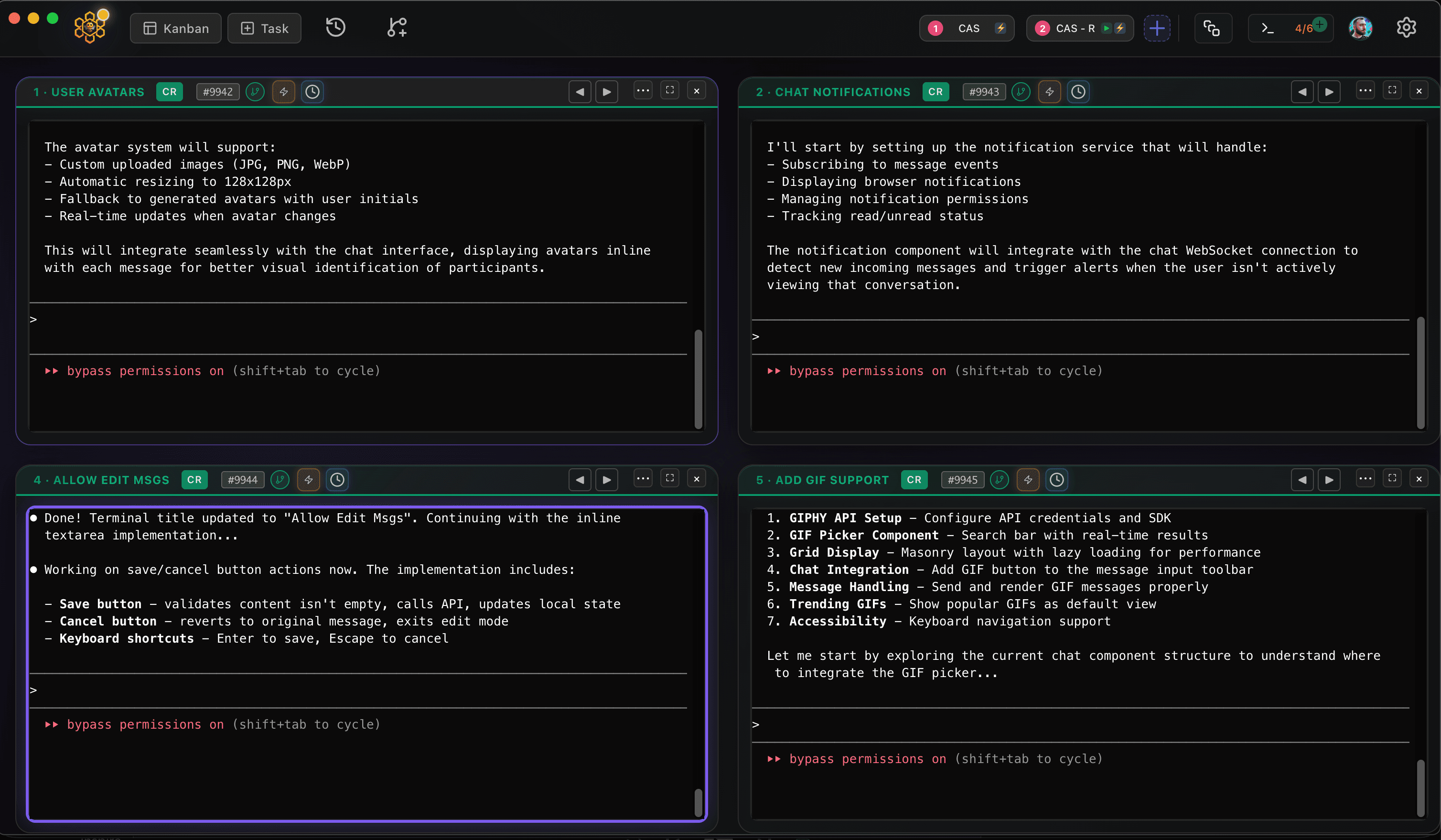
CodeAgentSwarm is a desktop app for exactly that, and it now runs on Linux as a .deb (Ubuntu, Debian and derivatives) or an AppImage (Fedora and most other distros), for x64 and ARM64. It puts several Claude Code terminals side by side and adds desktop notifications when an agent finishes or needs input, searchable history across every session and a live diff of what each terminal changed.
Good next steps: how to use multiple Claude Code terminals and run multiple Claude Code sessions. Setting up Codex on the same machine? See Codex CLI on Linux.
Conclusion
On Linux, Claude Code is one curl command away, or one apt or dnf install if you want your system to manage it. Run claude doctor if anything looks off, and when a single terminal stops being enough, CodeAgentSwarm is there to run several at once.
FAQ
Does Claude Code work on Linux?
Yes. Claude Code runs natively on Linux, on x64 and ARM64. Anthropic officially supports Ubuntu 20.04+, Debian 10+ and Alpine 3.19+, and publishes signed apt, dnf and apk repositories, which cover Fedora and RHEL too.
How do I install Claude Code on Ubuntu?
Run "curl -fsSL https://claude.ai/install.sh | bash" in a terminal, open a new terminal and type "claude". If you prefer apt, add the official Claude Code repository and run "sudo apt install claude-code". The apt version does not auto-update.
Do I need Node.js to run Claude Code on Linux?
No. The native installer and the apt, dnf and apk packages install a standalone binary. Node.js is only involved if you choose the npm package, and even then the binary it installs does not use Node at runtime.
Can I use Claude Code on a Linux server over SSH?
Yes. Install it the same way, run "claude", and when it asks you to log in, press "c" to copy the login URL and open it in a browser on any other device. You can also use an API key through the ANTHROPIC_API_KEY environment variable.
Does CodeAgentSwarm work on Linux?
Yes. CodeAgentSwarm runs on Linux as a .deb for Ubuntu, Debian and derivatives or as an AppImage for Fedora and most other distros, on x64 and ARM64. It uses your existing Claude Code install and lets you run several sessions in parallel.