
Claude Code GUI: A Visual Desktop App for Your AI Coding CLIs
By CodeAgentSwarm · Updated October 5, 2026
What is a Claude Code GUI?
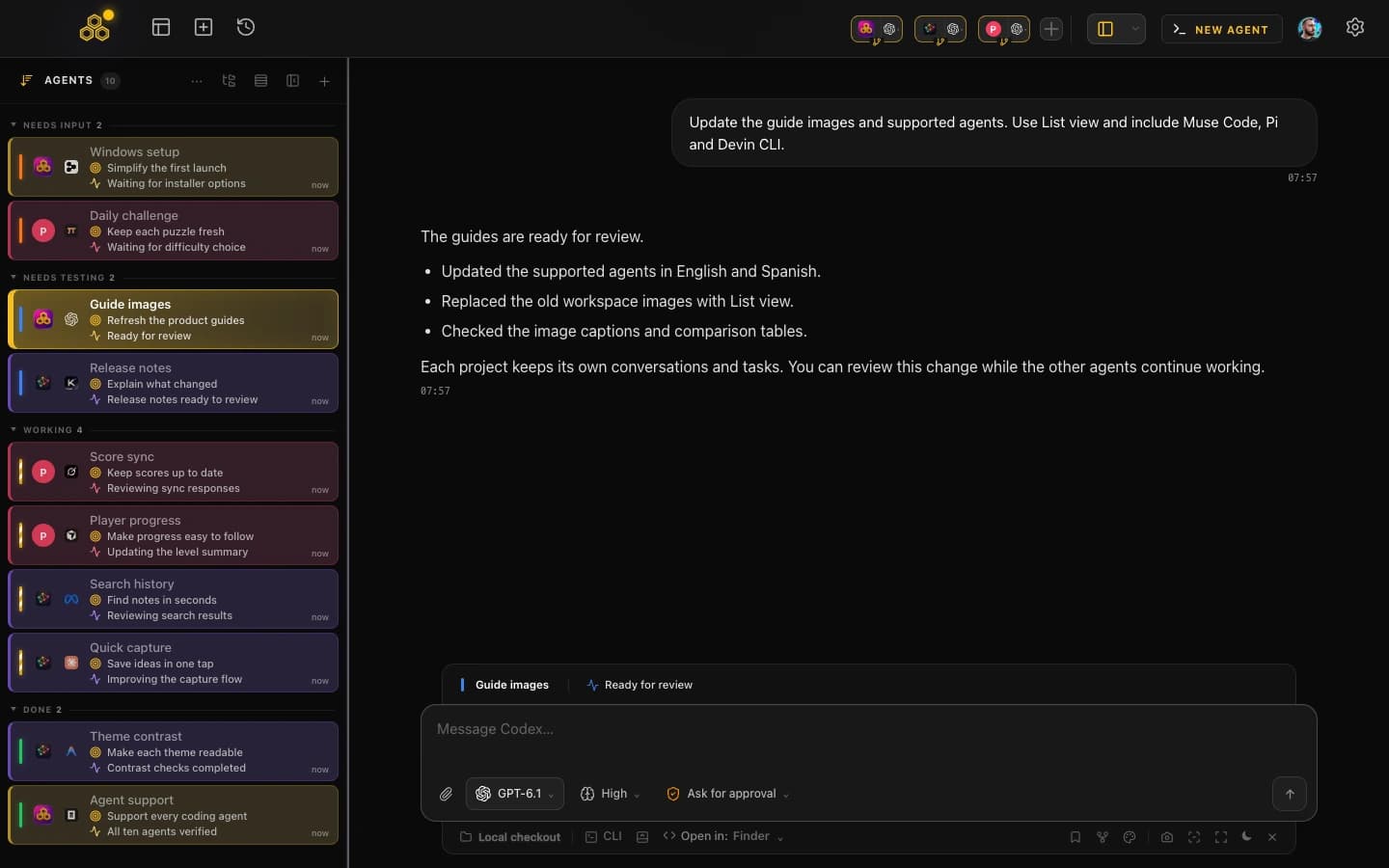
Anthropic offers Claude Code in its desktop app, including parallel sessions and visual diff review. CodeAgentSwarm is a separate product built by Arturo García, not an official Anthropic app. Its focus is supervising Claude Code and other coding agents in the same workspace.
CodeAgentSwarm is a Claude Code GUI in this sense. It is a desktop app for macOS, Windows and Linux that gives the CLI a real workspace: multiple terminals side by side, a task board, searchable history, live file diffs, native notifications, permission controls, project shortcuts, and a skills and MCP marketplace. None of that replaces the agent. It is a Claude Code dashboard and manager built around the tool you already use. If Codex is your main CLI, the same visual layer exists for it in the Codex GUI guide.
A GUI is not a different model or a different plan. CodeAgentSwarm runs on top of your existing Claude subscription, and it can drive Codex CLI and Antigravity CLI in the same workspace too. You keep the full CLI power, you just get a visual layer around it.
If you mostly want to run more than one agent at once, the deeper guide is running multiple Claude Code sessions, and the cross-vendor view is the AI CLI agent swarm guide. This page is about the graphical layer itself: what a Claude Code UI gives you that a bare terminal does not.
What you get in the GUI
The point of a Claude Code interface is to surface the things the terminal hides. Here is what the visual layer actually gives you, capability by capability.
A visual workspace with multiple terminals
Instead of one terminal in one window, you get a grid of multiple terminals in a single app. Each one runs its own Claude Code session, on the same project or different projects. You can lay them out, focus one, and glance at the rest, which is the core of any usable Claude Code dashboard. To set this up step by step, see running multiple Claude Code sessions.
A task board the agent updates itself
A kanban task board sits over the workspace, and Claude Code updates it over MCP as it works. You create tasks, the agent moves them through in progress and done, and you have a visual record of what got built without reading logs. The task management guide covers how the board and the agent stay in sync.
Searchable history across every session
Claude Code already stores conversations and can resume previous sessions. CodeAgentSwarm brings supported agent histories into one searchable interface across projects. The Claude Code history guide explains native resume and the shared workspace search.
Live diffs of what the agent changed
You can watch the file changes each session is making, per terminal and at project level, in real time. No more guessing what the agent touched: you see the diff as it happens, and you can review it before committing. The real-time changes guide goes into the live diff and Git diff views in detail.
Desktop notifications
When a session finishes its task or stops to ask you something, you get a native desktop notification. You can work on one terminal and let the rest tell you when they need you, instead of babysitting a prompt that may take minutes to respond.
Permission controls you can click
Granular permission controls let you decide what the agent can do unattended and what stays gated behind your approval. You configure it in the interface rather than juggling command-line flags, which matters more once several sessions are acting at once.
Project shortcuts and a skills + MCP marketplace
Project shortcuts let you jump straight into the repos you work on without retyping paths. A built-in skills marketplace and MCP marketplace let you add capabilities and connect external tools from the GUI, so the workspace grows with you instead of staying a plain terminal.
How it compares to the raw terminal
A GUI is not better than the CLI in some abstract sense. It is the same CLI with a visual layer on top, and that layer is worth more the more sessions you run. Here is the honest comparison.
What the raw terminal already does well
- There is no extra workspace to install if you already use Claude Code
- For a single session, focused on one task, it is all you need
- Full agent power, nothing is hidden or removed by a wrapper
- It scripts and pipes like any other command-line tool
Where the terminal gets painful
- Several sessions at once turn into a stack of identical-looking tabs
- Notifications depend on the terminal and hooks you configure
- Saved conversations from different coding agents are kept in separate histories
- Reviewing changes across several sessions means keeping track of their repositories and branches
- Permissions need to be checked for each session, whichever interface you use
What the GUI adds on top
The GUI does not take anything away. Underneath, it is still running real Claude Code in a real terminal, with the same model and the same subscription. What it adds is everything around the prompt: a workspace you can see, a task board, searchable history, live diffs, notifications, and clickable permissions. If you only ever run one session at a time, the raw terminal is fine and you should not overthink it. Once you run several, or you keep losing track of what each one did, the visual layer is what removes that friction.
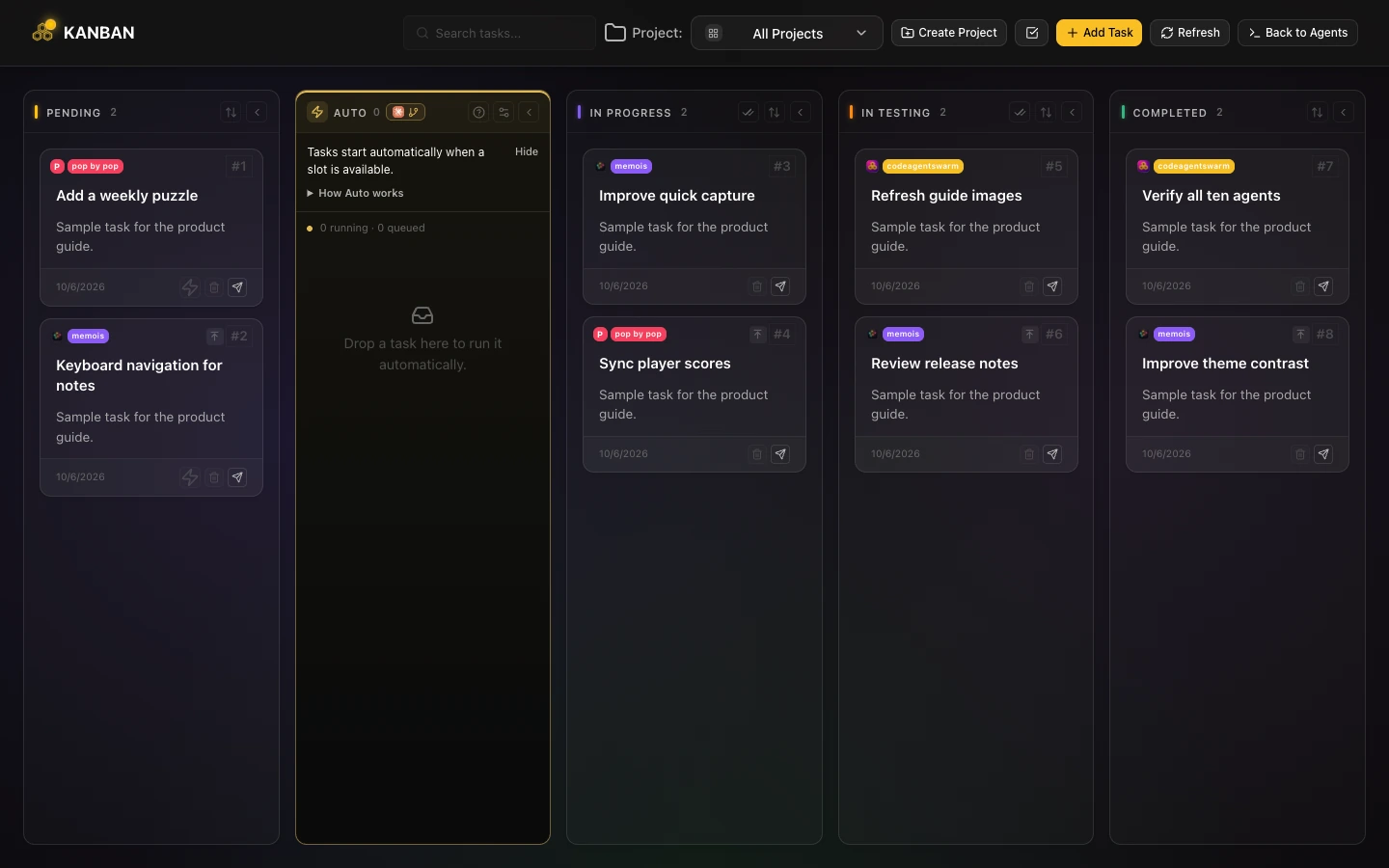
Because the GUI drives the CLI rather than replacing it, you can switch back to a bare terminal any time. Nothing about CodeAgentSwarm locks the agent in: it is a layer, not a fork.
FAQ
Is there a GUI for Claude Code?
Yes. Anthropic provides a desktop interface for Claude Code. CodeAgentSwarm is an independent option for macOS, Windows and Linux that brings Claude Code together with other agents, project tasks, searchable history, live diffs and notifications.
Does a Claude Code GUI replace the CLI?
No. A GUI like CodeAgentSwarm runs Claude Code in a real terminal under the hood and adds a visual layer around it. The agent, the model and your subscription stay exactly the same. The GUI is a dashboard and manager on top of the CLI, not a different tool or a replacement for it.
What is the difference between the Claude Code terminal and a Claude Code dashboard?
The terminal is a single text window where the agent runs. A dashboard is a graphical layer that surfaces what the terminal hides: several sessions at a glance, a task board, searchable history across days, live file diffs, and desktop notifications. The dashboard does not change how the agent works, it just makes its activity visible and clickable.
Does CodeAgentSwarm work with Claude Code on Windows and macOS?
Yes. CodeAgentSwarm is a desktop app for macOS, Windows and Linux. It installs locally, runs the Claude Code CLI on your machine, and uses your own Claude subscription. There is no separate model or plan involved.
Can the same GUI run Codex and Antigravity too?
Yes. CodeAgentSwarm is not tied to a single vendor. Each terminal has an agent picker, so you can set one to Claude Code, another to Codex CLI and another to Antigravity CLI, all in the same visual workspace. The cross-vendor setup is covered in the AI CLI agent swarm guide.
Do I need a Claude Code GUI if I only run one session?
Not necessarily. For a single session focused on one task, the raw terminal is enough. A GUI earns its place once you run several sessions, want notifications when the agent finishes, need searchable history, or want to see diffs and manage permissions visually instead of in scrollback and flags.