
Claude Code Task Management: A Kanban Board Your AI Agents Update
By CodeAgentSwarm · Updated August 11, 2026
What the Claude Code task board is
The Agent Task Board in CodeAgentSwarm is a kanban board built into the app, with an Auto queue and four columns that map to the real lifecycle of a coding task: Pending, In Progress, In Testing, and Completed. Each card is a task with a title, a plan, and an implementation summary, and it belongs to a project.
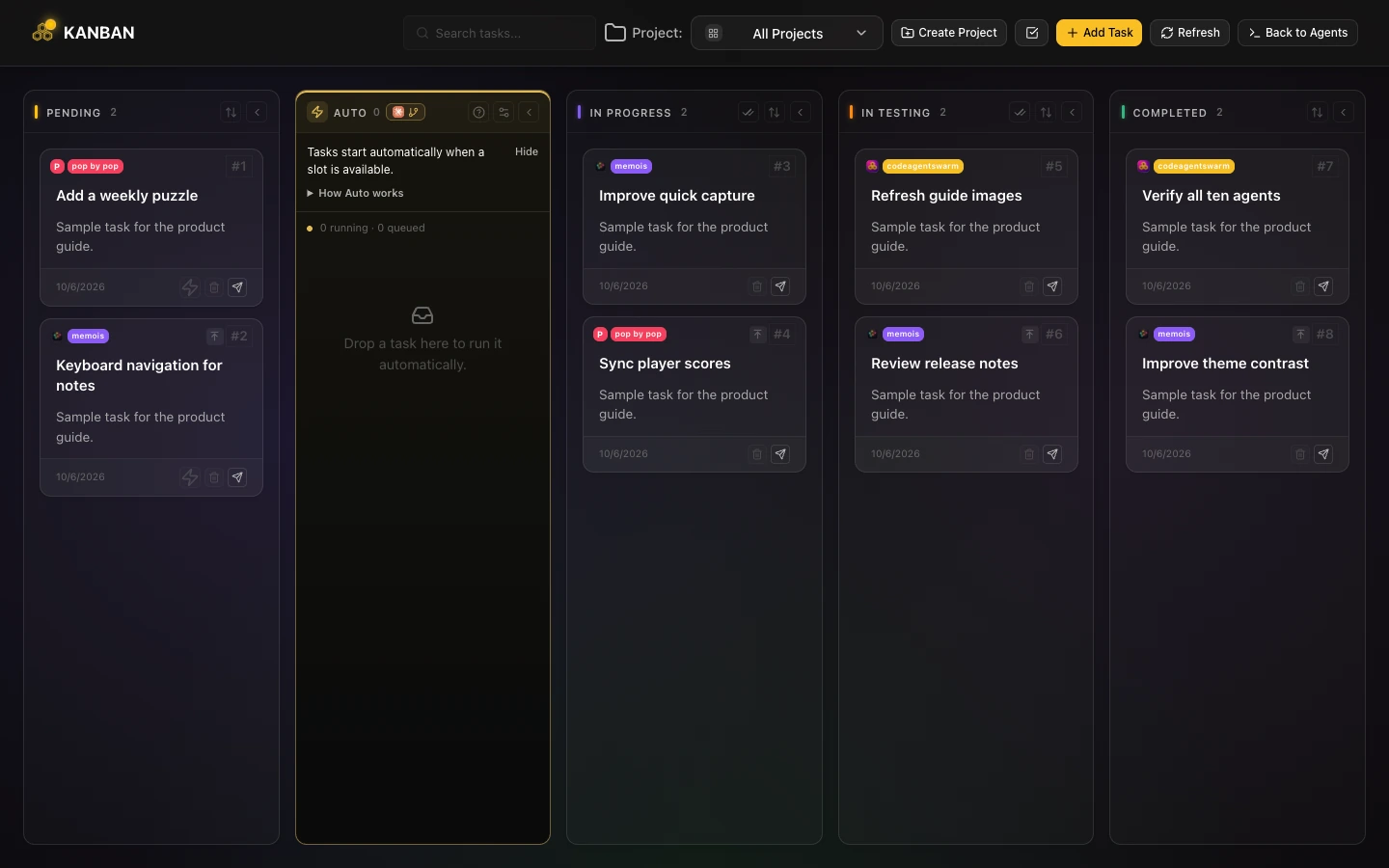
So far this sounds like any project board you have used before. The part that makes it different is who keeps it up to date. On a normal board you drag the cards yourself. Here the AI agents are full participants: they read the board to know what they are supposed to work on, and they update it as they go.
If you are new to Claude Code, it is Anthropic's agentic coding tool that runs in your terminal and edits your codebase directly. CodeAgentSwarm lets you run several of those agents side by side, and the task board is what stops them from becoming an untrackable mess. The board is one piece of a wider oversight layer, covered in the Claude Code dashboard guide.
The agents update the board themselves
This is the core idea, so it is worth being precise about it. The AI agents are not just executing commands while you babysit a board on the side. They read and write the board directly.
A typical task moves through the columns like this:
- You create a task and assign it to a terminal. It starts in Pending.
- When the agent picks it up, it moves the card to In Progress and writes a short plan of what it intends to do.
- As it works, it can create subtasks for the pieces that turn out to be separate jobs.
- When it finishes, it writes an implementation summary (which files it touched, what it changed) and moves the card to In Testing.
- You review the result. If it is good, the card goes to Completed.
Notice that the agent does not jump straight to Completed. Work lands in In Testing first, which gives you a clear checkpoint to look at what was done before it counts as finished. You stay the one who approves, the agent just keeps the board honest about where things actually are.
Because the agent writes the plan before it starts and the summary when it ends, the card becomes a small record of the work. You can open a Completed task weeks later and read what the AI actually did, without digging through terminal logs.
How agents update tasks (the MCP behind it)
The reason the agents can touch the board at all is MCP, the Model Context Protocol. CodeAgentSwarm exposes the task board to each agent as a set of MCP tools, so updating a task is something the AI can do on its own, the same way it edits a file or runs a command.
In practice the agent has tools to create a task, start it (move it to In Progress), write its plan, record the implementation summary, create subtasks, and submit the task for testing. You do not have to wire any of this up by hand. When you run Claude Code inside CodeAgentSwarm, those tools are already there for the agent to use.
The practical effect is that the board stays current without you doing the bookkeeping. The agent that just finished a refactor is the one that marks the refactor as ready for testing, because it is the thing that knows it just finished. You are not transcribing status from a terminal into a board, the agent reports its own status directly.
MCP is also how you connect other tools to your agents (databases, search, browsers). If you want to go deeper on that, the task board is a good example of how much smoother things get when the agent can act on a system instead of just describing it.
Projects, labels, and subtasks
The board is not a single flat list. Tasks organize per project, so each repository or product you work on gets its own set of cards instead of everything piling into one column. When you have an agent running in a project, its tasks land under that project automatically.
Labels
You can add labels to tasks to group them by type or area: bug, feature, refactor, tests, whatever fits how you think about the work. Labels make a busy board scannable, so you can see at a glance which cards are bugs versus new features without reading every title.
Subtasks
Tasks support subtasks, and this is where the agent's ability to update the board pays off most. When an agent starts a task and realizes it is actually three jobs, it can break the work into subtasks under the parent. Subtasks inherit the project from their parent, so you do not have to re-file them, and you get a clean hierarchy instead of one giant card that means nothing specific.
You can also create subtasks yourself, including under a task that is already completed, which is handy when you find a follow-up to something the AI shipped earlier.
Why this matters when you run several agents
A single agent working on a single task does not really need a board. The board earns its keep the moment you have several agents going at once, which is exactly what CodeAgentSwarm is built for. It runs multiple AI CLI terminals (Claude Code, Codex CLI, Antigravity CLI, OpenCode, Kimi Code, Grok Build, Cursor Agent, Muse Code, Pi and Devin CLI) in parallel, and once you have four or five of them working, "what is each one doing" stops being a question you can answer from memory.
With the task board, that question has a visible answer. You glance at the columns and you can see that two tasks are In Progress, one is In Testing waiting for your review, and three are still Pending. Each In Progress card has a plan you can read. Each In Testing card has a summary of what was done. The swarm of agents becomes a board you can actually look at.
This pairs naturally with the rest of the workspace. To set up the parallel sessions that make the board worth having, see how to run multiple Claude Code sessions. And for the bigger picture of coordinating different CLI tools together, see the guide on the AI CLI agent swarm.
The honest summary: the board does not make the agents smarter, it makes them legible. You still decide what gets built and you still approve the results. The board just means you never have to wonder which agent is on what, because the agents tell you themselves.
FAQ
What is the Claude Code task board?
It is a built-in kanban board in CodeAgentSwarm, called the Agent Task Board, with four task-status columns plus an Auto queue: Pending, In Progress, In Testing, and Completed. You create tasks and assign them to terminals running Claude Code (or any of the other supported agents), and the cards move across the columns as the work progresses.
Can AI agents update the kanban board themselves?
Yes. That is the whole point. The agents read the board to know what to work on and update it as they go. They move their own cards from Pending to In Progress to In Testing, write a plan before starting, record an implementation summary when they finish, and create subtasks when a job grows.
How do agents update tasks (MCP)?
CodeAgentSwarm exposes the task board to each agent as a set of MCP (Model Context Protocol) tools. The agent has tools to create a task, start it, write its plan, save an implementation summary, create subtasks, and submit it for testing. When you run Claude Code inside CodeAgentSwarm, those tools are available automatically, so you do not have to configure anything.
Can I organize tasks by project?
Yes. Tasks organize per project, so each repository or product has its own set of cards instead of one shared pile. When an agent is running inside a project, the tasks it creates land under that project automatically.
Does it support subtasks?
Yes. Tasks support subtasks, and they inherit the project from their parent. An agent can break a task into subtasks when it turns out to be several jobs, and you can also create subtasks yourself, including under a task that is already completed.
Do I have to move the cards myself?
You can, but you usually do not need to. The agents move their own cards as they work. Your main job is reviewing tasks that land in In Testing and approving them so they move to Completed. The board stays current without you doing the manual bookkeeping.