
How to schedule Claude Code: /schedule, cron jobs and local runs
By CodeAgentSwarm · Updated October 31, 2026
/schedule, local tasks in Claude Desktop, and /loop inside a session. You can also put claude -p in cron. This guide explains what each one does, where it runs and when CodeAgentSwarm Scheduled Conversations are the better fit.How do I schedule Claude Code?

Choose by where the run has to happen:
- Your laptop can be off: a cloud scheduled task (
/schedule). It runs on Anthropic's cloud against a fresh clone of your GitHub repository. - It needs your local files and Claude Code is your only agent: a local scheduled task in Claude Desktop.
- Repeat something while you work:
/loopin the open session. - You also schedule Codex, Cursor or another agent, or want to manage it from the CodeAgentSwarm phone app: CodeAgentSwarm Scheduled Conversations.
What Claude Code offers on its own
Cloud task (/schedule) | Desktop local task | /loop | |
|---|---|---|---|
| Runs on | Anthropic's cloud, fresh clone | Your machine | Your machine, inside the session |
| Machine must be on | No | Yes, app open and awake | Yes, session open |
| Local files | No | Yes | Yes |
| Shortest interval | 1 hour | 1 hour in the form, 1 minute if Claude sets it | 1 minute |
| Missed runs | Not applicable | One catch-up run for the last 7 days | Lost with the session |
Cloud scheduled tasks were called routines until recently; /routines still works as an alias. They are available on Pro, Max, Ultra, Team and Enterprise plans and need GitHub access to clone your repositories. Cloud scheduled tasks · Desktop scheduled tasks · /loop
Desktop local tasks are close to what CodeAgentSwarm does for every agent: they run in a local folder, can use a worktree and catch up once after sleep. If Claude Code is the only agent you use and you already live in Claude Desktop, they are a good choice.
A Claude Code cron job with claude -p
Without any app, cron can call Claude Code in print mode. It runs one prompt and exits:
# crontab -e: weekdays at 08:30
30 8 * * 1-5 cd ~/code/my-app && claude -p "Summarise yesterday's CI failures. Do not edit files." >> ~/logs/claude-cron.log 2>&1
Cheap and local, but you get text in a log file. Nobody answers a permission prompt, so set the allowed tools for the job, and if your Mac was asleep at 08:30 cron simply skips it.
Schedule Claude Code in CodeAgentSwarm
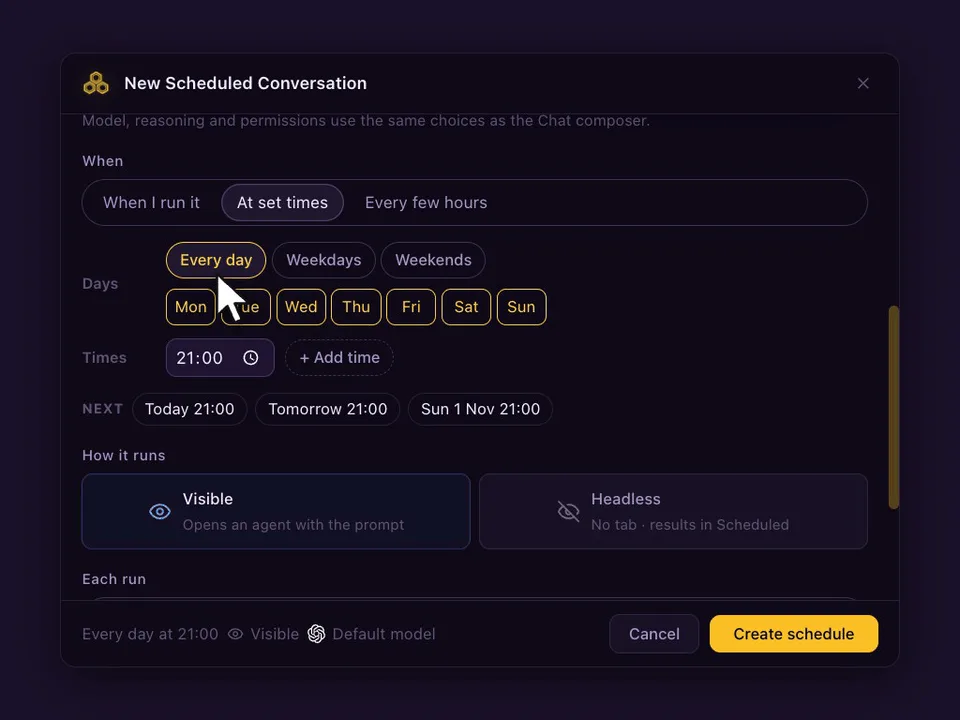
- Open Scheduled in the top bar and press New schedule. Or type the prompt in a Claude Code Chat and pick Schedule this prompt… from the send menu.
- Pick the Project and choose Claude Code as the agent. Model, reasoning and permissions are optional: leave them on Default or set them like in the Chat composer.
- Write the prompt the agent should run every time.
- Under When, choose At set times (up to 24 a day), Every few hours (1, 2, 3, 4, 6, 8 or 12) or When I run it, and the days.
- Choose Visible (opens a Chat) or Headless (no tab, result in Scheduled), and whether each run continues the same conversation or starts a new one. Press Create schedule.
Prompts worth scheduling with Claude Code
Every weekday at 08:30
Read the open issues labelled "bug" and yesterday's CI failures.
Group them by cause and tell me which one to fix first. Do not edit files.- Every night: run the test suite and explain any new failure since the last run.
- Every 4 hours on weekdays: check the dependency audit and summarise anything new.
- Fridays at 17:00: write the changelog for this week from the merged commits.
Leave permissions on Default or ask-first mode for the first runs. Once the output is right, a schedule can use the permissions you trust, and the Git Worktree option keeps its edits out of your working checkout.
What happens on each run
- With Continue the same conversation, a visible run goes to the Claude Code agent that already holds the conversation, and never opens a second copy. With Start a new conversation, each run opens a fresh agent. If it is busy, Skip if still working (on by default) skips that slot; turn it off and the prompt waits in the queue.
- The Chat marks every scheduled run, so you can tell your own messages from the scheduled ones and reply to a run like any other message.
- If CodeAgentSwarm was closed or the computer asleep at the set time, If missed, run when the app opens runs it once, late. A week away gives one run, not seven.
- Schedules run on your computer, so CodeAgentSwarm has to be open. Your phone can list, edit and run them from the Scheduled tab.
FAQ
What does /schedule do in Claude Code?
It creates a cloud scheduled task (formerly a routine). The task runs on Anthropic's cloud against a fresh clone of your GitHub repository, at least one hour apart, even with your computer off.
Can Claude Code run scheduled tasks on my own machine?
Yes, with Claude Desktop local scheduled tasks or /loop in an open session. CodeAgentSwarm also runs Claude Code on a schedule locally, alongside the other agents it supports.
How do I set up a Claude Code cron job?
Add a crontab line that changes to the project folder and runs claude -p with your prompt, redirecting output to a log. Allow only the tools the job needs.
Why use CodeAgentSwarm if Claude Desktop already schedules tasks?
Use it when you schedule more than one agent, want each run in the same Chat as your other sessions, or want to edit and run schedules from the CodeAgentSwarm phone app.