
Paseo vs CodeAgentSwarm: An Honest Comparison (2026)
By CodeAgentSwarm · Updated October 5, 2026
The one-sentence difference
Paseo is a self-hosted, open source orchestrator with desktop, mobile, web and CLI clients talking to a daemon on your own machine, while CodeAgentSwarm is a closed source desktop app for macOS, Windows and Linux that runs ten agent CLIs side by side in parallel terminals.
Both let you run several coding agents at once. They disagree about where you are standing while that happens. Paseo assumes you might be anywhere and puts a phone in your pocket as the control surface. CodeAgentSwarm assumes you are at a computer and spends its effort on what one screen can show: terminals, live diffs, notifications and a task board. For the wider field, see the best tools to run multiple AI coding agents.
Disclosure: we build CodeAgentSwarm, so treat this as a comparison written by an interested party. Everything stated about Paseo was verified on August 25, 2026 against paseo.sh, its public repository and public GitHub data. Where something is not documented publicly, this page says so instead of guessing.
What Paseo is
Paseo describes itself as a way to orchestrate coding agents from your desk and your phone. Architecturally it is a local daemon that manages your agents, plus desktop, mobile, web and CLI clients that connect to it. You install the daemon on the machine that holds your code and your credentials, then reach it from whatever device is in front of you, over your network, an end to end encrypted relay or your own tunnel.
The public repository is getpaseo/paseo. It had 15,543 stars when its public GitHub data was refreshed on August 31, 2026, and its most recent public commit landed on August 30. The LICENSE file places the code under AGPLv3, with third-party components under their own licenses.
- Truly cross-device: native iOS and Android apps, plus desktop, web and a scriptable CLI
- Self-hosted by design: the daemon and the agents run on your laptop, VM or dev server
- Multi-provider: their FAQ lists Claude Code, Codex, Cursor, OpenCode and Pi, and the README also lists GitHub Copilot
- Git worktrees: optional per-agent worktrees so each one works on its own branch
- Push notifications: the repository contains push and agent attention notification code
- Local voice control and a stated policy of no telemetry, no tracking and no forced login
That is a strong product and we will not pretend otherwise. The mobile story in particular is not a checkbox: they lean on parity between the phone app and the desktop app. CodeAgentSwarm offers Mobile Connect in alpha, with a web beta for every account and native access by request while the desktop stays open. That is not the same as Paseo shipping public native clients.
What CodeAgentSwarm is
CodeAgentSwarm is a desktop workspace to run and supervise multiple AI coding agents in parallel. It runs on macOS, Windows and Linux, it is not a model provider, and it drives the agent CLIs you already have installed: Claude Code, Codex CLI, Antigravity CLI, OpenCode, Kimi Code, Grok Build, Cursor Agent, Muse Code, Pi and Devin CLI.
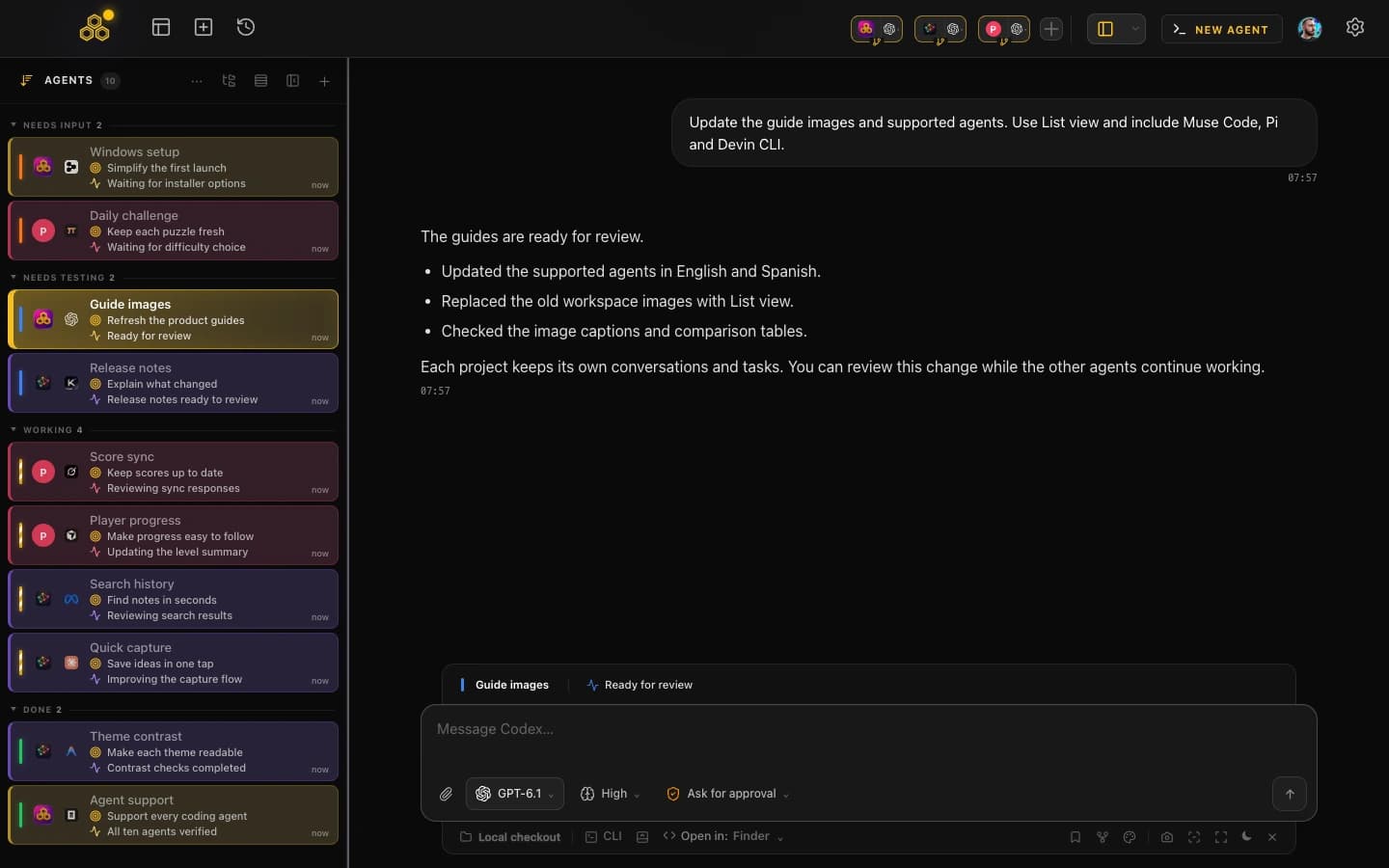
- Parallel terminals, each with its own agent, project and conversation
- Desktop notifications when an agent finishes or stops to ask you something
- Searchable conversation history across all ten agents and capability-aware resume back into a terminal
- Per-terminal live file diffs while the agent is still working
- Permission control, including a Turbo mode when you want to stop approving every step
- A kanban task board the agents update themselves over MCP
- Git worktrees per session, so parallel agents do not fight over one working directory
- Skills and MCP marketplaces, a provider quota indicator, AI commit messages and multi-project switching
The limitations, stated plainly: CodeAgentSwarm is closed source with no public app repository, Mobile Connect is still in alpha (web beta for every account, native iOS and Android access by request, desktop must stay open), it is beta software, and it needs your own subscriptions for whichever CLIs you run. If public native mobile access or self-hosting is a hard requirement, Paseo is the honest recommendation.
Side by side
| Paseo |  CodeAgentSwarm CodeAgentSwarm | |
|---|---|---|
| Platforms | macOS, Windows and Linux desktop builds, iOS and Android apps, web and CLI | macOS, Windows and Linux desktop app. Mobile Connect alpha: web beta for every account, native iOS and Android access by request, desktop must stay open |
| Interface | Self-hosted daemon plus desktop, mobile, web and CLI clients | Desktop workspace plus Mobile Connect alpha. Web beta for every account; native access by request; desktop must stay open |
| Supported agents | Claude Code, Codex, Cursor, OpenCode and Pi per their FAQ, plus GitHub Copilot in the README | Claude Code, Codex CLI, Antigravity CLI, OpenCode, Kimi Code, Grok Build, Cursor Agent, Muse Code, Pi and Devin CLI |
| Isolation model | Optional git worktree per agent, one branch per job | Git worktree per session plus a separate process per terminal |
| Notifications | Push notifications, including to mobile (push and attention notification code is public in the repo) | Desktop notifications when an agent finishes or needs input |
| Conversation history | Not documented on their site as of August 25, 2026 | Searchable across all ten agents and capability-aware resume |
| Task management | Their docs list schedules and orchestration workflows. A task board is not documented as of August 25, 2026 | Kanban board the agents update over MCP |
| Open source | Yes. Public repo under AGPLv3, self-hostable, no telemetry | No. Closed source, no public app repository |
| Price | Their FAQ states Paseo is free and open source, and you bring your own agent credentials | Free during beta with Pro included, and you bring your own CLI subscriptions |
| Last public commit | August 30, 2026, on a repo with 15,543 stars when refreshed on August 31 | Closed source, no public repo |
When Paseo is the better choice
There is a real set of people for whom this comparison is not close, and we would rather say so than waste your afternoon.
- You want public native mobile access today. Paseo has public iOS and Android apps. CodeAgentSwarm Mobile Connect is still in alpha, native access is by request and the desktop must stay open.
- You need to self-host. Paseo is a daemon you run on your own laptop, VM or dev server. That is the architecture, not an add-on.
- Open source is a requirement. The code is public under AGPLv3, so you can read it and keep running it whatever happens to the company. With us you take our word for things.
- You care about telemetry and forced logins. Paseo states it has neither, which is an easy answer if procurement asks.
- You use GitHub Copilot. Paseo lists it as a supported agent; CodeAgentSwarm does not currently integrate it. Pi is supported by both.
A useful test: picture yourself twenty minutes from your desk with an agent halfway through a task. If that scenario matters to you, that is Paseo territory, and no amount of desktop polish replaces it.
When CodeAgentSwarm is the better choice
The flip side is a workflow that lives at a desk, on macOS, Windows or Linux, where the bottleneck is not access but attention: too many agents, not enough eyes.
- You want Antigravity CLI or Kimi Code. Neither is listed among the agents Paseo documents as of August 25, 2026. We run both, alongside Claude Code, Codex CLI and OpenCode.
- You want one searchable history across vendors, with any conversation resumable back into a live terminal.
- You want the agents to keep the board updated. The kanban is written by the agents over MCP while they work.
- You review as you go. Live diffs per terminal catch a wrong turn during the task, not in the pull request.
- You are juggling provider limits. The quota indicator tells you where you stand before an agent stalls.
- You want everything on one screen, without stitching a daemon and its clients together.
Worktrees deserve a note, because both tools take them seriously and they are what makes parallel agents survivable. If you have not set that up, git worktrees for AI coding agents explains the pattern product by product. And if you are on a Mac weighing a Mac-native option, Conductor vs CodeAgentSwarm is the companion to this page.
Can you use both?
Yes, and it is less strange than it sounds, because neither tool is a model provider. Both drive the CLIs already installed on your machine with your own credentials, so Paseo can handle the jobs you want to check from your phone while CodeAgentSwarm handles the deep desk sessions.
One caution: do not point two orchestrators at the same repository and branch at once. Give each its own worktree, or its own project, and they coexist. If that sounds like more coordination than you want, pick the one that matches where you actually work.
FAQ
Is Paseo open source?
Yes. Paseo is developed in public at github.com/getpaseo/paseo and its LICENSE file places the code under AGPLv3, with third-party components keeping their original licenses. The repository had 15,543 stars when refreshed on August 31, 2026. CodeAgentSwarm, by contrast, is closed source with no public application repository.
Can I supervise CodeAgentSwarm from my phone?
Yes, through Mobile Connect alpha. The web beta is available to every account, while native iOS and Android access is by request, and the desktop app must stay open because it remains the source of truth. Paseo still wins on public native availability and self-hosting: its iOS, Android and web clients connect to a daemon you run.
Does Paseo support Antigravity CLI or Kimi Code?
Neither is listed among the agents documented by Paseo as of August 25, 2026. Their FAQ names Claude Code, Codex, Cursor, OpenCode and Pi, and the README also lists GitHub Copilot. CodeAgentSwarm supports Antigravity CLI and Kimi Code alongside Claude Code, Codex CLI and OpenCode. Paseo advertises further providers, so check their current docs first.
Are both projects actively maintained?
Paseo is verifiably active: its most recent public commit was August 30, 2026 when the repository data was refreshed on August 31. CodeAgentSwarm is under active development too, but it is closed source, so there is no public commit history you can inspect to confirm that yourself. That asymmetry is worth weighing.