
Run
50 AI agentsWork in parallel
- Grid + Tabs
- Resizable Agent Panels
- Live notifications and changes
Join the Open Beta and run Claude Code, Codex, Antigravity CLI, OpenCode, Kimi Code, Grok Build, Cursor Agent, Muse Code, Pi and Devin CLI in parallel, with live status, notifications and full conversation history. Pro is included during the beta.
Works on macOS 12+, Windows 10/11 and Linux. Cursor Agent runs natively on Windows.
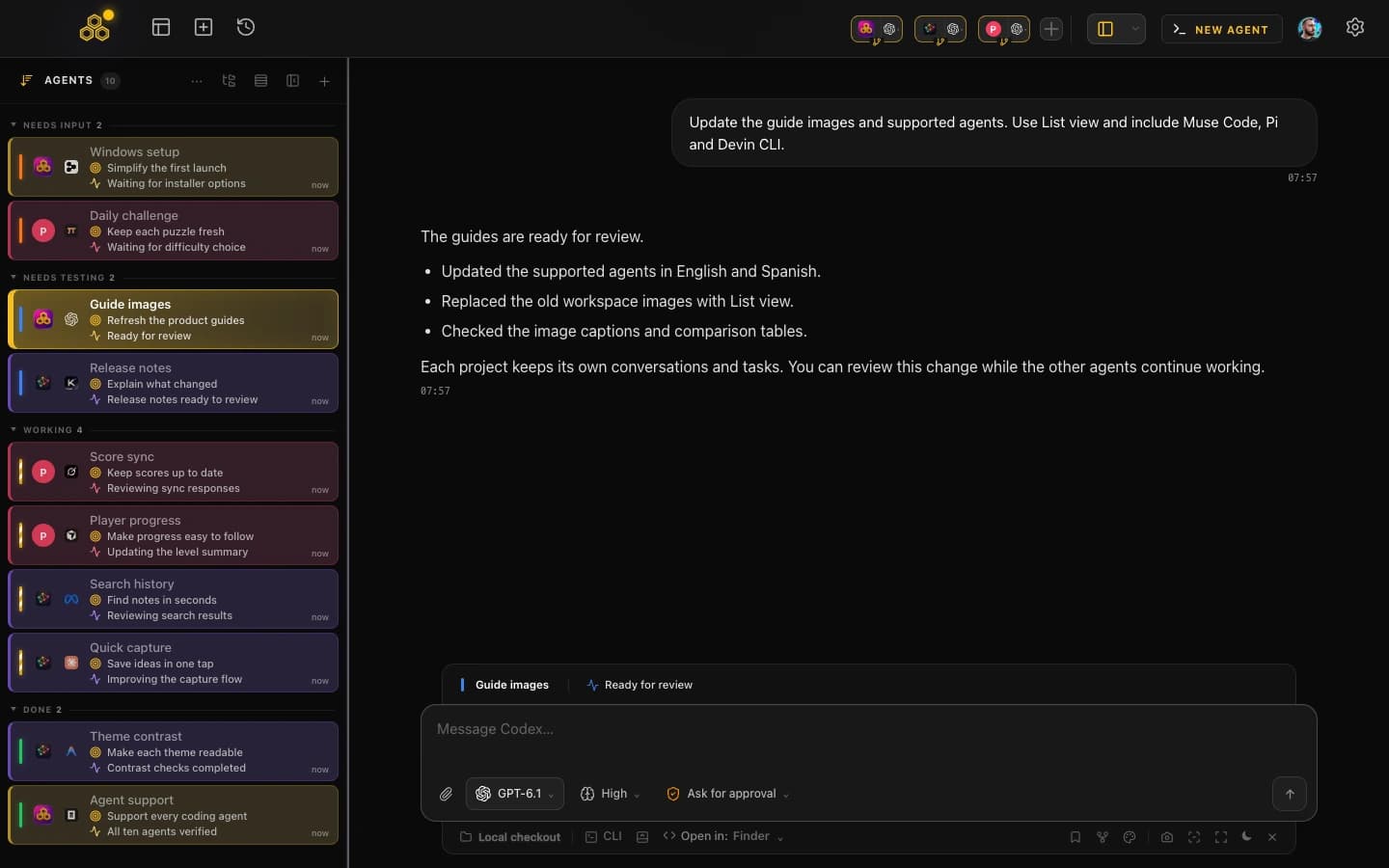
One command center for all your AI agents. Run them in parallel, track their work, and never lose context again.
Each agent has its own project, context and task. Work on the frontend while another agent handles the backend, without losing track of either.
View guideCreate tasks, assign them to agents and review the changes when they finish. Agents read the board via MCP and update their progress automatically.
Stop babysitting agent windows. When an agent finishes, needs input or fails, CodeAgentSwarm alerts you so you can focus elsewhere.
View guideLive diffs while Claude edits. Dynamic titles showing what each agent is doing. Know exactly what changed without checking git afterwards.
View guideEvery decision, every explanation, every snippet - searchable. Recover context from 3 weeks ago in seconds. Never repeat a prompt because it 'got lost'.
View guideSkip confirmation prompts for routine operations but maintain guardrails for sensitive ones. Block pushes to protected branches, prevent destructive deletes, limit sensitive commands. You set the limits.
View guideInstall CodeAgentSwarm on macOS, Windows or Linux, then sign in with Google, GitHub, or Discord. Pro access activates automatically.
We'd love to hear from you. Reach out at hello@codeagentswarm.com to share feedback or get support.
No credit card required. Full Pro access during the beta.
Full Pro, no restrictions
Your feedback comes first
New features before anyone else
You decide what we build
Direct line to the team
Free for the entire beta
Open Beta
Download the app and create an account. Pro activates automatically, with no CodeAgentSwarm subscription or credit card.
Download the Free BetaRun
50 AI agentsOrganize
Unlimited projectsYes. During the Open Beta, the entire Pro tier is free - all features unlocked, no credit card required.
No. Use any supported CLI account you already have. Each provider keeps its own plan and usage limits.
Yes. Mix free and paid accounts as you like. Each provider's plan and usage limits still apply.
We love hearing from our users. Send your feedback, bug reports or feature requests to hello@codeagentswarm.com and we'll get back to you.
You can stay on Free, upgrade to Pro, or stop using the app. There are no automatic charges. Beta founders keep the original Pro price for their first year.
macOS 12 or later, Windows 10/11 and Linux (Ubuntu, Debian and Fedora as deb or AppImage), each for x64 and ARM64.
CodeAgentSwarm never receives or stores your source code or terminal content. The CLI sends prompts and code directly to its AI provider under that provider's privacy policy.
You don't have to do anything. During the beta, Pro activates automatically the moment you create your account. Just download, sign in, and you're Pro.
Run all your AI coding agents from one visual command center, with live status, notifications and searchable conversation history.
Already using Claude Code, Codex, Antigravity CLI, OpenCode, Kimi Code, Grok Build, Cursor Agent, Muse Code, Pi or Devin CLI? It just works. Install and open.
Available for
 macOS
macOS Windows
First time installing? You might need to right-click and select "Open" to bypass Gatekeeper.