
T3 Code vs CodeAgentSwarm: An Honest Comparison (2026)
By CodeAgentSwarm · Updated October 5, 2026
The one-sentence difference
T3 Code is an open source control plane that wraps several coding agents in one desktop UI and optimises the path from a finished diff to a pull request, while CodeAgentSwarm is a closed source desktop workspace optimised for supervising many agent terminals at once across ten supported agent CLIs.
Both tools sit on top of the CLI agents you already pay for, and neither of them resells tokens. The difference is what they consider the hard part. T3 Code treats shipping the work as the hard part. CodeAgentSwarm treats keeping up with many agents as the hard part. If you want the wider field before you commit to either, the best tools to run multiple AI coding agents roundup covers the rest of the category, and there is a sibling comparison for Superset vs CodeAgentSwarm.
Disclosure: CodeAgentSwarm is our product. Everything we say about T3 Code was verified on August 25, 2026 against their own site (t3.codes) and public GitHub data for pingdotgg/t3code. Where a feature is not documented publicly, this page says so rather than claiming T3 Code lacks it.
What T3 Code is
T3 Code describes itself as "the open-source control plane for coding agents". It comes from the Ping team around Theo Browne of t3.gg, and the source lives at pingdotgg/t3code under the MIT license. Their homepage sums the pitch up as bring your own subscription, fork the whole thing.
The momentum is real and worth stating plainly. The repository was created on February 8, 2026 and had 21,084 stars when its public GitHub data was refreshed on August 31, 2026, with its last public commit that day. Roughly 21,100 stars in under seven months is the fastest growth anyone in this category has shown, and it is a legitimate reason to take T3 Code seriously.
- A three-panel desktop layout with an integrated terminal, plus remote access to your sessions
- Git worktrees, so each agent thread works on its own branch without stepping on the others
- A per-turn diff viewer in unified or split view, so you review each turn rather than one giant diff at the end
- One-click Commit, Push and Create PR, with generated titles and bodies, working with your existing GitHub auth
- Model and reasoning-level selection, plus chat and plan modes
- Per-project quick actions and, per their roadmap, skills management, headless mode and CLI integration
On agents, their site lists Claude Code, Codex, OpenCode, Cursor and Grok, and says more harnesses ship weekly. Distribution is unusually generous: desktop apps for macOS, Windows and Linux, a web app, and public iOS and Android apps. It is free, open source under MIT and uses your existing agent subscriptions.
What CodeAgentSwarm is
CodeAgentSwarm is a desktop workspace to run and supervise multiple AI coding agents in parallel. It runs on macOS, Windows and Linux, it is closed source, and it is free during the beta with Pro included. It is not a model provider: every terminal runs on a CLI subscription you already have.
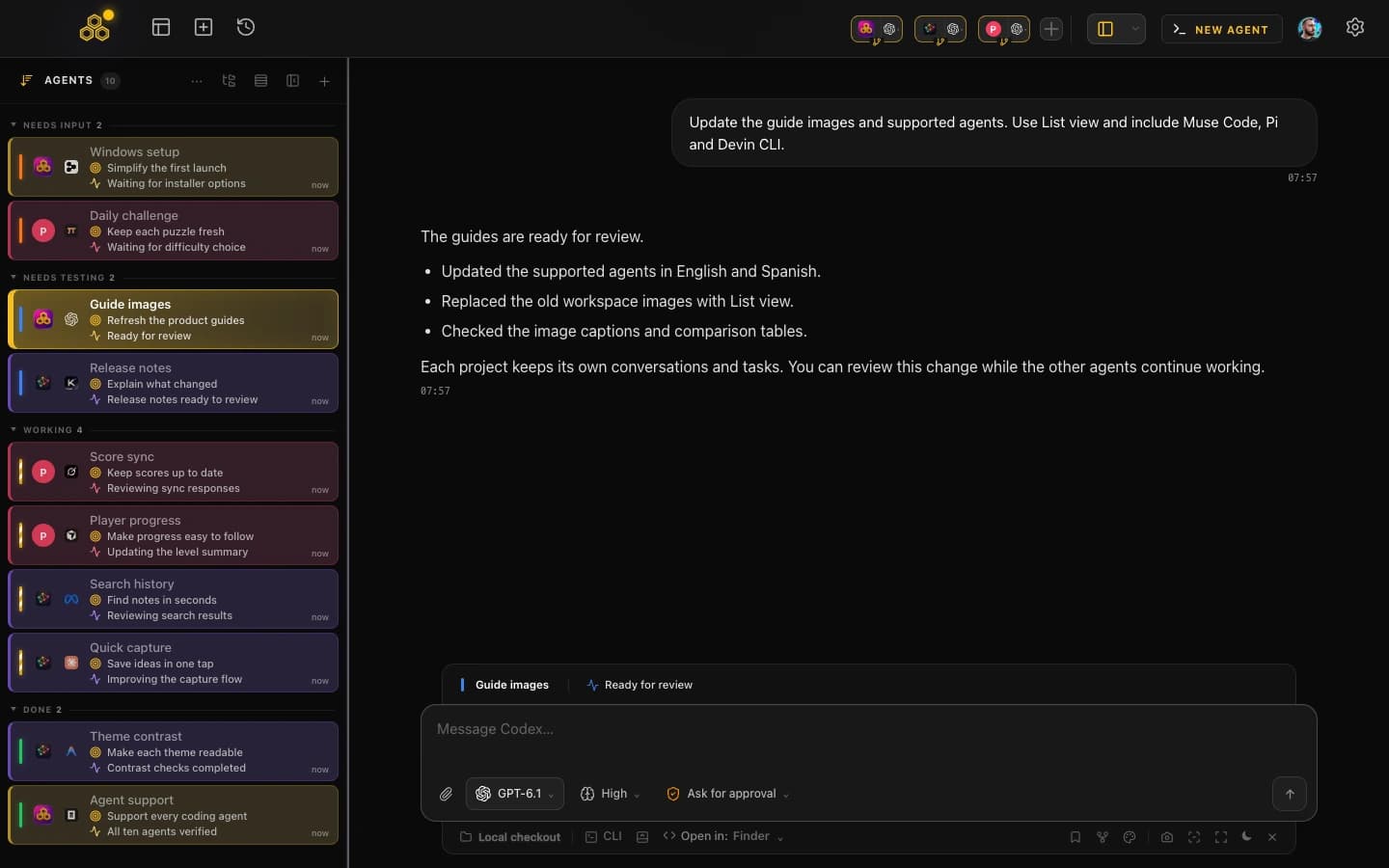
The design assumption is that past two or three agents, the bottleneck stops being the agents and becomes you. So the features cluster around attention: desktop notifications when an agent finishes or stops to ask something, searchable history across all ten agents and capability-aware resume, per-terminal live diffs, permissions with Turbo and YOLO modes, a quota indicator, AI commit messages, git worktrees per session, skills and MCP marketplaces, and a kanban board the agents update over MCP. If you mostly run one vendor, the guide to running multiple Claude Code sessions is the same idea at a smaller scale.
The honest limitations, in the same breath: it is closed source, there is no public app repository, Mobile Connect is still in alpha (web beta for every account, native iOS and Android access by request, desktop must stay open), it is beta software, it needs your own CLI subscriptions, and there is no one-click PR button (you commit from the app, then open the PR yourself). If any of those are dealbreakers, T3 Code is probably the better tool for you and the rest of this page will not change that.
Side by side
Two rules filled this table: state only what the vendor documents, and label the rest. A cell that says "not documented" says nothing about whether the feature exists.
| T3 Code |  CodeAgentSwarm CodeAgentSwarm | |
|---|---|---|
| Platforms | macOS, Windows and Linux desktop; web; iOS and Android | macOS, Windows and Linux. Mobile Connect alpha |
| Install and distribution | npx t3@latest with nothing installed, desktop app, winget, Homebrew cask, AUR, direct downloads | Desktop installer for macOS and Windows; .deb and AppImage for Linux |
| Interface | Three-panel layout with an integrated terminal, plus remote access | Multi-terminal workspace with a kanban board, history browser and per-terminal diffs |
| Supported agents | Claude Code, Codex, OpenCode, Cursor and Grok listed on t3.codes, with more harnesses shipping weekly | Claude Code, Codex CLI, Antigravity CLI, OpenCode, Kimi Code, Grok Build, Cursor Agent, Muse Code, Pi and Devin CLI |
| Isolation model | Git worktrees, one branch per agent thread | Git worktrees per session, one process per terminal |
| Notifications | Not documented on their site as of August 25, 2026 | Desktop notifications when an agent finishes or needs input |
| Conversation history | Per-turn diff viewer with chat and plan modes. A cross-agent searchable history is not documented on their site as of August 25, 2026 | Searchable history across all ten agents and capability-aware resume |
| Task management | Per-project quick actions, plus one-click Commit, Push and Create PR | Kanban board the agents update over MCP. No one-click PR button |
| Open source | Yes, MIT (pingdotgg/t3code) | No. Closed source, no public app repository |
| Price | Free, bring your own key, no subscription (their claim) | Free during beta with Pro included. You bring your own CLI subscriptions |
| Last public commit (verified Aug 31, 2026) | August 31, 2026. 21,084 stars since February 8, 2026 | Closed source, no public repo |
When T3 Code is the better pick
Several situations send you to T3 Code instead of our own app, and none of them are close calls.
- You want open source. MIT licensed and forkable: read the code, patch it, ship your own build. CodeAgentSwarm offers none of that.
- You want to try it in ten seconds.
npx t3@latestruns it with nothing installed, a lower barrier than any installer. - Your bottleneck is shipping, not supervising. One button to commit, push and open a PR with a generated title and body, including draft and stacked PRs, beats doing it by hand. We generate commit messages but have no PR button.
- You want public mobile apps. T3 Code ships iOS and Android apps today. CodeAgentSwarm Mobile Connect is still in alpha.
- You value community momentum. Roughly 21,100 stars in under seven months and frequent harness additions mean bugs get found and fixed fast.
When CodeAgentSwarm is the better pick
The cases that favour us all come from the same place: many agents running at once, from different vendors, needing you at unpredictable moments.
- You use Antigravity CLI or Kimi Code. Neither is named among the agents on t3.codes as of August 25, 2026. CodeAgentSwarm supports both, plus Claude Code, Codex CLI and OpenCode.
- You want to be told, not to check. Desktop notifications fire when any agent finishes or needs input, so you can leave the window and come back when something happened.
- You want one searchable history across vendors. Conversations from all ten agents are stored and searchable in one place instead of ten different formats, with resume when the agent supports it.
- You want the agents to keep your board honest. The kanban is exposed over MCP, so agents move their own tasks as they work.
- You watch quota. The provider quota indicator shows how much room each subscription has left before you start a long run.
- You want live diffs with graded permissions. Per-terminal diffs show what each agent touches in real time, and Turbo mode auto-approves the safe operations while the risky ones still stop and ask.
Can you use both?
They are two separate desktop applications, so there is no integration between them and no shared state. But nothing stops you from installing both, because both are free to try: T3 Code is free and bring your own key, and CodeAgentSwarm is free during beta.
Test them on the same repository, in the same week, on the same kind of work. Both use git worktrees, so neither has to touch your main checkout while you experiment. After a couple of real tasks, ask which friction you noticed more: not knowing what your agents were doing, or the manual steps between a good diff and a merged PR. That answer picks the tool.
FAQ
Is T3 Code free and open source?
Yes to both. T3 Code is free with a bring-your-own-key model and no subscription, and its source is public at github.com/pingdotgg/t3code under the MIT license, an OSI approved open source license. CodeAgentSwarm is free during beta with Pro included, but closed source with no public repository.
Does T3 Code support Antigravity CLI or Kimi Code?
Neither is listed among the supported agents on t3.codes as of August 25, 2026. Their site names Claude Code, Codex, OpenCode, Cursor and Grok, and says more harnesses ship weekly, so this may change. CodeAgentSwarm supports Antigravity CLI and Kimi Code today, along with Claude Code, Codex CLI and OpenCode.
Which one is more actively maintained?
Both are active, and neither side wins this row. The public t3code repository had its last commit on August 31, 2026, with 21,084 stars when its GitHub data was refreshed that day. CodeAgentSwarm is closed source, so there is no public commit history to inspect: our cadence has to be taken on trust, and that is a fair criticism.
Can I try both for free?
Yes. T3 Code runs with npx t3@latest without installing anything, or as a desktop app on macOS, Windows and Linux, free with your own agent subscriptions. CodeAgentSwarm is free during the beta with Pro included, for macOS, Windows and Linux. Neither resells model tokens, so you keep using the CLI subscriptions you already pay for.