
How to Run Multiple OpenCode Sessions at Once
By CodeAgentSwarm · Updated September 29, 2026
Short answer: yes, each opencode session is its own process
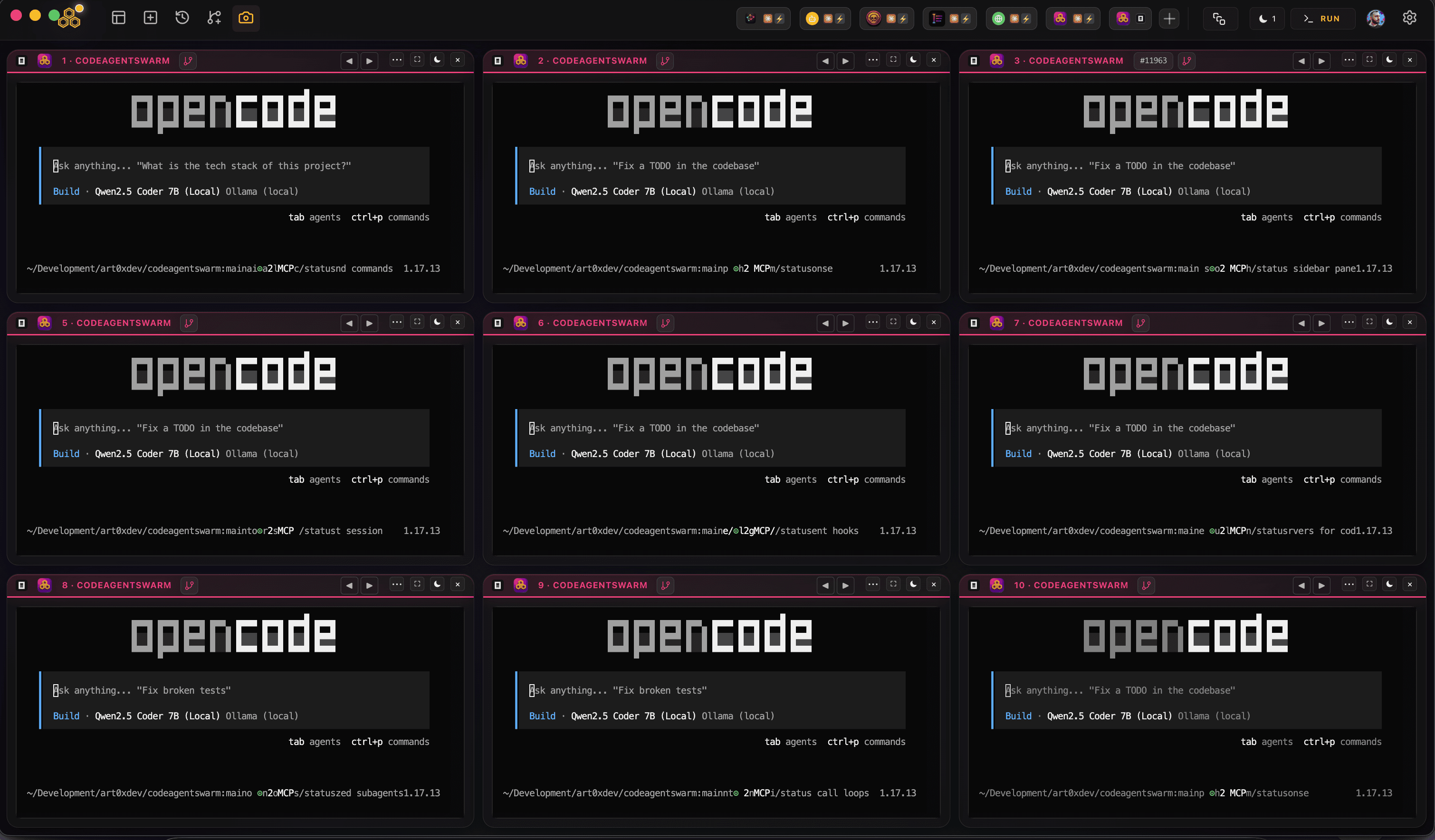
An opencode session is just a process. opencode is SST's open-source AI coding agent for the terminal, installed with npm install -g opencode-ai and started with the opencode command. You connect a model provider once (check the official opencode docs for the exact auth command, usually something like opencode auth login), and from then on each session keeps its own conversation, its own context, and its own working directory. Two sessions know nothing about each other.
So running multiple opencode sessions at once is not a special mode you have to unlock. Open a second terminal, run opencode again, and you already have two independent sessions. One can be migrating a database layer while the other writes integration tests. If you want the bigger picture of what that looks like at scale, the opencode agent swarm guide covers the concept in depth.
You are not limited to opencode either. Because each agent is its own process, you can run opencode in some terminals and Claude Code or Codex CLI in others, all on the same repository. Running opencode and Claude Code together is a common setup, and the AI CLI agent swarm overview shows how the different tools fit side by side.
There is one thing that is genuinely opencode-specific here: because opencode is provider-agnostic, your parallel sessions do not all have to sit on the same model. One session can talk to Anthropic, another to OpenAI, another to a local model, all at the same time. That is something Codex CLI, which is tied to OpenAI models, cannot do.
There is no separate plan and no surcharge for running several opencode sessions in parallel. Each session bills whatever provider you connected it to, for the work it actually does. Running them at the same time just finishes sooner.
The real question is how you keep several sessions legible once you go past one or two. That is what the three methods below are about.
Method 1: Multiple terminal tabs (free, basic)
The most direct way to run two opencode sessions at once is to open several terminal tabs, move into your project in each one, and start opencode. Nothing to install beyond opencode itself.
# Terminal tab 1
cd ~/my-project
opencode

# Terminal tab 2
cd ~/my-project
opencode

# Terminal tab 3
cd ~/my-project
opencode
Each tab is now an independent opencode session. Hand each one a different task and switch between them as they work. Whether a session pauses to ask you before acting depends on your opencode permission config: with ask-style settings every tab stops and waits for your approval, so you end up bouncing between tabs just to keep them moving.
Pros
- Free, nothing to set up beyond opencode
- Works instantly with tools you already have
- Easy to reason about, one tab is one session
Cons
- You lose track of which tab is running which task almost immediately
- No notification when an opencode session finishes or stops for a permission prompt
- No shared view, you have to click into each tab to check progress
- No way to search across the conversation history of different sessions
- If two sessions edit the same file, untangling it is on you
- With three or more tabs they all look the same
For two opencode sessions this is fine. Beyond that, the time you spend hunting for the tab that is waiting on a permission prompt starts to cancel out the speed you gained by going parallel in the first place.
Method 2: tmux or screen (free, advanced)
If you live in the terminal, tmux lets you split one window into panes and keep sessions alive in the background. You can watch several opencode sessions at once without flipping between tabs, which is closer to running opencode in parallel than tabs ever get.
# Start a new tmux session
tmux new-session -s opencode

# Split horizontally
tmux split-window -h

# Split the right pane vertically
tmux split-window -v

# Now you have 3 panes - run opencode in each one
tmux also lets you detach and reattach, so your opencode sessions keep running even after you close the terminal window. That is genuinely useful for long migrations or refactors where you have configured opencode to run with few permission prompts.
Pros
- Free and available on almost any Unix machine
- See several panes at once, no tab switching
- Sessions survive disconnects, good for long unattended runs
- Scriptable and configurable down to the keybinding
Cons
- Real learning curve if you have never used tmux
- Still no desktop notification when a session finishes or asks for a permission
- No conversation history or cross-session search
- Text-only panes get cramped past three or four opencode sessions
- No task board or organization layer on top
- You rebuild the layout by hand every session unless you script it
- Conflicts between sessions touching the same file are still your problem
tmux is a great general-purpose multiplexer and plenty of developers already use it. But it was never built for supervising AI agents specifically. The moment an opencode session in pane 3 quietly stops for a permission prompt while you are reading pane 1, you feel the gap.
Method 3: CodeAgentSwarm (visual, full-featured)
CodeAgentSwarm is a desktop app built for exactly this: running and supervising several AI CLI sessions in one place. It runs on macOS, Windows and Linux, gives you multiple terminals in a single workspace, and lets you choose the agent per terminal. To run opencode in parallel you just pick "opencode" in the SELECT AI AGENT picker in each terminal you want running opencode.
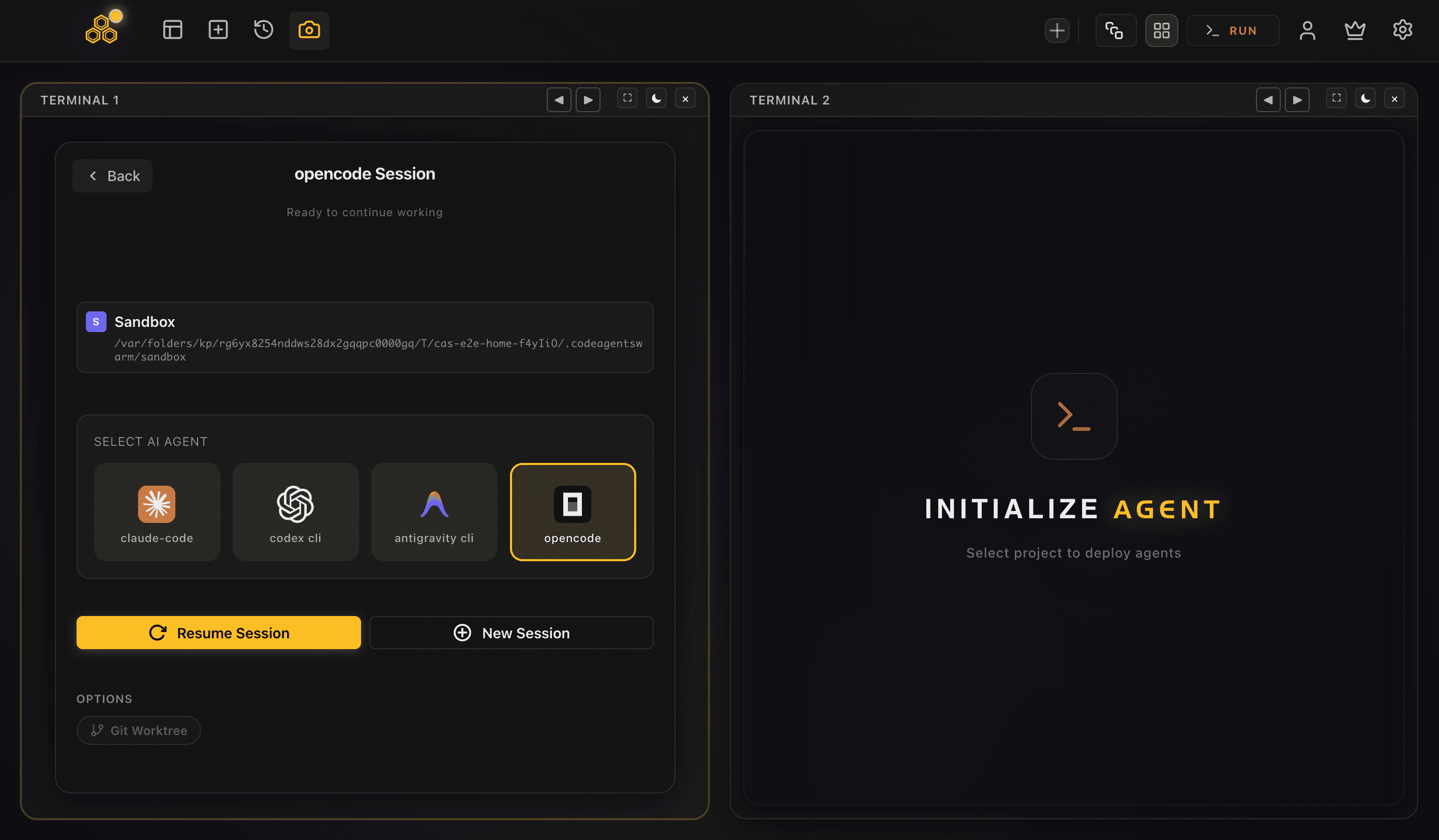
Here is what that gives you when several opencode sessions are running at once:
Multiple opencode sessions in parallel
Set every terminal to "opencode" to run several opencode sessions at once, or mix in Claude Code and Codex CLI where they fit better. Each terminal is a fully independent opencode process with its own conversation and project context, and since opencode is provider-agnostic each one can even sit on a different model provider. CodeAgentSwarm runs on top of your existing accounts and subscriptions, so it is not a model provider, it just orchestrates the agents you already pay for. If Claude Code is your main agent, the same setup is covered in the running multiple Claude Code sessions guide.
Real-time visibility with dynamic titles
Every terminal updates its own title to reflect what its opencode session is doing right now. Instead of several tabs all labelled "opencode", you read titles like "Migrating User Schema", "Writing API Tests", "Refactoring Auth". You can tell which session is on which task without clicking into any of them.
Desktop notifications
This is the single biggest fix when you run several sessions. When an opencode session finishes its task or stops to ask for a permission, you get a native desktop notification. You stop babysitting panes and let the sessions call you when they actually need you, which is the whole point of running them in parallel.
Full conversation history, searchable
opencode stores its sessions locally, and CodeAgentSwarm reads them, so every conversation across every terminal is saved and searchable, including across different agents. You can go back and find what an opencode session decided yesterday, resume it, or trace exactly which session made a given change. The opencode conversation history guide goes deeper on how that works. With several sessions running, that audit trail is what keeps the whole thing legible.
Built-in task board
A kanban task board sits next to your terminals, and the agents update it themselves over MCP. You create tasks, hand them to terminals, and watch cards move as each opencode session picks up, works, and finishes. When several sessions are chipping away at related features, the board keeps the plan visible instead of living in your head.
Full auto driven by opencode config
opencode has no single full-auto flag, nothing like a one-shot danger-bypass switch. Its autonomy is config-driven: you set permissions in opencode.json, globally, per project, or per agent, to decide when a session acts on its own and when it stops to ask. Because of that, CodeAgentSwarm does not add a Turbo Mode toggle for opencode terminals the way it does for Claude Code and Codex. Instead it keeps your permissive configs supervised, with live file diffs and desktop notifications so a session running with few prompts is still one you can watch. The opencode YOLO mode guide walks through the config side of this.
Per-terminal live file diffs
You can watch the file changes each opencode session is making in real time, per terminal and at the project level. When two sessions edit the same file, you see it as it happens instead of discovering it in a messy diff later. Git still handles the merge, but the visibility means overlapping edits never surprise you.
New to running several terminals at once? The multi-terminal guide walks through the layout and workflow, and applies the same way whether the agent is opencode or Claude Code.
Quick comparison
Here is how the three ways to run multiple opencode sessions compare on the things that actually bite once you scale past two:
Cost
- Terminal tabs: Free
- tmux/screen: Free
- CodeAgentSwarm: All Pro features are free during the open beta. Your opencode usage is billed by whichever providers you connect.
Setup time
- Terminal tabs: Zero, just open tabs and run opencode
- tmux/screen: 10-30 minutes to learn the basics, longer to script a reusable layout
- CodeAgentSwarm: A couple of minutes to download, open, and pick opencode per terminal
Notifications
- Terminal tabs: None
- tmux/screen: None unless you script something custom
- CodeAgentSwarm: Native desktop notifications when a session finishes or needs a permission
Conversation history
- Terminal tabs: Gone when you close the tab
- tmux/screen: Kept while the session lives, no search
- CodeAgentSwarm: Reads opencode's local sessions and makes them searchable across every terminal
Full-auto supervision
- Terminal tabs: All on you, one tab at a time
- tmux/screen: Visible in panes, but no guardrails or shared view
- CodeAgentSwarm: opencode's config decides autonomy, and CodeAgentSwarm adds live diffs, notifications and per-terminal visibility on top
Learning curve
- Terminal tabs: None
- tmux/screen: Moderate to steep, with keybindings and config files
- CodeAgentSwarm: Low, a visual interface with familiar patterns
If you only ever need two opencode sessions at once, terminal tabs are perfectly fine. If you already run your day inside tmux, dropping a few opencode sessions into your existing panes is natural. But once you regularly run three or more opencode sessions, often on different providers, and want to actually see what each one is doing, CodeAgentSwarm removes the coordination overhead that the other two leave on your plate.
FAQ
Can you run multiple opencode sessions at once?
Yes. Each time you run the opencode command you get an independent session with its own conversation and context, so you can open several terminals and run opencode in each one. They do not share state or step on each other unless they edit the same files. CodeAgentSwarm supports multiple terminals so you can supervise several opencode sessions in one window.
How do I run two opencode sessions at the same time?
Open two terminal tabs, move into your project in each one with cd, and run opencode in both. Each tab is now a separate opencode session you can give different instructions to, and since opencode is provider-agnostic they can even run on different models. For more than two, tmux split panes or CodeAgentSwarm make the extra sessions much easier to keep track of.
Does running multiple opencode sessions cost more?
There is no surcharge for running sessions in parallel. Each opencode session bills whatever model provider you connected it to, for the work it actually does, the same as if you ran them one after another. Running them at the same time finishes sooner, it does not change the per-session cost.
Can I run opencode and Claude Code together?
Yes. Because every agent is just a separate process, you can run opencode in some terminals and Claude Code or Codex CLI in others, all on the same project. In CodeAgentSwarm you choose the agent per terminal with the SELECT AI AGENT picker, so a mixed setup of opencode and Claude Code is the default rather than a workaround.
How do I run opencode sessions in full auto?
opencode does not have a single full-auto flag. Its autonomy is config-driven: you set permissions in opencode.json, globally, per project, or per agent, to decide when a session acts on its own and when it stops to ask. When you run several sessions with permissive configs at once, the risk is that they act without you watching, so CodeAgentSwarm keeps those runs supervised with live file diffs and desktop notifications rather than adding a separate toggle.
How many opencode sessions can I run at once?
There is no hard limit from opencode itself, since each session is just a process. In practice your machine resources and screen space are the constraints. CodeAgentSwarm supports multiple simultaneous terminals with a layout that keeps several opencode sessions manageable in one window.
Running multiple opencode sessions vs tmux, which is better?
tmux can host several opencode sessions in split panes for free, and if you already use it that works well. What it lacks is anything built for AI agents: no desktop notification when a session finishes or asks for a permission, no searchable history across sessions, no dynamic titles, and no task board. CodeAgentSwarm adds all of that and reads opencode's local sessions directly, which matters most exactly when you are running several opencode sessions at once.