
How to Install OpenCode on Linux (Ubuntu, Debian, Fedora, Arch)
By CodeAgentSwarm · Updated September 29, 2026
Quick answer: install OpenCode on Linux in one line
Quick answer: run the official install script in any terminal. No sudo and no Node.js. When it finishes, open a new terminal, type opencode in your project and run /connect to add a provider.
# Official install script (recommended)
curl -fsSL https://opencode.ai/install | bash

# Verify the install
opencode --version

# Start it inside a project
cd ~/my-project
opencode
The script detects your architecture (x64 or ARM64) and whether your system uses musl, downloads the matching binary and adds its folder to your PATH in your shell config. This is also the command CodeAgentSwarm uses when it installs OpenCode for you on Linux. Every command in this guide comes from the official OpenCode documentation.
Requirements
- A 64-bit Linux on x64 or ARM64. The script handles glibc distributions (Ubuntu, Debian, Fedora, Arch) and musl ones such as Alpine.
curlandtarfor the install script. Most distributions ship both.- A modern terminal emulator. The docs name WezTerm, Alacritty, Ghostty and Kitty as examples.
- An account or API key with at least one model provider (Anthropic, OpenAI, Google, GitHub Copilot or another one). OpenCode does not lock you to a single vendor.
- On a desktop session, a clipboard tool:
xcliporxselon X11, orwl-clipboardon Wayland.
Other ways to install: npm, Homebrew, pacman
If you prefer a package manager, OpenCode publishes several official options. Pick one and stick with it, so you do not end up with two copies on your PATH.
# npm (also works with bun, pnpm or yarn)
npm install -g opencode-ai

# Homebrew on Linux
brew install anomalyco/tap/opencode

# Arch Linux (stable)
sudo pacman -S opencode

# Arch Linux, latest from the AUR
paru -S opencode-bin
Want the binary somewhere specific? The script checks $OPENCODE_INSTALL_DIR first, then $XDG_BIN_DIR, then $HOME/bin, and falls back to $HOME/.opencode/bin. For example: XDG_BIN_DIR=$HOME/.local/bin curl -fsSL https://opencode.ai/install | bash. To update later, run opencode upgrade.
First run and connecting a provider (also over SSH)
- Open a terminal in a project folder and type
opencode. - Run
/connect, search for your provider and enter an API key, or follow the browser sign-in for providers that offer it (such as ChatGPT Plus/Pro or GitHub Copilot). - Run
/modelsto pick a model, then/initso OpenCode analyses the project and writes anAGENTS.mdfile.
On a server or over SSH, the simplest route is an API key: run opencode auth login, choose the provider and paste the key. Several providers also read their credentials from environment variables, which you can set in your shell profile. Everything you add is stored in ~/.local/share/opencode/auth.json, and opencode auth list shows which providers are connected.
Common Linux errors and how to fix them
- "opencode: command not found" after installing: your shell has not reloaded its PATH yet. Open a new terminal, or add
export PATH=$HOME/.opencode/bin:$PATH(or whichever folder the script printed) to your~/.bashrcor~/.zshrc. - "Error: 'tar' is required but not installed": minimal images and containers sometimes lack it. Install
tarwith your package manager and run the script again. - Copy and paste do nothing: OpenCode needs a clipboard tool on Linux. Install
wl-clipboardon Wayland, orxcliporxselon X11. - ProviderInitError or a broken config: remove
~/.local/share/opencodeand connect your provider again with/connect. This also deletes stored credentials. - API call errors after an update: an old provider package may be cached. Run
rm -rf ~/.cache/opencodeand start OpenCode again. - It will not start at all: run
opencode --print-logsto see what fails, and make sure you are on the latest version withopencode upgrade. Log files live in~/.local/share/opencode/log/.
For anything else, the official OpenCode troubleshooting page covers logs, storage and the known fixes.
Running several OpenCode sessions on Linux
With OpenCode working, the next limit shows up quickly: one terminal is one task at a time. You give OpenCode a job and wait. Opening more tabs in GNOME Terminal or tmux helps, until you lose track of which session finished, which one is waiting for approval and what each one changed.
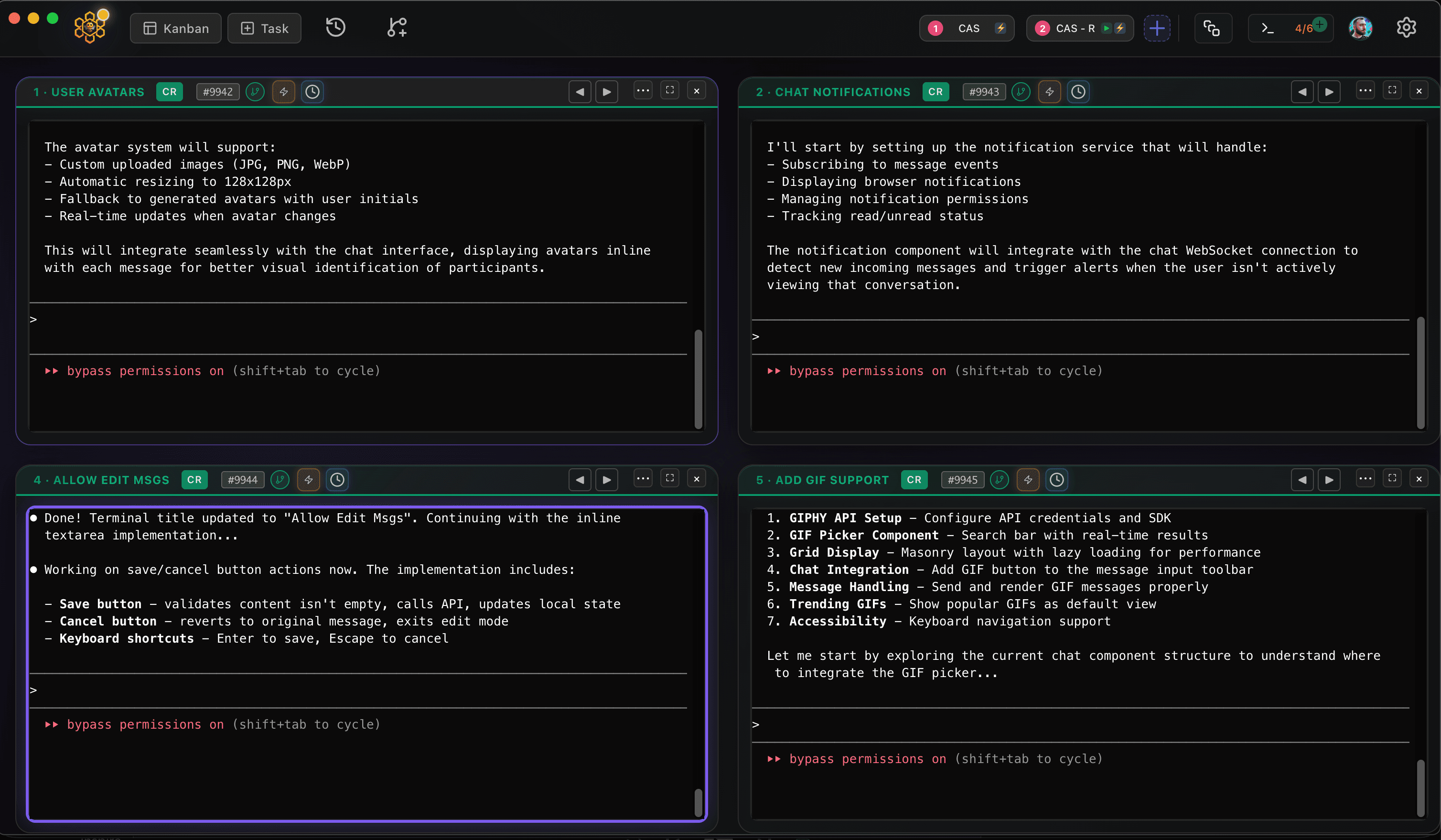
CodeAgentSwarm is a desktop app for exactly that, and it now runs on Linux as a .deb (Ubuntu, Debian and derivatives) or an AppImage (Fedora and most other distros), for x64 and ARM64. It puts several OpenCode terminals side by side and adds desktop notifications when an agent finishes or needs input, searchable history across every session and a live diff of what each terminal changed. You can also mix OpenCode with Claude Code, Codex and other agents in the same window.
Good next steps: run multiple OpenCode sessions and build an OpenCode agent swarm. Setting up other agents on the same machine? See Claude Code on Linux.
Conclusion
On Linux, OpenCode is one curl command away, or one npm, brew or pacman install if you prefer a package manager. Connect a provider with /connect or opencode auth login, install a clipboard tool, and check the logs if anything fails. When a single terminal stops being enough, CodeAgentSwarm lets you run several at once.
FAQ
Does OpenCode work on Linux?
Yes. OpenCode runs natively on Linux, on x64 and ARM64. The official install script also detects musl distributions such as Alpine, and there are official npm, Homebrew, pacman and AUR packages.
How do I install OpenCode on Ubuntu?
Run "curl -fsSL https://opencode.ai/install | bash" in a terminal, open a new terminal and type "opencode". If you already use Node.js, "npm install -g opencode-ai" works too.
Do I need Node.js to run OpenCode on Linux?
No. The install script, Homebrew and pacman install a standalone binary. Node.js is only needed if you choose the npm, bun, pnpm or yarn package.
Can I use OpenCode on a Linux server over SSH?
Yes. Install it the same way, then run "opencode auth login" and paste an API key for your provider, which needs no browser. Credentials are saved in ~/.local/share/opencode/auth.json.
Does CodeAgentSwarm work on Linux?
Yes. CodeAgentSwarm runs on Linux as a .deb for Ubuntu, Debian and derivatives or as an AppImage for Fedora and most other distros, on x64 and ARM64. It works with OpenCode and lets you run several sessions in parallel.