
Nimbalyst vs CodeAgentSwarm: An Honest Comparison (2026)
By CodeAgentSwarm · Updated October 5, 2026
The one-sentence difference
Nimbalyst, formerly Crystal, is a visual editor for what Claude Code and Codex produce, letting you review and edit the markdown, mockups and diagrams alongside the agent, while CodeAgentSwarm is a supervision workspace for ten agent CLIs, built around the running terminals.
These are the two honest halves of the same day. For the full landscape, read the best tools to run multiple AI coding agents, and if watching edits land is the part you care about, our guide on how to view Claude Code changes in real time covers our side of it.
Disclosure: CodeAgentSwarm is our product. All third-party facts on this page were verified on August 25, 2026 against nimbalyst.com, the public nimbalyst/nimbalyst README and public GitHub data, including the Crystal rename. Where their documentation does not mention something, we say it is not documented rather than claiming it is absent.
What Nimbalyst is (and its Crystal history)
Nimbalyst calls itself the visual editor for Claude Code and Codex: run parallel sessions, review AI diffs, and edit markdown, mockups, diagrams and code. Their README describes built-in WYSIWYG editors for markdown, mockups with annotations, Mermaid, Excalidraw, CSV, data models and code through Monaco, where you approve agent changes as red and green diffs, then edit and annotate them.
This is the project formerly called Crystal. The old repository, stravu/crystal, still says in its own description that Crystal is now Nimbalyst and points at nimbalyst.com. That repository is MIT with about 3,100 stars (3,106) and its last public commit was February 26, 2026. Development moved to nimbalyst/nimbalyst, also MIT, with about 1,600 stars (1,613) and a public commit on August 28, 2026. We refreshed the current repository data on August 31. So if you remember Crystal, the star count looks like it dropped: it did not, the project changed address.
- Open source under the MIT license, with builds for macOS (Apple Silicon and Intel), Windows and Linux per their README
- A mobile app, with a session dashboard, voice or text replies, swipe-through diff review and push notifications when agents need you
- Session management: run sessions in parallel, search and resume them, link sessions to the files they touched, and see them in a kanban view
- Task tracking that the agent can edit as well as you
- Developer tooling: git state management, AI commit messages, worktrees and an embedded terminal
- An extension system with pluggable editors, and Teams and Pricing sections on their site
Their supported coding agents, per their README, are Codex, Claude Code, Opencode (alpha) and Copilot (alpha). Their site says the desktop app is free for individuals and works with your existing Claude Code or Codex subscription or API key. Their navigation also lists Teams and Pricing sections, so a paid team tier exists; we are not quoting figures because we did not verify any.
What CodeAgentSwarm is
CodeAgentSwarm is a desktop workspace to run and supervise multiple AI coding agents in parallel. Each terminal is a real agent process, and you choose per terminal between Claude Code, Codex CLI, Antigravity CLI, OpenCode, Kimi Code, Grok Build, Cursor Agent, Muse Code, Pi and Devin CLI.
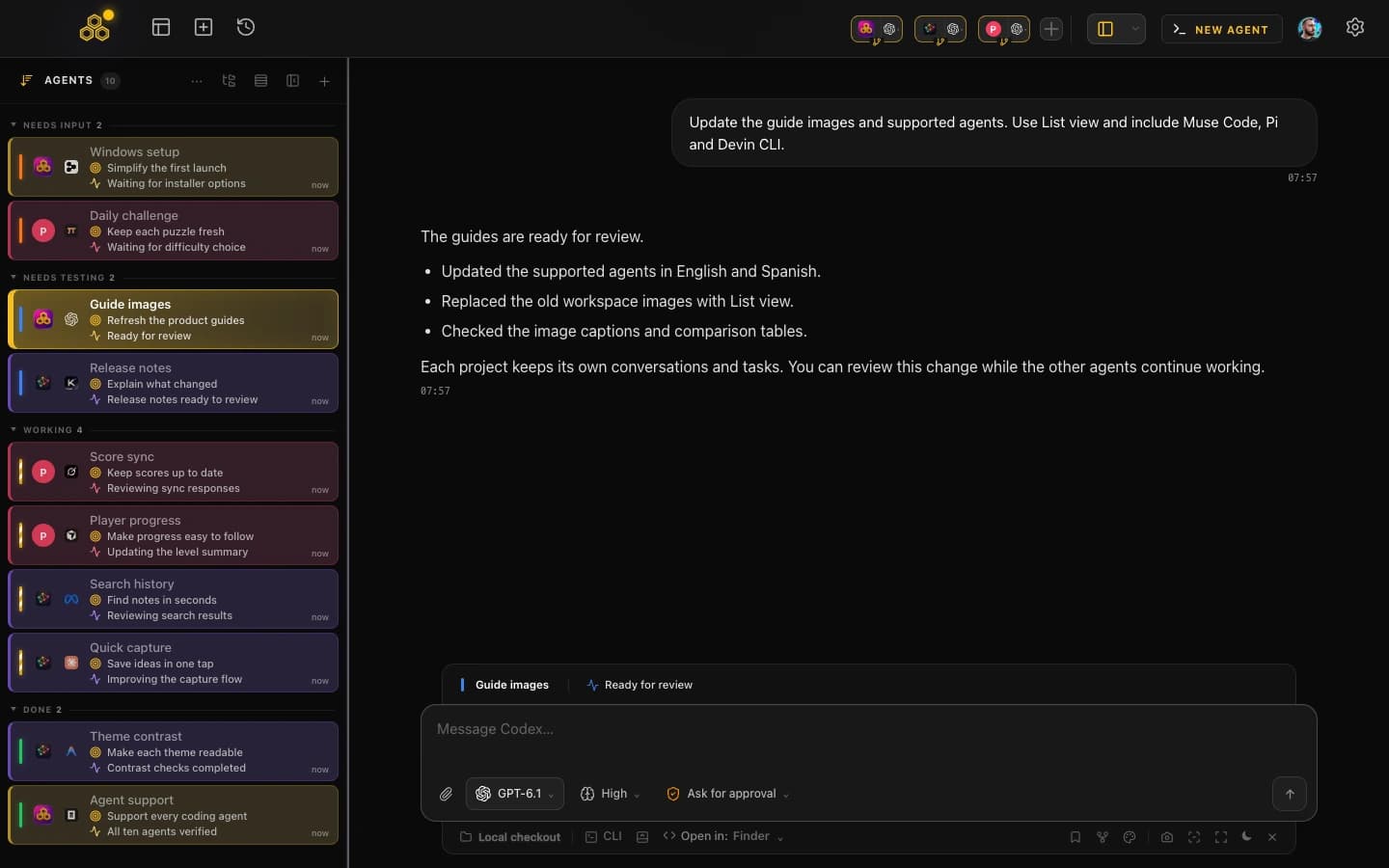
The design is terminal-first. You get desktop notifications when an agent finishes or needs input, searchable conversation history across all ten agents and capability-aware resume, per-terminal live file diffs, permission control with a Turbo mode for the operations you trust, a kanban board the agents update over MCP, git worktrees per session, multi-project switching, AI commit messages, a provider quota indicator, and skills and MCP marketplaces shared across agents.
And the limits: closed source with no public repository, Mobile Connect still in alpha (web beta for every account, native iOS and Android access by request, desktop must stay open), still in beta with Pro included, and no models of our own, so your existing subscriptions do the work.
Side by side
| Nimbalyst (formerly Crystal) |  CodeAgentSwarm CodeAgentSwarm | |
|---|---|---|
| Platforms | macOS (Apple Silicon and Intel), Windows and Linux, plus a mobile app, per their README | macOS, Windows and Linux desktop. Mobile Connect alpha: web beta for every account, native iOS and Android access by request, desktop must stay open |
| Interface | Desktop app built around visual editors, with a session kanban and an embedded terminal | Desktop workspace built around live agent terminals |
| Supported agents | Codex, Claude Code, Opencode (alpha) and Copilot (alpha), per their README | Claude Code, Codex CLI, Antigravity CLI, OpenCode, Kimi Code, Grok Build, Cursor Agent, Muse Code, Pi and Devin CLI |
| Isolation model | Parallel sessions with git worktree support, per their README | A separate process per terminal, with optional git worktrees per session |
| Notifications | Push notifications in their mobile app, per their README. Desktop notifications are not documented on their site as of August 25, 2026 | Desktop notifications when an agent finishes or needs input |
| Conversation history | Search and resume sessions, with sessions linked to the files they touched | Searchable history across all ten agents and capability-aware resume |
| Task management | Task tracking plus a kanban view of sessions, editable by you and by the agent | Kanban board that the agents update over MCP |
| Open source | Yes, MIT, about 1,600 stars on the current repository | No, closed source with no public app repository |
| Price | Free for individuals per their site; a paid Teams tier exists per their site navigation (we did not verify any figures) | Free during beta with Pro included, and you bring your own agent subscriptions |
| Last public commit (verified Aug 31, 2026) | August 28, 2026 on nimbalyst/nimbalyst; February 26, 2026 on the old stravu/crystal repository | Closed source, no public repo |
When Nimbalyst is the better choice
Nimbalyst wins several of these outright, and if any of them is your situation you should use it rather than us.
- You want to edit what the agent produces, visually. Markdown, mockups with annotations, Mermaid, Excalidraw, CSV and data models in WYSIWYG editors, approving changes as red and green diffs. We have no equivalent to that at all.
- You want open source. MIT, public repository, and an active one: there was a public commit on August 28, three days before we refreshed the repository data. CodeAgentSwarm is closed source.
- You want a public native mobile app today. Their mobile app offers a session dashboard, push notifications, voice or text replies and swipe-through diff approval. CodeAgentSwarm Mobile Connect is still in alpha: web beta is available, while native iOS and Android access is by request and the desktop must stay open.
- Non-developers are involved. Product and design people can work on documents and mockups in the same tool, which a terminal workspace does not really allow.
- You want to extend the tool. Their extension system lets you build custom editors for your own file types.
When CodeAgentSwarm is the better choice
- You use more than two agent vendors. Claude Code, Codex CLI, Antigravity CLI, OpenCode, Kimi Code, Grok Build, Cursor Agent, Muse Code, Pi and Devin CLI are all first-class here. Antigravity CLI, Kimi Code and Grok Build are not listed among the supported coding agents in the Nimbalyst README as of August 25, 2026.
- You want the terminals, not an abstraction over them. Every session is a real CLI in a pane you can read, scroll and type into, which matters when an agent does something unexpected.
- You want desktop notifications without reaching for a phone. Ours fire on the same machine you are working on.
- You want one history across every vendor. Search a phrase and find the session, whichever of the ten agents ran it, then resume it when that agent supports resume.
- You want fine-grained permission control. Turbo mode auto-approves the operations you trust and keeps the rest gated, instead of approving everything or nothing.
- You keep running into plan limits. The provider quota indicator tells you how much allowance is left before an agent stops mid-task.
A blunt way to choose: if your day is mostly editing the artefacts around the code, Nimbalyst is built for that. If your day is mostly keeping several agent sessions moving, that is what we built.
Using both
Both are desktop apps working against the same repositories and both support git worktrees, so running them side by side is straightforward. A practical split: CodeAgentSwarm for the parallel agent sessions and the supervision around them, Nimbalyst when you want to sit with a document, a mockup or a diagram and iterate on it visually.
Still comparing? The Claude Squad comparison covers the terminal-only approach and the Vibe Kanban comparison covers the kanban-first one.
FAQ
Is Nimbalyst the same as Crystal?
Yes, it is the same project renamed. The old repository stravu/crystal states in its own description that Crystal is now Nimbalyst and links to nimbalyst.com. Crystal is MIT with about 3,100 stars and its last public commit was February 26, 2026, while development continues at nimbalyst/nimbalyst, also MIT, with about 1,600 stars and a public commit on August 28, 2026. Product facts and predecessor repository data were verified on August 25; current repository activity was refreshed on August 31, 2026.
Is Nimbalyst open source?
Yes. The nimbalyst/nimbalyst repository is published under the MIT license, with about 1,600 stars (1,613 when refreshed on August 31, 2026). Their README notes that the collaboration sync server behind their team features is a separate project. CodeAgentSwarm is closed source with no public application repository, so if open source is a requirement, Nimbalyst wins that point.
Is Nimbalyst actively maintained?
When checked on August 31, 2026, the nimbalyst/nimbalyst repository had a public commit from August 28, so it was active at the time of verification. The predecessor repository, stravu/crystal, last saw a public commit on February 26, 2026, which is expected after the rename. Check the repository yourself before committing a workflow to any tool.
Does Nimbalyst support Antigravity CLI or Kimi Code?
Neither is listed among the supported coding agents in the Nimbalyst README as of August 25, 2026, which names Codex, Claude Code, Opencode (alpha) and Copilot (alpha). CodeAgentSwarm supports Antigravity CLI and Kimi Code directly, along with Claude Code, Codex CLI and OpenCode, which is the main breadth difference between the two tools.