
Claude Squad vs CodeAgentSwarm: An Honest Comparison (2026)
By CodeAgentSwarm · Updated October 5, 2026
The one-sentence difference
Claude Squad manages multiple AI coding agents inside your terminal, while CodeAgentSwarm gives the same parallelism a desktop app with notifications, searchable conversation history across agents and a kanban board.
Everything else follows from that. One is a terminal application you run with a keystroke over SSH, the other is a window you keep open on a second monitor. If you want the wider category view first, read the best tools to run multiple AI coding agents, and the AI CLI agent swarm guide explains the workflow itself.
We make CodeAgentSwarm, so treat this as an interested comparison and check the claims yourself. All third-party facts on this page were verified on August 25, 2026 against the vendor own site, their public README and public GitHub data. Where something is not documented publicly, we say so instead of guessing.
What Claude Squad is
Claude Squad is a terminal application that manages multiple AI terminal agents. Its current README names Claude Code, Codex, Gemini and Aider, and its program flag or named profiles can launch arbitrary local commands per session.
The README documents how it works under the hood: tmux to create an isolated terminal session for each agent, git worktrees so each session works on its own branch, and a text UI to move between them. You install it with Homebrew or a shell script, it lands as the cs binary, and tmux plus the GitHub CLI are listed as prerequisites.
- Open source under AGPL-3.0, roughly 8,400 stars on GitHub (8,362 on August 25, 2026)
- Last public commit on August 20, 2026
- One tmux session and one git worktree per task, so branches never collide
- A diff tab to review changes, plus keys to commit, push, pause and resume a session
- A background auto-accept mode (the autoyes flag) for agents that keep asking for confirmation
- Free, with no account and no server component
That is a genuinely good design for people who already work in the terminal. There is nothing to install beyond a binary, it runs on the machine where your code lives, and the whole thing is auditable because the source is public.
What CodeAgentSwarm is
CodeAgentSwarm is a desktop workspace to run and supervise multiple AI coding agents in parallel. It runs on macOS, Windows and Linux, each terminal inside it is a real agent process, and you choose the agent per terminal: Claude Code, Codex CLI, Antigravity CLI, OpenCode, Kimi Code, Grok Build, Cursor Agent, Muse Code, Pi and Devin CLI.
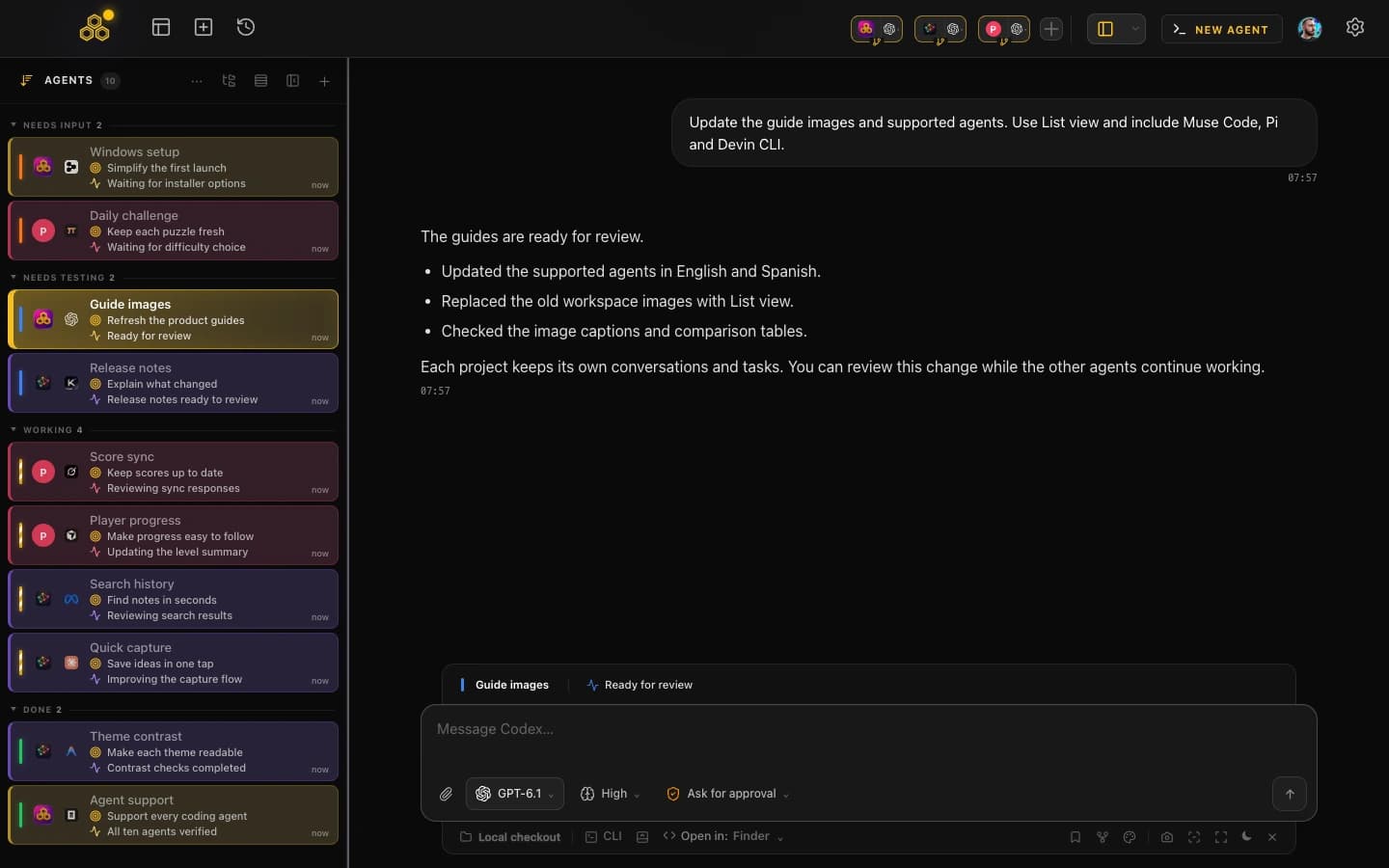
- Desktop notifications when an agent finishes or stops to ask you something
- Searchable conversation history across all ten agents and capability-aware resume from any entry
- Per-terminal live file diffs, so you see what each agent is touching while it works
- Permission control, including a Turbo mode for the operations you are happy to auto-approve
- A kanban task board the agents update themselves over MCP
- Git worktrees per session, multi-project switching, AI commit messages and a provider quota indicator
- Skills and MCP marketplaces shared across the agents you run
Our honest limits: the app is closed source with no public repository, Mobile Connect is still in alpha (web beta for every account, native iOS and Android access by request, desktop must stay open), it is still in beta with Pro included, and it is not a model provider, so you bring your own Claude, OpenAI or other subscriptions.
Side by side
| Claude Squad |  CodeAgentSwarm CodeAgentSwarm | |
|---|---|---|
| Platforms | Terminal environments with tmux and the GitHub CLI installed, via Homebrew or a shell script. A native Windows install is not documented on their site as of August 25, 2026 | Desktop app for macOS, Windows and Linux |
| Interface | Terminal UI, keyboard driven | Graphical desktop workspace with terminal panes |
| Supported agents | Claude Code, Codex, Gemini and Aider; arbitrary local commands via the program flag | Claude Code, Codex CLI, Antigravity CLI, OpenCode, Kimi Code, Grok Build, Cursor Agent, Muse Code, Pi and Devin CLI |
| Isolation model | A tmux session plus a git worktree per task, one branch each | A separate process per terminal, with optional git worktrees per session |
| Notifications | Not documented on their site as of August 25, 2026 | Desktop notifications when an agent finishes or needs input |
| Conversation history | Sessions can be paused and resumed in the app. A searchable history across agents is not documented on their site as of August 25, 2026 | Searchable history across all ten agents and capability-aware resume |
| Task management | Session list with per-session state. A kanban board is not documented on their site as of August 25, 2026 | Kanban board that the agents update over MCP |
| Open source | Yes, AGPL-3.0 | No, closed source with no public app repository |
| Price | Free | Free during beta with Pro included, and you bring your own agent subscriptions |
| Last public commit (verified Aug 25, 2026) | August 20, 2026 | Closed source, no public repo |
When Claude Squad is the better choice
These are real advantages, not polite concessions. If any of them describe you, Claude Squad wins and you should use it.
- You work on remote machines. Claude Squad runs where your code runs. Over SSH on a dev box, a VPS or a Linux workstation, a terminal app is the right shape and a desktop GUI simply is not there.
- You want open source. AGPL-3.0, public repository, roughly 8,400 stars. You can read every line, fork it and audit what it does with your code. CodeAgentSwarm cannot offer that.
- You already live in tmux. If your muscle memory is keyboard-first and you resent switching to a mouse, a TUI with single-key session management will feel faster than any window.
- You want zero install weight. One binary, no account, no updater, no packaged desktop runtime.
- You want Aider or another local agent. Its program flag launches any local agent command, which is broader than our fixed list of ten.
When CodeAgentSwarm is the better choice
- You want to be told, not to check. Desktop notifications fire when an agent finishes or needs input, so you can go do something else instead of watching a pane.
- You use ten agent CLIs. Claude Code, Codex CLI, Antigravity CLI, OpenCode, Kimi Code, Grok Build, Cursor Agent, Muse Code, Pi and Devin CLI are all supported directly. Antigravity, Kimi and Grok Build are not listed among the agents in the Claude Squad README as of August 25, 2026.
- You want history you can search. Every conversation from every agent is searchable in one place, and you can resume any of them where you left it.
- You want to watch the diffs live. Per-terminal file diffs update as the agent edits, so overlapping work is visible early rather than at review time.
- You want the work tracked. The kanban board is updated by the agents themselves over MCP, so the board reflects what actually happened.
- You are on Windows. CodeAgentSwarm is a first-class Windows app, while a native Windows install for Claude Squad is not documented on their site as of August 25, 2026.
- You keep hitting plan limits. The quota indicator shows how much of your provider allowance is left before an agent stalls mid-task.
A fair way to decide: if you would rather press a key than click, pick Claude Squad. If you would rather be interrupted by a notification than remember to look, pick CodeAgentSwarm.
Using both
They do not conflict. A common split is Claude Squad on the remote box, where a terminal app is the only sensible option, and CodeAgentSwarm on the laptop for the projects you are actively supervising. Both use git worktrees, so the branch layout stays familiar either way.
If you are weighing up more than these two, the Vibe Kanban comparison covers the kanban-first approach to the same problem, and Nimbalyst, formerly Crystal, covers the visual editor approach.
FAQ
Is Claude Squad open source?
Yes. Claude Squad is published at github.com/smtg-ai/claude-squad under the AGPL-3.0 license, with roughly 8,400 stars (8,362 when verified on August 25, 2026). CodeAgentSwarm is closed source and has no public application repository, which is a real point in Claude Squad favour if auditability or forking matters to you.
Is Claude Squad still maintained?
Its last public commit on the default branch was August 20, 2026, five days before this page was verified. That confirms active development at the time of checking. Check the repository yourself before you build a workflow on it.
Does Claude Squad support Antigravity CLI or Kimi Code?
Neither is named in the Claude Squad README as of August 25, 2026, which lists Claude Code, Codex, Gemini and Aider. Its program flag launches an arbitrary local command, so pointing it at another CLI may work, but it is not a documented first-party integration. CodeAgentSwarm supports Antigravity CLI, OpenCode and Kimi Code directly.
Do I need to know tmux to use Claude Squad?
Its README lists tmux and the GitHub CLI as prerequisites and explains that tmux is what creates the isolated session per agent, with git worktrees isolating the code. You do not need to be a tmux expert, because the text UI creates and switches sessions for you with single keys, but you do need tmux installed and you should be comfortable working in a terminal. CodeAgentSwarm handles the equivalent isolation inside a desktop app instead.