
How to install and use Cline CLI
By CodeAgentSwarm · Updated October 31, 2026
cline command. This guide covers installation, sign-in, the flags you will use every day, where Cline keeps its files and how CodeAgentSwarm 2.5.0 runs it, in beta. Cline facts were checked against the official docs and the npm package (version 3.0.74) on October 31, 2026.What Cline CLI is

Cline CLI is a terminal agent: it reads your project, edits files and runs commands. Run cline on its own to open the interactive terminal UI, or cline "your task" to run one task and exit. It is the same agent as the Cline extension for VS Code and JetBrains, and both share rules and skills. The npm package is published under the Apache-2.0 license.
Cline does not lock you to one model vendor. You can use the Cline provider, which bills inference by usage, or bring your own key for Anthropic, OpenAI, Google Gemini, OpenRouter, AWS Bedrock, GCP Vertex, Groq, Cerebras or any OpenAI-compatible endpoint. That is the main reason people pick it over a single-vendor CLI.
Install Cline CLI
npm install -g cline
cline version
The package ships native binaries for macOS, Linux and Windows on x64 and ARM64, and npm picks the right one through an optional dependency. Cline's installation docs ask for Node.js 20 or later and recommend 22. A nightly build is available as cline@nightly. To update later, run cline update.
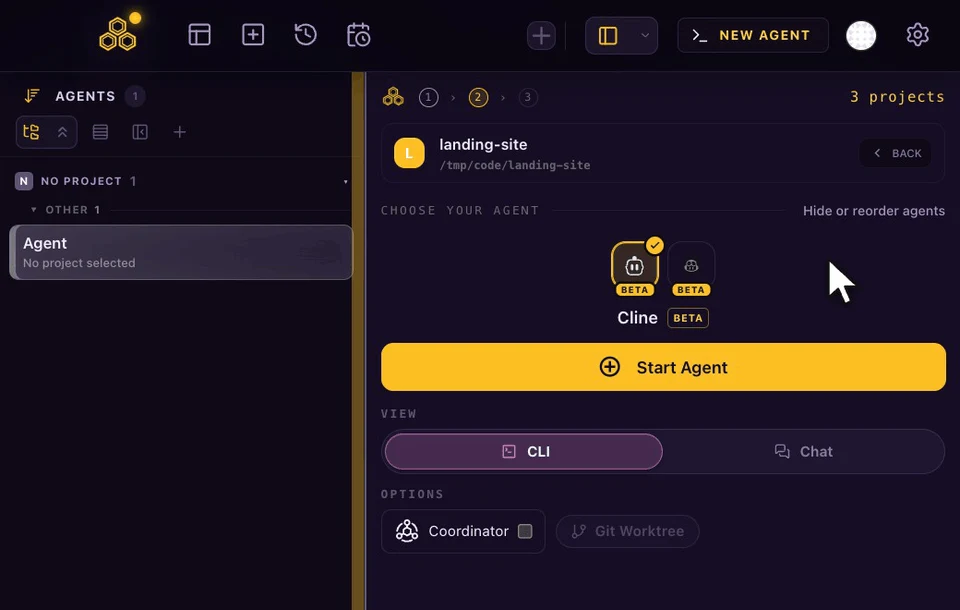
In CodeAgentSwarm you do not need the terminal for this. Pick Cline in the agent picker, or press Install in Settings > Providers, and the app installs the official npm package for you. It first makes sure Node.js 22.19 or later is present (on Windows and Linux it can set up its own Node runtime; on macOS it uses the Node.js you already have), then checks the result with cline --version. Settings > Providers shows the next step for each agent: Install, Sign in or Ready.
Connect a model provider with cline auth
cline authRun cline auth without options and it walks you through choosing a provider, a key or account and a default model. Credentials are saved under ~/.cline/data/settings/ and reused by every later session, including Chat in CodeAgentSwarm. For OAuth providers, run cline auth first: a normal start does not open a browser.
If you open Cline in Chat before signing in, CodeAgentSwarm opens the terminal and gives you the cline auth command to run. Your provider bills the usage; CodeAgentSwarm does not resell model access.
Flags you will use every day
| Flag or command | What it does |
|---|---|
cline | Opens the interactive terminal UI |
cline "fix the failing test" | Runs one task and exits |
-p, --plan | Starts in plan mode instead of act mode |
-m, --model | Picks the model for the selected provider |
--thinking | Sets reasoning effort: none, low, medium, high or xhigh |
--auto-approve true|false | Turns automatic tool approval on or off |
--id <session-id> | Resumes a saved session |
cline history | Lists saved sessions |
--worktree | Runs the task in a detached git worktree |
The CLI reference lists auto-approve as on by default, except in ACP mode where it is off. If you want to review each tool call in the terminal, start Cline with --auto-approve false.
Use Cline in Chat or in the terminal
CodeAgentSwarm gives Cline two views. The terminal view runs the normal cline interface. Chat talks to Cline through its Agent Client Protocol server (cline --acp) and shows the models your provider offers, plan and act modes, image attachments, a stop button and every permission request.
- Ask before actions: Cline waits for your approval before it edits a file or runs a command.
- Auto-accept edits: workspace edits go through; commands and risky actions still ask.
- Full access: no approval prompts, the same as
--auto-approve true.
Chat always starts Cline with auto-approve off and applies the mode you pick. The app remembers your last choice for Cline and reuses it for new sessions. In the terminal it adds --auto-approve true only when that last choice was Full access; otherwise Cline follows its own setting.
Where Cline keeps its files
| What | Where |
|---|---|
| Configuration folder | ~/.cline (or CLINE_DIR) |
| Providers and keys | ~/.cline/data/settings/providers.json |
| MCP servers | ~/.cline/data/settings/cline_mcp_settings.json |
| Global rules and skills | ~/.cline/rules/ and ~/.cline/skills/ |
| Project rules | .clinerules/, .cline/rules/ or AGENTS.md in the project root |
| Session index | ~/.cline/data/db/sessions.db |
When you allow it in Settings > Privacy, CodeAgentSwarm adds its task and title tools as one MCP entry, a short rule file at ~/.cline/rules/codeagentswarm.md and small hooks that report when a task finishes and which files changed. Your own servers and hooks stay as they are, and turning each option off removes only what the app added.
What the 2.5.0 beta does not do yet
- Cline reports the cost and tokens of each session, so the usage panel shows session spend. There is no account quota to read, so there is no percentage ring or daily budget for Cline.
- Conversation titles and commit messages need a run without tools, which Cline does not offer. Pick another provider for those two helpers.
- Cline's native conversation forks are not available inside CodeAgentSwarm.
- If your Cline version cannot load an old session over ACP, Chat says so instead of starting an empty one. Update Cline or open the session in the terminal.
More on Cline in CodeAgentSwarm:
- Cline vs Claude Code: pricing, models, rules and permissions side by side.
- Run multiple Cline sessions in parallel, each in its own folder or worktree.
- Cline CLI on Windows and Linux: install, Node.js and paths.
- Cline conversation history: find, search and resume old sessions.
FAQ
Is Cline CLI free?
The CLI is open source and free to install. You pay for the model you use: through the Cline provider, which bills inference by usage, or through your own provider key. CodeAgentSwarm does not include model usage.
How do I install Cline CLI?
Run npm install -g cline with Node.js 20 or later (22 is recommended), then cline auth to connect a provider. In CodeAgentSwarm, picking Cline in the agent picker installs it for you.
How do I resume a Cline session?
Run cline history to list sessions and cline --id followed by the session id to resume one. CodeAgentSwarm lists the same sessions in Conversation History and reopens them in Chat or the terminal.
Does Cline CLI read AGENTS.md?
Yes. Cline reads AGENTS.md in the project root along with .clinerules and .cline/rules, plus global rules in ~/.cline/rules.
Is Cline stable in CodeAgentSwarm?
Cline arrives in CodeAgentSwarm 2.5.0 with a beta label. Installation, Chat, history, permissions and session spend work; titles, commit messages and native forks are not available yet.