
Cline CLI on Windows and Linux: install, Node.js and paths
By CodeAgentSwarm · Updated October 31, 2026
What you need

| System | Native binary in the npm package |
|---|---|
| Windows x64 | @cline/cli-windows-x64 |
| Windows ARM64 | @cline/cli-windows-arm64 |
| Linux x64 | @cline/cli-linux-x64 |
| Linux ARM64 | @cline/cli-linux-arm64 |
You need Node.js and npm to install it. Cline's installation docs ask for Node.js 20 or later and recommend 22. Check what you have with node --version.
Install Cline CLI on Windows
node --version
npm install -g cline
cline version
Run this in PowerShell or Windows Terminal. npm puts a cline.cmd launcher in %APPDATA%\npm, which the Node.js installer adds to your PATH. If cline is not found right after installing, open a new terminal so it picks up the updated PATH.
Cline keeps its configuration in the .cline folder of your user profile. Global rules can also live in Documents\Cline\Rules, and Cline checks the OneDrive Documents folder too when Windows redirects it there.
Install Cline CLI on Linux
node --version
npm install -g cline
cline version
If npm install -g fails with EACCES, your global npm folder belongs to root. Do not fix it with sudo; point npm at a folder you own instead:
npm config set prefix ~/.npm-global
echo 'export PATH="$HOME/.npm-global/bin:$PATH"' >> ~/.bashrc
source ~/.bashrc
npm install -g cline
A Node version manager such as nvm avoids the problem too, because it installs Node in your home folder. On a server or over SSH, sign in with cline auth and an API key from your provider.
When an editor or app cannot find cline
Apps that launch Cline as an Agent Client Protocol server do not always inherit your shell's PATH. Cline's ACP docs suggest using the absolute path from which cline (or where cline on Windows) in that case.
CodeAgentSwarm looks in the usual places on its own: the PATH, the global npm folder (%APPDATA%\npm on Windows, ~/.local/bin and /usr/local/bin on Linux) and the Node runtime it manages.
Let CodeAgentSwarm install it for you
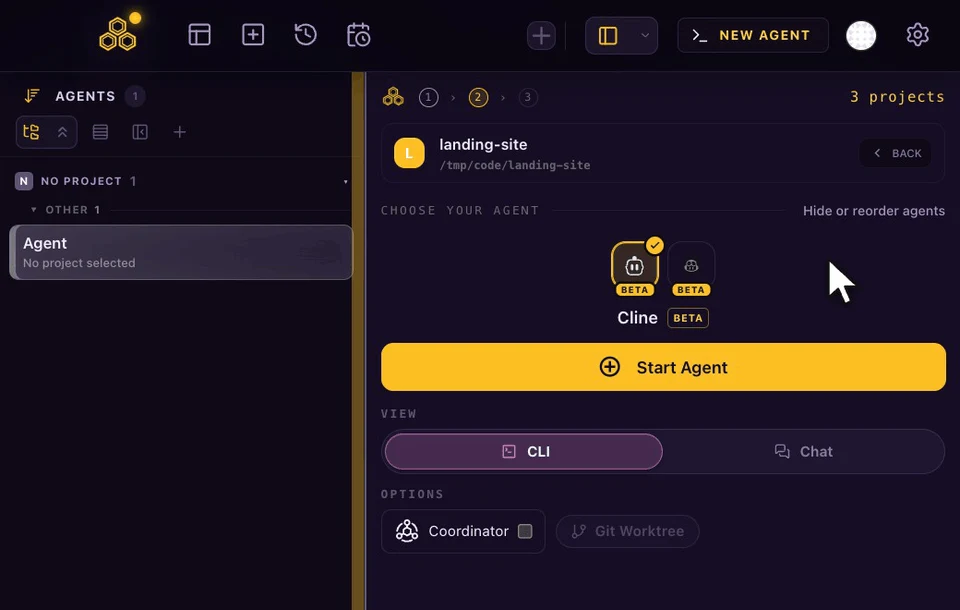
In CodeAgentSwarm 2.5.0, where Cline is in beta, pick Cline in the agent picker or press Install in Settings > Providers. On Windows and Linux the app can download its own Node.js runtime when yours is missing or older than 22.19, then installs the official cline package with the binary for your machine and checks it with cline --version.
During 2.5.0 development the installer was tested on Windows ARM64 and Linux ARM64. If something looks wrong on an x64 machine, tell us from Settings > Feedback.
Next steps: connect a provider and learn the daily flags, or run several Cline sessions in parallel. Running other agents on Linux too? See GitHub Copilot CLI on Linux.
FAQ
Does Cline CLI work on Windows?
Yes. The npm package includes native Windows binaries for x64 and ARM64. Install it with npm install -g cline from PowerShell or Windows Terminal.
Does Cline CLI work on Linux ARM64?
Yes. The package ships a Linux ARM64 binary, and npm picks it automatically on ARM64 machines.
Which Node.js version does Cline CLI need?
Cline's installation docs ask for Node.js 20 or later and recommend 22. CodeAgentSwarm uses Node.js 22.19 or later when it installs Cline.
How do I update Cline CLI?
Run cline update, or npm install -g cline again. Use cline@nightly if you want the nightly build.
Why does npm install -g cline fail with EACCES on Linux?
Your global npm folder is owned by root. Set a user prefix with npm config set prefix ~/.npm-global and add its bin folder to PATH, or use a Node version manager such as nvm.