
How to install GitHub Copilot CLI on Linux (and sign in over SSH)
By CodeAgentSwarm · Updated October 31, 2026
copilot. This guide covers the three install methods, the Alpine (musl) case the script does not handle, signing in on a server with no browser, tokens for headless machines, local models, updates and the errors you are likely to see. We checked the commands against the 1.0.93 install script and the GitHub docs on October 8, 2026.Quick answer: install GitHub Copilot CLI on Linux

Quick answer: run the official script, no sudo needed. It installs ~/.local/bin/copilot and checks the download against GitHub's published checksums. Then run copilot inside a project and sign in.
# Official script for Linux and macOS (wget -qO- works too)
curl -fsSL https://gh.io/copilot-install | bash

# Check the install
copilot --version

# Start it inside a project
cd ~/my-project
copilot
Sources: GitHub installation docs and GitHub authentication docs, checked October 8, 2026. For a general tour of the agent, read how to install and use GitHub Copilot CLI.
Script, Homebrew or npm
| Method | Command | Good to know |
|---|---|---|
| Official script | curl -fsSL https://gh.io/copilot-install | bash | Standalone binary. ~/.local/bin as a normal user, /usr/local/bin as root. |
| Homebrew | brew install --cask copilot-cli | Prerelease: copilot-cli@prerelease. |
| npm | npm install -g @github/copilot | Needs Node.js 22 or later. Prerelease: @github/copilot@prerelease. |
# Install into a folder you choose and pin a version
curl -fsSL https://gh.io/copilot-install | VERSION="v1.0.93" PREFIX="$HOME/tools" bash
# The binary ends up in $HOME/tools/bin/copilot
The script reads two variables. PREFIX picks the base folder and the binary goes into $PREFIX/bin. VERSION picks a release (the default is the latest; prerelease also works if git is installed). When sha256sum or shasum is available, the script verifies the archive against SHA256SUMS.txt before extracting it, and stops if the checksum does not match.
Alpine and other musl distributions
GitHub publishes two Linux builds for each architecture: copilot-linux-x64 and copilot-linux-arm64 for glibc distributions (Ubuntu, Debian, Fedora and most others), and copilot-linuxmusl-x64 and copilot-linuxmusl-arm64 for musl distributions such as Alpine. When we read the install script on October 8, 2026, it always downloaded the glibc build. On Alpine, download the musl archive from the release page yourself:
# Alpine on x64 (use copilot-linuxmusl-arm64 on ARM64)
BASE=https://github.com/github/copilot-cli/releases/latest/download
curl -fsSLO $BASE/copilot-linuxmusl-x64.tar.gz
curl -fsSLO $BASE/SHA256SUMS.txt
grep copilot-linuxmusl-x64.tar.gz SHA256SUMS.txt | sha256sum -c -
mkdir -p ~/.local/bin
tar -xz -C ~/.local/bin -f copilot-linuxmusl-x64.tar.gz
copilot --version
Not sure which one you have? Run ldd --version. If the output mentions musl, or /etc/alpine-release exists, use the musl build. The npm package is another route on Alpine if you already have Node.js 22 or later.
Sign in over SSH with a device code
On a desktop, copilot login opens the browser. Over SSH, in dev containers, in CI and on headless Linux, it uses the device code flow by default, so you can sign in from any other device.
copilot login                 # device code by default over SSH
copilot login --device-code   # force the device code flow
copilot login --web-flow # force the browser flow- The command prints
https://github.com/login/deviceand a one-time code. Open that page on your laptop or phone, enter the code and approve access. - Inside the interactive interface,
/logindoes the same./user listand/user switchhandle several accounts. - For GitHub Enterprise Cloud with data residency, add
--host https://example.ghe.com(with your own domain) or setCOPILOT_GH_HOST. - The first time you open Copilot in a folder, it asks you to confirm folder trust. Answer once, or choose to remember the folder.
Copilot stores the token in the system keychain. A headless server often has no keychain (for example, no libsecret). In that case Copilot asks whether to save the token in plain text in ~/.copilot/config.json. Say yes only on a machine you control, and keep that file out of backups you share. /logout removes the local token but does not revoke it on GitHub.
Headless machines and CI: COPILOT_GITHUB_TOKEN
When nobody can type a device code, give Copilot a token. It must be a fine-grained personal access token with the Copilot Requests permission:
- Open the fine-grained token page on GitHub.
- Under Resource owner, pick your personal account.
- In Account permissions, add Copilot Requests, then generate the token.
# Option 1: environment variable, nothing saved on disk
export COPILOT_GITHUB_TOKEN="github_pat_..."
copilot

# Option 2: store it once (read from stdin)
copilot login --with-token < ~/copilot-token.txt
Classic tokens that start with ghp_ do not work. Copilot checks COPILOT_GITHUB_TOKEN, then GH_TOKEN, then GITHUB_TOKEN, then the keychain, and finally a signed-in GitHub CLI. If a server already exports a GITHUB_TOKEN for something else, Copilot may pick it up; set COPILOT_GITHUB_TOKEN to make the choice explicit.
Your own model, or fully offline
Copilot CLI can talk to your own provider (BYOK) instead of GitHub models, and then it needs no GitHub login. COPILOT_PROVIDER_TYPE accepts openai (the default, for any endpoint compatible with the OpenAI Chat Completions API), azure or anthropic. A remote provider also takes COPILOT_PROVIDER_API_KEY.
# Example from the GitHub docs: a local Ollama server
export COPILOT_PROVIDER_BASE_URL=http://localhost:11434
export COPILOT_MODEL=YOUR-MODEL-NAME
# Optional: never contact GitHub servers
export COPILOT_OFFLINE=true
copilot- The model has to support tool calling and streaming. GitHub recommends a context window of at least 128k tokens.
COPILOT_OFFLINE=truerequires a local provider. GitHub notes that offline mode only isolates you fully if the provider also runs locally or inside the same isolated network.--modelon the command line does the same asCOPILOT_MODEL.
Source: GitHub docs on BYOK models, checked October 8, 2026.
Updates, and turning them off in CI
| Installed with | How it updates |
|---|---|
| Script or release archive | Downloads updates on its own and applies them on the next launch. copilot update does it now. |
| npm | Only tells you a newer version exists. Update with npm install -g @github/copilot. |
| Homebrew | Update with brew upgrade --cask copilot-cli. |
copilot update              # latest stable
copilot update prerelease   # latest prerelease

# Keep a pinned version on a shared server or build image
copilot --no-auto-update
export COPILOT_AUTO_UPDATE=false
On a build image, pin the version with VERSION when you install and keep auto-update off, so every job runs the same binary.
Common Linux errors and how to fix them
- "copilot: command not found" after installing:
~/.local/binis not on your PATH. The script offers to add it to~/.profile,~/.bash_profileor~/.zprofile. Otherwise addexport PATH="$HOME/.local/bin:$PATH"yourself and open a new shell. - "Error: Unsupported architecture": the script supports x86_64 and aarch64 only. Check with
uname -m. - The binary exists but will not run on Alpine: you have the glibc build on a musl system. Install the
linuxmuslarchive as shown above. - "Could not create directory ... You may not have write permissions": set
PREFIXto a folder you own, or run the script as root to install into/usr/local/bin. - "No sha256sum or shasum found, skipping checksum validation": install coreutils from your package manager and run the script again.
- Login never finishes over SSH: force
copilot login --device-code. - A token is rejected: it is probably a classic
ghp_token, or a fine-grained token without the Copilot Requests permission. - The npm package fails to install or start: check
node --version. The package needs Node.js 22 or later.
Logs live in ~/.copilot/logs/. Raise the detail with --log-level, or send them elsewhere with --log-dir.
On a remote server and in CodeAgentSwarm
On a remote server, start Copilot inside tmux or screen so a dropped SSH connection does not end the session. If it does end, copilot --continue reopens the latest session and copilot --resume <id> reopens a specific one. Sessions live in ~/.copilot/session-state/ on that server.
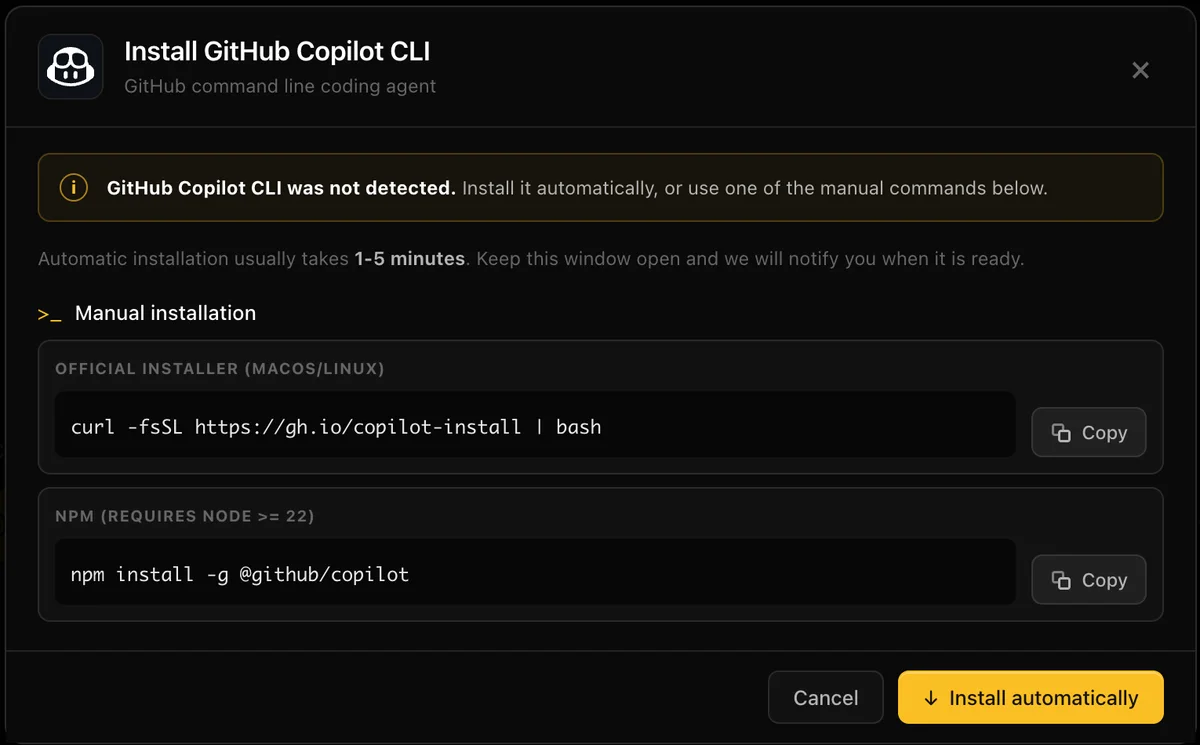
On a Linux desktop, CodeAgentSwarm adds GitHub Copilot CLI support in 2.5.0, in beta. Pick GitHub Copilot CLI in the agent picker or install it from Settings > Providers: the app downloads the official archive for your machine, glibc or musl, verifies SHA256SUMS and installs ~/.local/bin/copilot. If you already installed Copilot with npm or Homebrew, the app detects it and updates it through that tool. You sign in from Chat with a device code, and a session started in Chat continues in the terminal view.
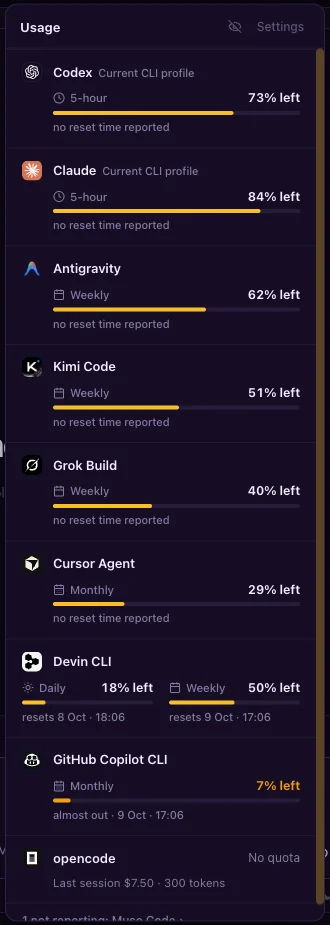
The usage panel shows your monthly Copilot allowance and reset date next to your other agents. It reads it with a token from the environment or a signed-in GitHub CLI, never from the keychain. You can run several Copilot sessions side by side, each in its own project or git worktree, next to Claude Code, Codex and the other supported agents. Next: Copilot CLI MCP and history and models and AI credits.
Conclusion
On most Linux machines, one curl line installs GitHub Copilot CLI into your home folder. Alpine needs the musl archive by hand. Over SSH the device code flow is the default, headless machines take a fine-grained token in COPILOT_GITHUB_TOKEN, and COPILOT_OFFLINE=true with a local model keeps everything on your network. Turn auto-update off where you need a fixed version.
FAQ
How do I install GitHub Copilot CLI on Linux?
Run "curl -fsSL https://gh.io/copilot-install | bash". It installs the binary in ~/.local/bin as a normal user, or /usr/local/bin as root. Homebrew ("brew install --cask copilot-cli") and npm ("npm install -g @github/copilot", Node.js 22 or later) also work.
Does GitHub Copilot CLI work on Alpine Linux?
Yes. GitHub publishes musl builds for x64 and ARM64 (copilot-linuxmusl-x64 and copilot-linuxmusl-arm64). The install script we checked on October 8, 2026 always fetched the glibc build, so download the musl archive from the release page or use npm.
How do I sign in to Copilot CLI on a server without a browser?
Run "copilot login". Over SSH it uses the device code flow by default: it prints github.com/login/device and a code you enter on any other device. For machines where nobody can type, export COPILOT_GITHUB_TOKEN with a fine-grained token that has the Copilot Requests permission.
Can I use GitHub Copilot CLI offline?
Yes, with your own local model. Set COPILOT_PROVIDER_BASE_URL and COPILOT_MODEL for the local provider, then COPILOT_OFFLINE=true. The model must support tool calling and streaming. No GitHub login is needed in that setup.
How do I stop GitHub Copilot CLI from updating itself?
Start it with --no-auto-update or set COPILOT_AUTO_UPDATE=false. In CI, auto-update is already off by default. npm installs never update themselves; they only report a newer version.