
How to schedule GitHub Copilot CLI: /every, cron and GitHub Actions
By CodeAgentSwarm · Updated October 31, 2026
/every command that repeats a prompt inside a session. For unattended runs, GitHub's own docs point you to copilot -p with cron, Task Scheduler or GitHub Actions. This guide covers those options and scheduling Copilot CLI in CodeAgentSwarm.Can GitHub Copilot CLI run on a schedule?

- Inside a session (experimental):
/everyand/after. - Unattended on your machine: cron or Task Scheduler with
copilot -p, or CodeAgentSwarm. - On GitHub runners: a workflow with an
on: scheduletrigger.
Copilot CLI /every and /after
/every (alias /loop) repeats a prompt between 10 seconds and 1 day apart; /after runs it once later. Both belong to the session and come back with --continue or --resume. They need experimental mode (/experimental on). GitHub: schedule prompts
GitHub also documents running Copilot CLI from GitHub Actions. Automate with GitHub Actions
A Copilot CLI cron job with copilot -p
# crontab -e: weekdays at 09:00
0 9 * * 1-5 cd ~/code/my-app && copilot -p "Summarise the issues assigned to me in this repo." -s --no-ask-user >> ~/logs/copilot-cron.log 2>&1
Grant only the tools the job needs with --allow-tool; GitHub advises against --allow-all outside a sandbox. Run Copilot CLI programmatically
Schedule GitHub Copilot CLI in CodeAgentSwarm
- Open Scheduled in the top bar and press New schedule. Or type the prompt in a GitHub Copilot CLI Chat and pick Schedule this prompt… from the send menu.
- Pick the Project and choose GitHub Copilot CLI as the agent. Model, reasoning and permissions are optional: leave them on Default or set them like in the Chat composer.
- Write the prompt the agent should run every time.
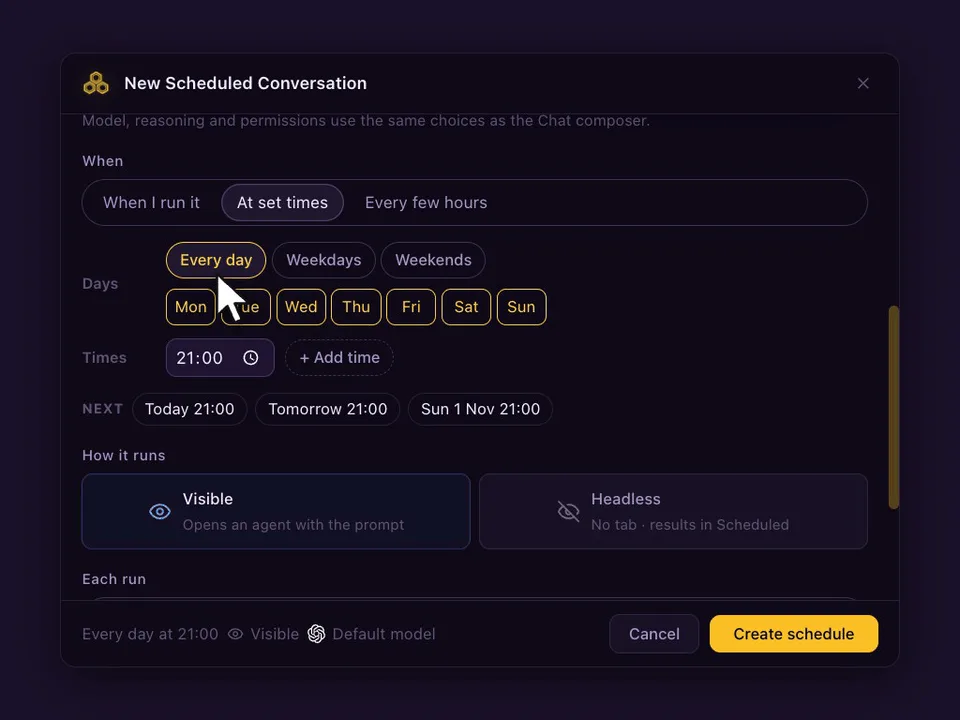
- Under When, choose At set times (up to 24 a day), Every few hours (1, 2, 3, 4, 6, 8 or 12) or When I run it, and the days.
- Choose Visible (opens a Chat) or Headless (no tab, result in Scheduled), and whether each run continues the same conversation or starts a new one. Press Create schedule.
Prompts worth scheduling with GitHub Copilot CLI
- Every weekday at 09:00: summarise the issues assigned to me in this repo and suggest an order.
- Every 4 hours: run the tests locally and explain new failures.
- Fridays at 17:00: draft release notes from the commits merged this week.
What happens on each run
- With Continue the same conversation, a visible run goes to the GitHub Copilot CLI agent that already holds the conversation, and never opens a second copy. With Start a new conversation, each run opens a fresh agent. If it is busy, Skip if still working (on by default) skips that slot; turn it off and the prompt waits in the queue.
- The Chat marks every scheduled run, so you can tell your own messages from the scheduled ones and reply to a run like any other message.
- If CodeAgentSwarm was closed or the computer asleep at the set time, If missed, run when the app opens runs it once, late. A week away gives one run, not seven.
- Schedules run on your computer, so CodeAgentSwarm has to be open. Your phone can list, edit and run them from the Scheduled tab.
FAQ
What is /every in GitHub Copilot CLI?
An experimental command that repeats a prompt inside the current session, from every 10 seconds to once a day. It needs experimental mode.
How do I run Copilot CLI on a cron?
Call copilot -p from a crontab line or Task Scheduler, with only the tools the job needs allowed. GitHub documents this pattern.
Can CodeAgentSwarm schedule Copilot CLI with my GitHub account?
Yes. Scheduled runs use the Copilot CLI login on the computer that runs them.