
How to schedule Cline: cline schedule vs CodeAgentSwarm
By CodeAgentSwarm · Updated October 31, 2026
cline schedule in the Cline CLI runs agents on cron expressions, keeps schedules across restarts and needs no open terminal. This guide shows the native command and when CodeAgentSwarm Scheduled Conversations are the better fit.How do I schedule Cline?

- Cline only, from the terminal:
cline schedule create. - Cline next to other agents, with each run in a Chat you can answer and phone control: CodeAgentSwarm.
cline schedule
cline schedule create "weekday triage" \
  --cron "0 9 * * MON-FRI" \
  --prompt "Sort new issues by priority. Do not edit files." \
  --workspace ~/code/my-app
Schedules run through the Cline hub, which starts on its own, use your local time zone and survive restarts. Other subcommands: list, trigger, pause, resume, delete and executions. Scheduled runs approve their own tool calls, so write the prompt with that in mind. The feature is in the Cline CLI, SDK and Kanban, not in the VS Code or JetBrains extensions. Cline scheduling docs
If Cline is your only agent and you like the terminal, cline schedule does the job. CodeAgentSwarm adds one editor for every agent you use, visible or headless runs, a Chat per run that you can continue, and a Scheduled tab on your phone.
Schedule Cline in CodeAgentSwarm
- Open Scheduled in the top bar and press New schedule. Or type the prompt in a Cline Chat and pick Schedule this prompt… from the send menu.
- Pick the Project and choose Cline as the agent. Model, reasoning and permissions are optional: leave them on Default or set them like in the Chat composer.
- Write the prompt the agent should run every time.
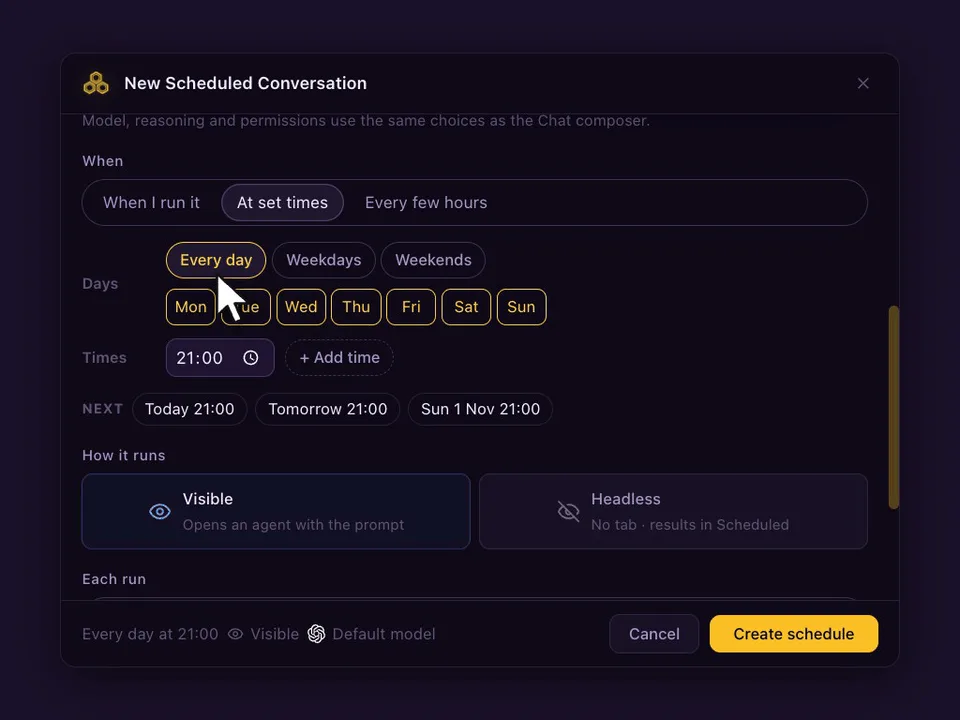
- Under When, choose At set times (up to 24 a day), Every few hours (1, 2, 3, 4, 6, 8 or 12) or When I run it, and the days.
- Choose Visible (opens a Chat) or Headless (no tab, result in Scheduled), and whether each run continues the same conversation or starts a new one. Press Create schedule.
Prompts worth scheduling with Cline
- Every weekday at 08:30: run the tests and explain new failures, without editing files.
- Every 6 hours: check the open pull requests of this repo and summarise review comments.
- Sundays at 10:00: list dependencies with a newer major version and what would break.
What happens on each run
- With Continue the same conversation, a visible run goes to the Cline agent that already holds the conversation, and never opens a second copy. With Start a new conversation, each run opens a fresh agent. If it is busy, Skip if still working (on by default) skips that slot; turn it off and the prompt waits in the queue.
- The Chat marks every scheduled run, so you can tell your own messages from the scheduled ones and reply to a run like any other message.
- If CodeAgentSwarm was closed or the computer asleep at the set time, If missed, run when the app opens runs it once, late. A week away gives one run, not seven.
- Schedules run on your computer, so CodeAgentSwarm has to be open. Your phone can list, edit and run them from the Scheduled tab.
FAQ
Does Cline have a scheduler?
Yes. The Cline CLI has cline schedule, which runs agents on cron expressions through the Cline hub and keeps schedules across restarts.
Does cline schedule work in the VS Code extension?
No. Cline documents it for the CLI, SDK and Kanban, not for the VS Code or JetBrains extensions.
Why schedule Cline in CodeAgentSwarm instead?
When you schedule several agents in one place, want each run in a Chat you can reply to, or want to manage schedules from your phone.