
How to schedule Antigravity CLI (agy): /schedule, cron and recurring runs
By CodeAgentSwarm · Updated October 31, 2026
agy, the successor to Gemini CLI) has /schedule, which sets a timer or a cron schedule inside the current conversation. Google's persistent option, scheduled sidecars, is documented for the Antigravity app. To run agy every morning from the terminal, use cron with headless mode or CodeAgentSwarm Scheduled Conversations.Can Antigravity CLI run on a schedule?

- While a conversation is open:
/schedule, a timer or a cron schedule that wakes the agent. - Jobs that outlive the conversation: Google points to scheduled sidecars, documented for the Antigravity app.
- From the CLI at set times: cron with
agy -p, or CodeAgentSwarm.
What Antigravity offers on its own
/schedule sets "a one-time timer or a recurring cron schedule that wakes the agent with an instruction". Google is explicit about its scope: timers and schedules belong to the conversation that created them, and for "standing jobs that outlive a session" you should use a persistent sidecar or Automation instead. Antigravity /schedule
Scheduled sidecars are a sidecar.json file with "builtin": "schedule" and a five-field cron expression. They are off until you enable them, and the sidecars page lists them as available on the Antigravity app, without mentioning the CLI. Antigravity sidecars
An agy cron job with headless mode
Headless mode uses your cached credentials, so sign in once in an interactive agy session. Then cron can call it:
# crontab -e: weekdays at 09:00
0 9 * * 1-5 cd ~/code/my-app && agy -p "Explain any failing test. Do not edit files." --output-format text >> ~/logs/agy-cron.log 2>&1
--output-format takes text, json or stream-json, and --model pins a model. Google warns that --dangerously-skip-permissions approves every tool call and recommends scoped allow rules instead. Antigravity headless mode
Schedule Antigravity CLI in CodeAgentSwarm
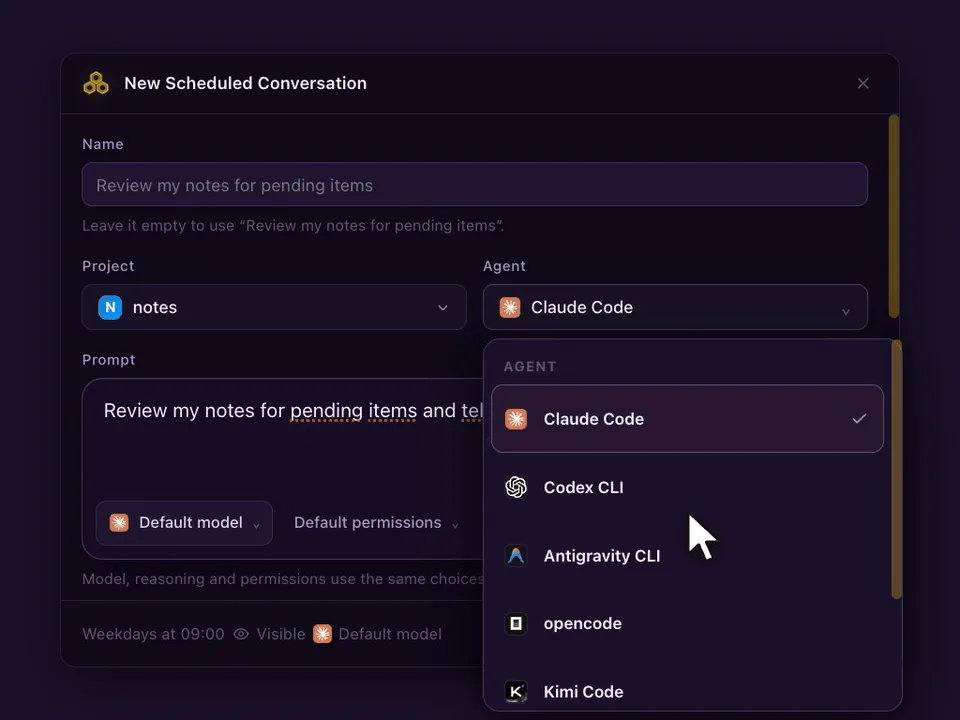
- Open Scheduled in the top bar and press New schedule. Or type the prompt in a Antigravity CLI Chat and pick Schedule this prompt… from the send menu.
- Pick the Project and choose Antigravity CLI as the agent. Model, reasoning and permissions are optional: leave them on Default or set them like in the Chat composer.
- Write the prompt the agent should run every time.
- Under When, choose At set times (up to 24 a day), Every few hours (1, 2, 3, 4, 6, 8 or 12) or When I run it, and the days.
- Choose Visible (opens a Chat) or Headless (no tab, result in Scheduled), and whether each run continues the same conversation or starts a new one. Press Create schedule.
Prompts worth scheduling with Antigravity CLI
- Every weekday at 09:00: read the open issues and draft a plan for the top one, without editing files.
- Every 8 hours: run the tests and explain any failure in plain words.
- Sundays at 20:00: review this week's commits and list risky changes.
What happens on each run
- With Continue the same conversation, a visible run goes to the Antigravity CLI agent that already holds the conversation, and never opens a second copy. With Start a new conversation, each run opens a fresh agent. If it is busy, Skip if still working (on by default) skips that slot; turn it off and the prompt waits in the queue.
- The Chat marks every scheduled run, so you can tell your own messages from the scheduled ones and reply to a run like any other message.
- If CodeAgentSwarm was closed or the computer asleep at the set time, If missed, run when the app opens runs it once, late. A week away gives one run, not seven.
- Schedules run on your computer, so CodeAgentSwarm has to be open. Your phone can list, edit and run them from the Scheduled tab.
FAQ
What does /schedule do in Antigravity CLI?
It sets a one-time timer or a recurring cron schedule that wakes the agent with an instruction. It belongs to the current conversation.
How do I run agy from cron?
Sign in once in an interactive agy session, then add a crontab line that changes to the project and runs agy -p with your prompt, writing output to a log.
Can I schedule Antigravity CLI and still continue the conversation?
Yes, in CodeAgentSwarm. With Continue the same conversation, every run lands in the same Antigravity Chat and you can reply to it.