
How to Install Pi Coding Agent on Linux (Ubuntu, Debian, Fedora)
By CodeAgentSwarm · Updated September 29, 2026
Quick answer: install Pi on Linux
Quick answer: run the official installer, or install the npm package if you already have Node.js 22.19 or newer. Then type pi inside a project folder and run /login.
# Official installer for macOS and Linux
curl -fsSL https://pi.dev/install.sh | sh

# Or with npm (Node.js 22.19 or newer)
npm install -g --ignore-scripts @earendil-works/pi-coding-agent

# Verify the install
pi --version
Every command in this guide comes from the official Pi quickstart.
Requirements
- A Linux machine with a terminal. The official installer supports macOS and Linux.
- Node.js 22.19 or newer if you install with npm. CodeAgentSwarm verified Pi 0.85.1 on that Node version.
- Access to a model: a subscription, an API key or a local model through a supported provider.
Pi has no subscription of its own. The provider you connect decides which models you can use and how you are billed. See Pi subscriptions and models.
Install with npm or the official installer
Both methods give you the same pi command. Use the installer if you want a guided setup. Use npm if you already manage Node.js with your distro or a version manager and want Pi to live next to your other global packages.
node --version
npm --version
npm install -g --ignore-scripts @earendil-works/pi-coding-agent
pi --version
The --ignore-scripts flag is part of the official command: Pi does not need dependency lifecycle scripts for a normal npm install. Older tutorials may still use the former @mariozechner package name.
To remove Pi later, run npm uninstall -g @earendil-works/pi-coding-agent, or run the installer again and choose Uninstall Pi if you used it.
First run and logging in (also over SSH)
cd ~/my-project
pi- Inside Pi, run
/login, choose a provider and follow its subscription or API key flow. - Run
/modelto pick a model your account can use. - On a server or over SSH, the OAuth callback may not reach Pi. When Pi asks, paste the final redirect URL or the authorization code back into it.
- You can also skip
/loginand set the provider key as an environment variable, such asANTHROPIC_API_KEYorOPENAI_API_KEY.
Pi saves credentials in auth.json inside its agent directory. That file can hold API keys and OAuth tokens, so keep it private and never commit it. Details are in the official provider authentication page.
Pi saves sessions automatically. Run pi --continue to pick up the last session in the same folder, or /resume to choose another one.
Common Linux errors and how to fix them
- "pi: command not found" after installing: open a new terminal first. If it still fails, run
command -v piandnpm config get prefixand check that the npm global bin folder is on your PATH. - Pi installed under a different Node: version managers such as nvm keep one set of global packages per Node version. Check
node --versionand reinstall Pi in the Node you actually use. - Node.js too old: the npm package needs Node.js 22.19 or newer. Distro packages are often behind, so check the version before installing.
- Login stuck on a remote machine: the browser callback cannot reach the server. Paste the redirect URL or code into Pi when it asks, or use an API key environment variable.
- Shift+Enter submits inside tmux: tmux can merge modified keys with plain Enter. Enable extended keys as described in the official tmux page.
Pi's tools run with the permissions of the Pi process and it does not ask before every tool call. For untrusted repositories or unattended work, run it in a container or another sandbox.
Running several Pi sessions on Linux
Once Pi works, the next limit is time: one terminal handles one task. More tabs or tmux panes help until you lose track of which session finished, which one needs you and what each one changed.
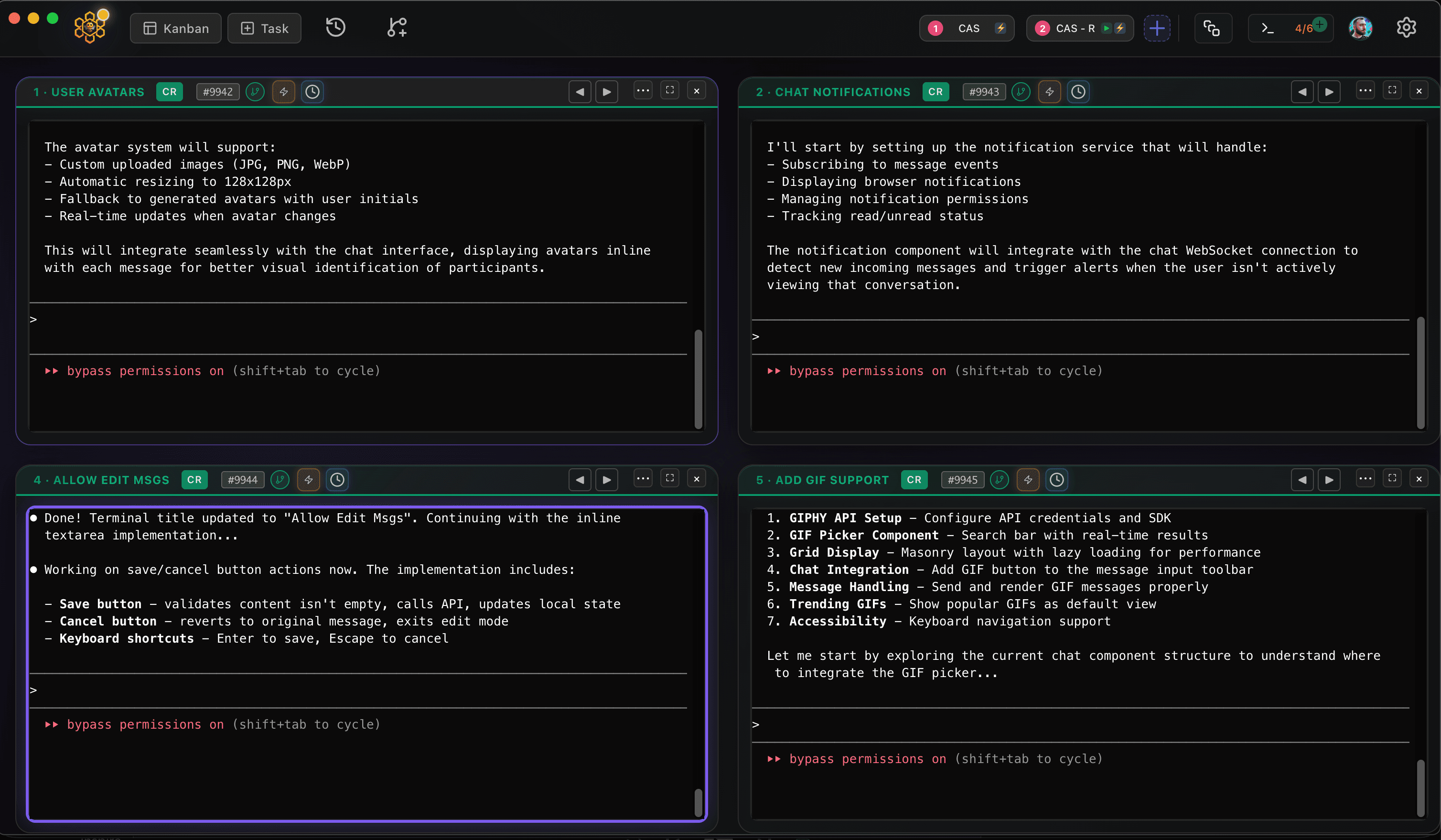
CodeAgentSwarm is a free desktop app for that, and it now runs on Linux as a .deb (Ubuntu, Debian and derivatives) or an AppImage (Fedora and most other distros), for x64 and ARM64. It puts several Pi terminals side by side, with desktop notifications when an agent finishes or needs input, searchable history across sessions and a live diff of what each terminal changed. You can mix Pi with Claude Code, Codex and other agents in the same window.
On Linux, CodeAgentSwarm installs Pi with its own bundled Node on x64 and ARM64, using the same official package: npm install -g --ignore-scripts @earendil-works/pi-coding-agent. Your credentials still come from Pi's own /login.
Next steps: how to use Pi coding agent for your first real task, and Pi subscriptions and models to choose a provider.
Conclusion
On Linux, Pi is one installer command or one npm install away. Check your Node version, run /login, and paste the redirect URL when you work over SSH. When a single terminal stops being enough, CodeAgentSwarm runs several Pi sessions at once.
FAQ
Does Pi coding agent work on Linux?
Yes. Pi runs in a Linux terminal. You can install it with the official installer for macOS and Linux or with the @earendil-works/pi-coding-agent npm package.
Which Node.js version does Pi need?
The npm package requires Node.js 22.19 or newer. CodeAgentSwarm verified Pi 0.85.1 on that version.
Can I log in to Pi on a server over SSH?
Yes. Run /login. If the OAuth callback cannot reach the server, paste the final redirect URL or authorization code into Pi when it asks. You can also use a provider API key through an environment variable.
Where does Pi store my credentials on Linux?
In auth.json inside Pi's agent directory. It can contain API keys and OAuth tokens, so keep it private and out of version control.
Does CodeAgentSwarm support Pi on Linux?
Yes. CodeAgentSwarm runs on Linux as a .deb or an AppImage, on x64 and ARM64, and Pi is available in it for macOS, Windows and Linux. It installs Pi with its own bundled Node and lets you run several Pi sessions in parallel.