
Pi models and subscriptions: ChatGPT, Claude and local providers
By CodeAgentSwarm · Updated September 24, 2026
Quick answer

Pi keeps its own provider connections. A ChatGPT subscription, an API key and a custom gateway are different ways to access models. Check the provider label in the model picker before sending a task.
Pi in CodeAgentSwarm, in pictures
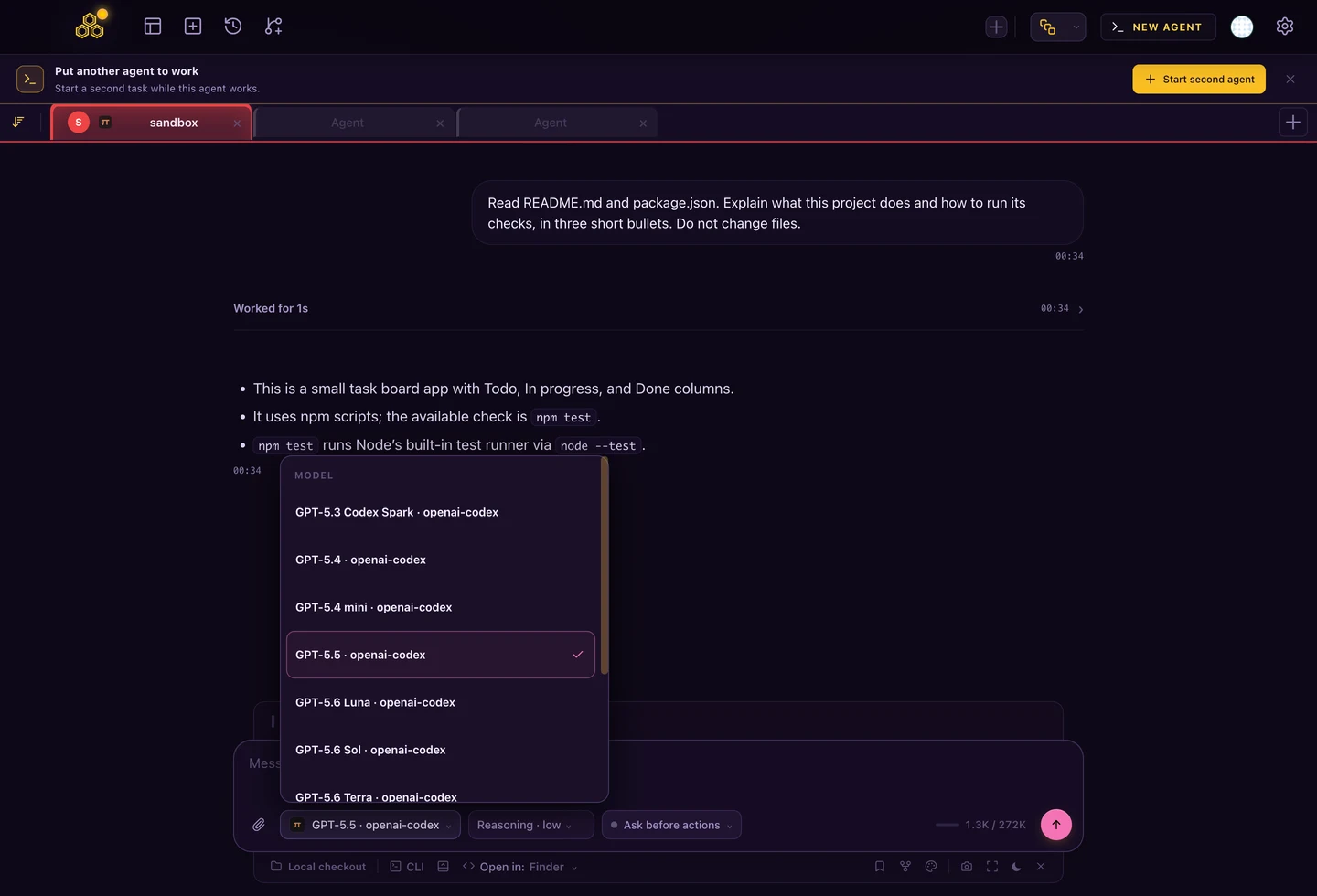
The picker shows the model and its provider. You can inspect that connection without leaving the project, while Chat keeps the task messages and tools together.
Diagnose model access by symptom
| What you see | What to check |
|---|---|
| No models | Run /login inside Pi on the host that runs this session. |
| Only a custom gateway | Add your intended provider through /login, preserving the gateway configuration. |
| A model appears but the request fails | Read the provider error; verify account access, credentials and available usage. |
| Desktop works, Cloud does not | Configure Pi on the Cloud host. Your desktop login stays on the desktop. |
Read both parts of a selection such as “GPT-5.5 · openai-codex”: the first names the model, the second identifies the connection. The screenshot is one configured account at capture time; your menu may contain a different set of models.
Can Pi use an existing subscription?
| Connection | What to expect |
|---|---|
| ChatGPT Plus or Pro | Pi supports subscription sign-in through its OpenAI Codex provider. |
| Claude Pro or Max | Pi documents third-party harness usage as extra usage billed per token, outside the included plan limits. |
| GitHub Copilot | Sign in with GitHub; available models depend on the account and enabled access. |
| Provider API key | Usage follows that API account's billing. |
| Local model server | Connect your own inference server and a model it can serve. |
These are provider connections, not a subscription sold by Pi. Review Pi's provider documentation and Anthropic's rules for third-party access before using a paid account. Signing in is not a guarantee that usage is included.
Connect ChatGPT or another provider
- Start
piin your project. If it is not installed, follow the installation guide. - Enter
/logininside Pi and choose the provider and authentication method. - Complete the browser or code flow shown by Pi.
- Open
/modeland choose from the models available to that connection.
In CodeAgentSwarm's Pi integration, complete this in CLI view and then open a new Pi Chat. Chat shows the model and provider together. Authenticating Codex elsewhere in CAS does not authenticate Pi: the two agents keep separate credentials.
Which models can Pi use?
The supported providers include OpenAI, Anthropic, Google Gemini, DeepSeek, Mistral, Kimi and gateways such as OpenRouter. Exact model IDs change, and a provider's catalog is not a promise that your account can use every entry. Use the installed Pi catalog to choose rather than copying a stale model name.
A model can appear through different providers. Compare the provider as well as the name when you want a particular subscription or API account to pay for the request. Reasoning and image support also depend on the selected model.
Inspect the catalog before copying a model name
pi --list-models
pi --list-models codex
These commands inspect the installed catalog without sending a coding task. The filtered command helps locate Codex entries; use a search term for the provider you actually connected. A listed entry is still not proof of billing eligibility or remaining allowance.
For a support request, record Pi version, provider, model ID and the error message. Remove account identifiers and credentials. Keep the CLI version with the result: a provider catalog can change independently of the model name in an older screenshot.
Why is only one provider showing?
Check the configuration on the machine that runs Pi. A custom entry in ~/.pi/agent/models.json can add a gateway alongside built-in providers. In CAS Chat, a suffix such as · my-gateway identifies that provider; it is not a different coding agent.
- Confirm you signed in inside Pi, using the intended provider.
- Check which host owns the chat: desktop and CAS Cloud have separate local configuration.
- Preserve existing custom providers while adding another connection. Do not delete the whole configuration to change models.
- After signing in from CLI view, open a new Pi Chat so CAS obtains a fresh model list.
Never post auth.json or API keys in a support message. The provider name and model ID are enough to start diagnosing a missing option.
Connect a local model
Pi can connect to Ollama, LM Studio or another supported API endpoint through models.json. Start the model server first and use its actual model ID and endpoint. A local server with no key may still need a placeholder credential for the model to appear in Pi. Custom model configuration.
Test tool calls on a disposable project before handing the model a larger task. A server accepting chat requests does not prove that the selected model handles coding tools or image inputs correctly. For a comparison of agent behavior, read Pi vs OpenCode.
FAQ
Does logging into Codex in CAS also log Pi in?
No. Pi has its own provider credentials. Sign in from Pi's CLI with /login, then open a new Pi Chat.
Does Claude Max include all Pi usage?
Do not assume that. Pi documents Claude third-party harness usage as additional per-token usage, and Anthropic may charge third-party access against usage credits.
Why does the same model have a different provider suffix?
The suffix identifies the connection serving that model. A custom gateway and a direct provider can expose similarly named models with different accounts and billing.