
How to schedule Muse Code: /loop, muse exec in cron and CodeAgentSwarm
By CodeAgentSwarm · Updated October 31, 2026
/loop, which schedules a recurring prompt as a cron job. Recurring jobs expire after 7 days, so a job that must run every weekday needs something longer-lived: cron with muse exec or CodeAgentSwarm Scheduled Conversations.Can Muse Code run on a schedule?

- For up to a week:
/loop, with shorthand like 1h or a cron expression. - At set times, week after week: cron with
muse exec, or CodeAgentSwarm.
Muse Code /loop
/loop "schedules a recurring prompt as a cron job". It takes shorthand (5m, 1h, 2d) or a five-field cron expression in local time, and with no cadence it runs every 10 minutes. Recurring jobs expire after 7 days, and an occurrence that lands while a run is active is skipped, not queued. Muse Code interactive docs
A Muse Code cron job with muse exec
# crontab -e: weekdays at 09:00
0 9 * * 1-5 cd ~/code/my-app && muse exec "Read the new issues and suggest quick fixes. Do not edit files." >> ~/logs/muse-cron.log 2>&1
muse exec "takes one prompt, runs it to completion, and exits". --json prints JSONL events and --prompt-file reads the prompt from a file. --disable-approval skips approvals but keeps the sandbox; --yolo disables both and is meant only for trusted code in a disposable container. Muse Code automation docs
Schedule Muse Code in CodeAgentSwarm
- Open Scheduled in the top bar and press New schedule. Or type the prompt in a Muse Code Chat and pick Schedule this prompt… from the send menu.
- Pick the Project and choose Muse Code as the agent. Model, reasoning and permissions are optional: leave them on Default or set them like in the Chat composer.
- Write the prompt the agent should run every time.
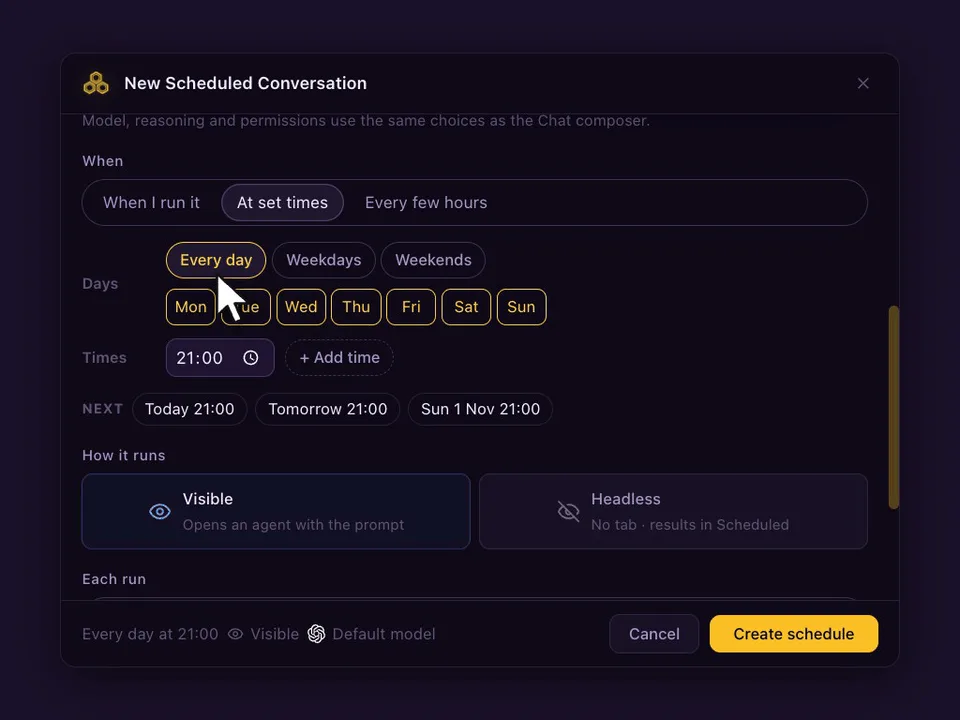
- Under When, choose At set times (up to 24 a day), Every few hours (1, 2, 3, 4, 6, 8 or 12) or When I run it, and the days.
- Choose Visible (opens a Chat) or Headless (no tab, result in Scheduled), and whether each run continues the same conversation or starts a new one. Press Create schedule.
Prompts worth scheduling with Muse Code
- Every weekday at 09:00: read the new issues and suggest which ones are quick fixes.
- Every 6 hours: run the tests and explain any failure.
- Saturdays at 10:00: review the docs folder and list pages that mention removed functions.
What happens on each run
- With Continue the same conversation, a visible run goes to the Muse Code agent that already holds the conversation, and never opens a second copy. With Start a new conversation, each run opens a fresh agent. If it is busy, Skip if still working (on by default) skips that slot; turn it off and the prompt waits in the queue.
- The Chat marks every scheduled run, so you can tell your own messages from the scheduled ones and reply to a run like any other message.
- If CodeAgentSwarm was closed or the computer asleep at the set time, If missed, run when the app opens runs it once, late. A week away gives one run, not seven.
- Schedules run on your computer, so CodeAgentSwarm has to be open. Your phone can list, edit and run them from the Scheduled tab.
FAQ
Is Muse Code /loop a cron job?
It schedules a recurring prompt as a cron job, but recurring jobs expire after 7 days. For a schedule that keeps going, use cron with muse exec or CodeAgentSwarm.
How do I run Muse Code from cron?
Add a crontab line that changes to the project and runs muse exec with your prompt, writing the output to a log.
Can I schedule Muse Code on Windows?
Yes. CodeAgentSwarm schedules work the same on macOS, Windows and Linux.