
How to Install Muse Code (Meta) on Linux
By CodeAgentSwarm · Updated September 29, 2026
Quick answer: install Muse Code on Linux in one line
Quick answer: run the official installer in any terminal. No sudo needed. When it finishes, open a new terminal, type muse in your project and sign in.
# Official installer for macOS and Linux
curl -fsSL https://dev.meta.ai/install.sh | bash

# Verify the install
muse --version

# Start it inside a project
cd ~/my-project
muse
The official docs pipe the script to sh, but the script is written for Bash, so piping it to bash is the safer choice on Ubuntu and Debian, where sh is a different shell. It is also what CodeAgentSwarm runs when it installs Muse for you. The commands in this guide come from the official Muse Code documentation.
Requirements
- A Linux machine with
curlandmktempavailable. The installer stops with "required command not found" if either is missing. - Bash, Zsh or fish. The installer adds Muse to your PATH in the matching startup file.
- A Meta account for browser sign-in, or a Meta API key.
- A working sandbox helper. On Linux, Muse Code runs shell commands inside a bundled bubblewrap helper.
Meta's docs list the Linux features as the same as macOS, including voice input and session messaging between local sessions. Both are unavailable on Windows.
What the installer changes
The script downloads the Muse launcher, checks its checksum and places it in ~/.local/bin/muse. You can pick another folder with the MUSE_INSTALL_DIR environment variable.
If ~/.local/bin is not on your PATH yet, it appends one line to ~/.bashrc, ~/.zshrc, your fish config or ~/.profile, depending on your shell. Set MUSE_NO_MODIFY_PATH if you prefer to edit your PATH yourself.
# Install into a custom folder
curl -fsSL https://dev.meta.ai/install.sh | MUSE_INSTALL_DIR="$HOME/bin" bash
First run and logging in (also over SSH)
- Open a terminal in a project folder and type
muse. - Muse asks whether you trust the workspace. Only say yes for folders you own.
- Choose browser sign-in to approve the session in your browser, or paste a Meta API key directly.
- Type
/logininside a session to open the login options again, and runmuse logoutto clear the stored session and key.
On a server or over SSH, where no browser can open, use an API key. Export META_API_KEY and it takes priority over any stored key or browser session. Meta Managed Account users must use an API key too, because browser sign-in is not available to them. Details are on the official authentication page.
# Scripts and CI: no interactive UI
META_API_KEY="$MUSE_KEY" muse exec "Summarize the README"
Common Linux errors and how to fix them
- "muse: command not found" after installing: the PATH change only applies to new shells. Open a new terminal, or run the
sourceline the installer printed. - "required command not found: curl" or "mktemp": install the missing tool with your package manager and run the installer again.
- Every shell command fails as an environment error: the bubblewrap sandbox helper is not working on this host. Meta notes that a musl build without the helper fails the same way.
- Muse cannot write to .git or .muse: this is expected. The sandbox gives write access to the workspace and a temp folder, keeps the rest of the filesystem read-only, and protects
.git,.museand.agents. - The browser login went through but the wrong account is used: check whether
META_API_KEYis set in your shell. It wins over the browser session.
The permissions and safety reference explains the sandbox limits in full.
Running several Muse Code sessions on Linux
With Muse working, the next limit shows up quickly: one terminal is one task at a time. You give Muse a job and wait. Opening more tabs in GNOME Terminal or tmux helps, until you lose track of which session finished, which one is waiting for approval and what each one changed.
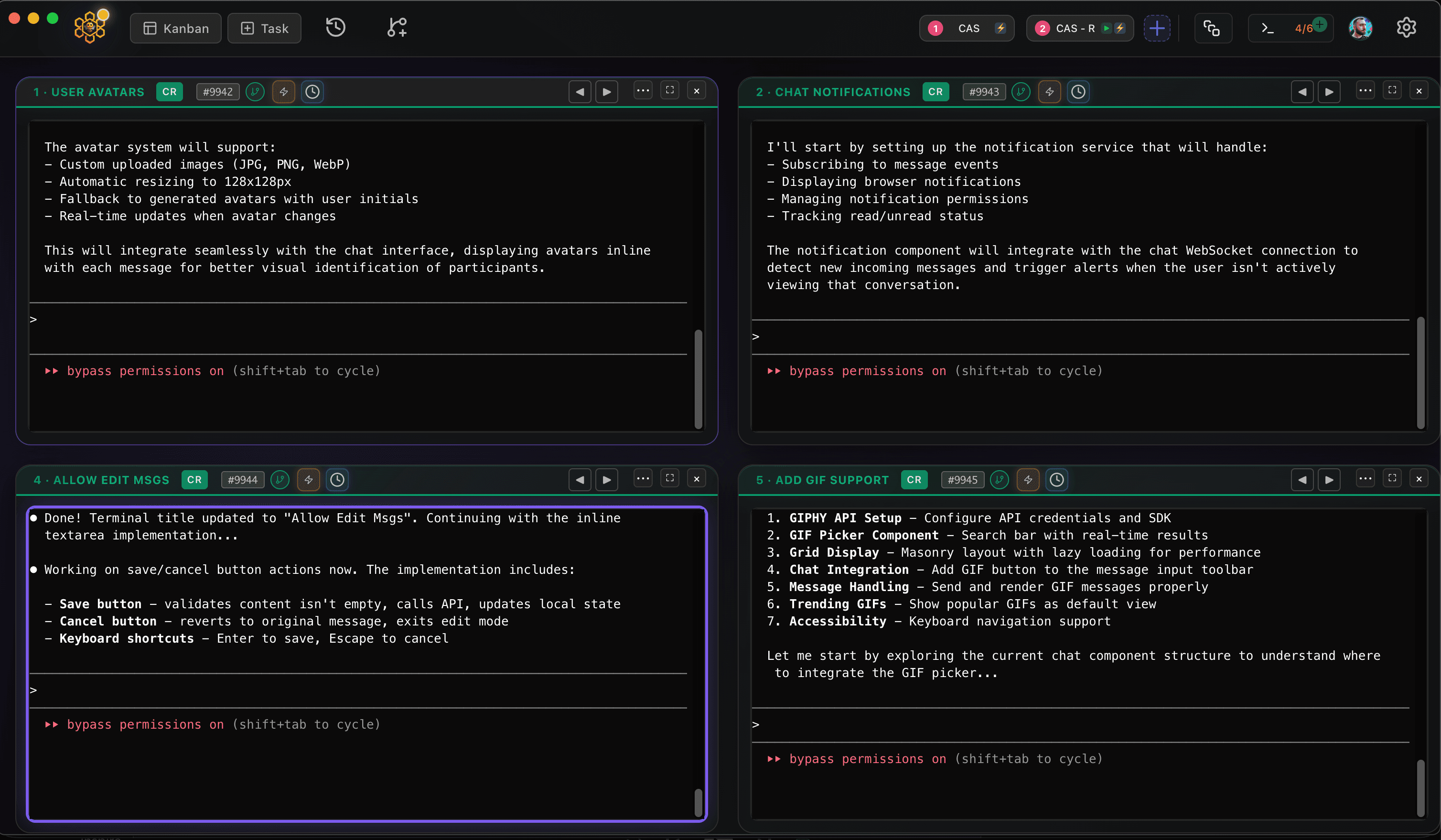
CodeAgentSwarm is a desktop app for exactly that, and it now runs on Linux as a .deb (Ubuntu, Debian and derivatives) or an AppImage (Fedora and most other distros), for x64 and ARM64. It can install and launch Muse Code on Linux, puts several agent terminals side by side and adds desktop notifications when an agent finishes or needs input, searchable history across every session and a live diff of what each terminal changed. You can run Muse next to Claude Code, Codex and other agents in the same window.
Good next steps: how to use Muse Code for your first real task, and Muse Code models, pricing and privacy to understand billing before you run several sessions.
Conclusion
On Linux, Muse Code is one curl command away. Use browser sign-in on a desktop and META_API_KEY on servers, and if shell commands fail, check the bubblewrap sandbox first. When one terminal stops being enough, CodeAgentSwarm lets you run several at once.
FAQ
Does Muse Code work on Linux?
Yes. Meta ships one installer for macOS and Linux, and its docs list full feature support on both, including voice input and session messaging.
How do I install Muse Code on Ubuntu or Fedora?
Run "curl -fsSL https://dev.meta.ai/install.sh | bash" in a terminal, open a new terminal and type "muse". You need curl and Bash, which most distributions include.
Can I use Muse Code on a Linux server over SSH?
Yes. Install it the same way and log in with a Meta API key instead of the browser. Set the META_API_KEY environment variable, or paste the key when Muse asks you to sign in. For scripts and CI, use "muse exec".
Why does every shell command fail inside Muse on Linux?
Muse runs shell commands inside a bundled bubblewrap sandbox. If that helper cannot run on your host, Muse reports every shell command as an environment error. Fix the sandbox before changing permissions.
Does CodeAgentSwarm support Muse Code on Linux?
CodeAgentSwarm runs on Linux as a .deb for Ubuntu, Debian and derivatives or as an AppImage for Fedora and most other distros, on x64 and ARM64. It can install and launch Muse Code on Linux and run it next to Claude Code, Codex and other agents.