
Claude Code Skills Marketplace: Browse and Install Agent Skills
By CodeAgentSwarm · Updated October 5, 2026
What the Claude Code Skills Marketplace is
The Skills Marketplace is a screen inside CodeAgentSwarm where you browse agent skills and install them with one click. Think of it as an app store for capabilities you can hand to your CLI agents.
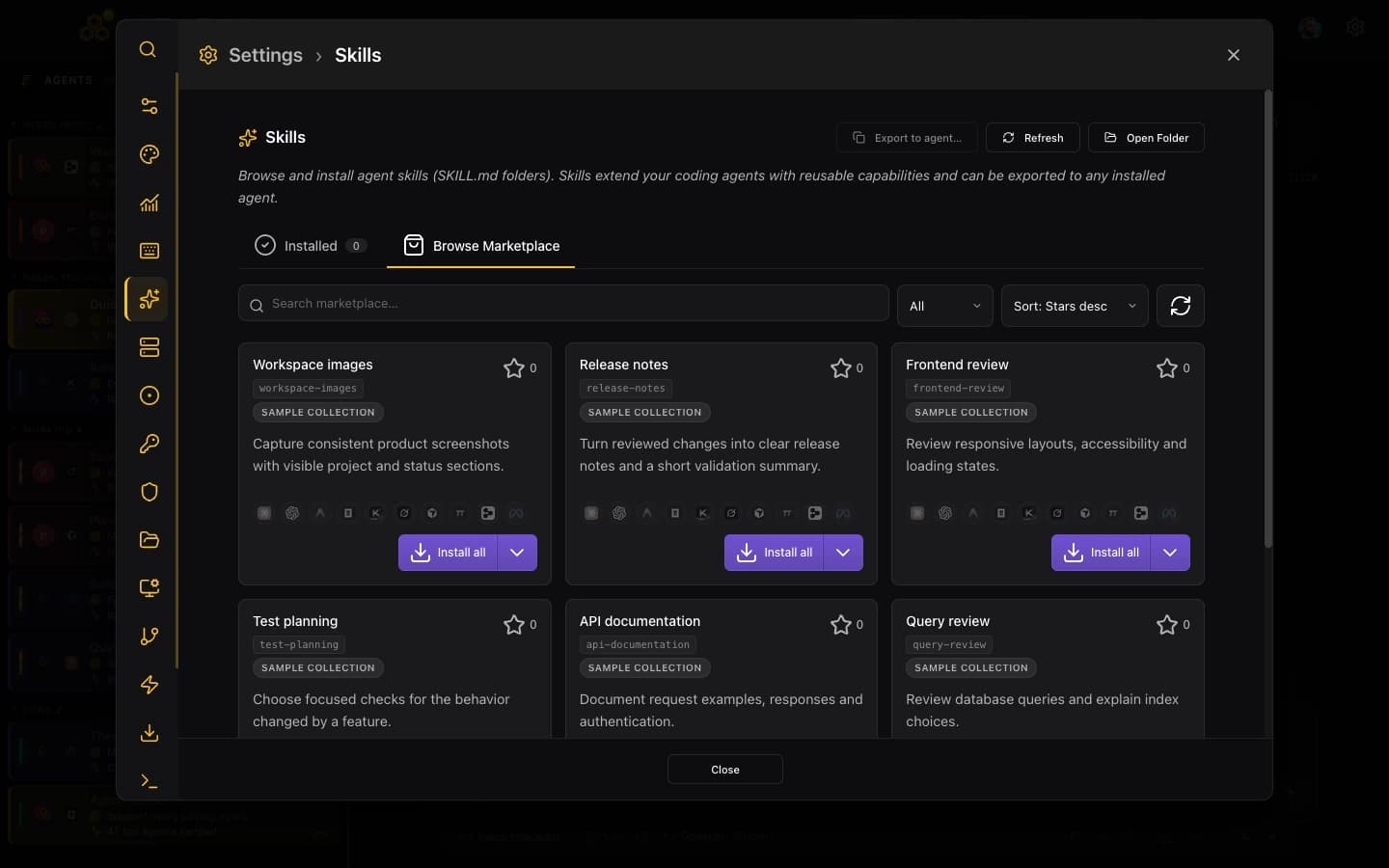
A skill is a small bundle: a SKILL.md file that describes what the skill does and when to use it, plus its folder of supporting files (scripts, templates, references). When an agent has that skill installed, it can pick it up automatically when the task matches.
The marketplace mirrors a large public catalogue, so you are not limited to a handful of curated examples. There are tens of thousands of skills to look through, you can search by keyword, and you can sort by stars to surface the ones other people actually rely on.
If you are new to Claude Code, it is Anthropic's agentic coding tool that runs in your terminal. Skills are how you extend what it knows how to do without retyping the same instructions in every session.
How to install a Claude Code skill (and where it goes)
Installing is the easy part. You open the marketplace, find a skill, and click Install. What makes it interesting is the choice you get about where to install it.
The arrow beside Install all opens the agent selector. The skill detail view also offers individual installation targets:
- Install to one supported agent: Claude Code, Codex CLI, Antigravity CLI, OpenCode, Kimi Code, Grok Build, Cursor Agent, Muse Code, Pi and Devin CLI
- Install all, which puts the skill into all ten agents at once
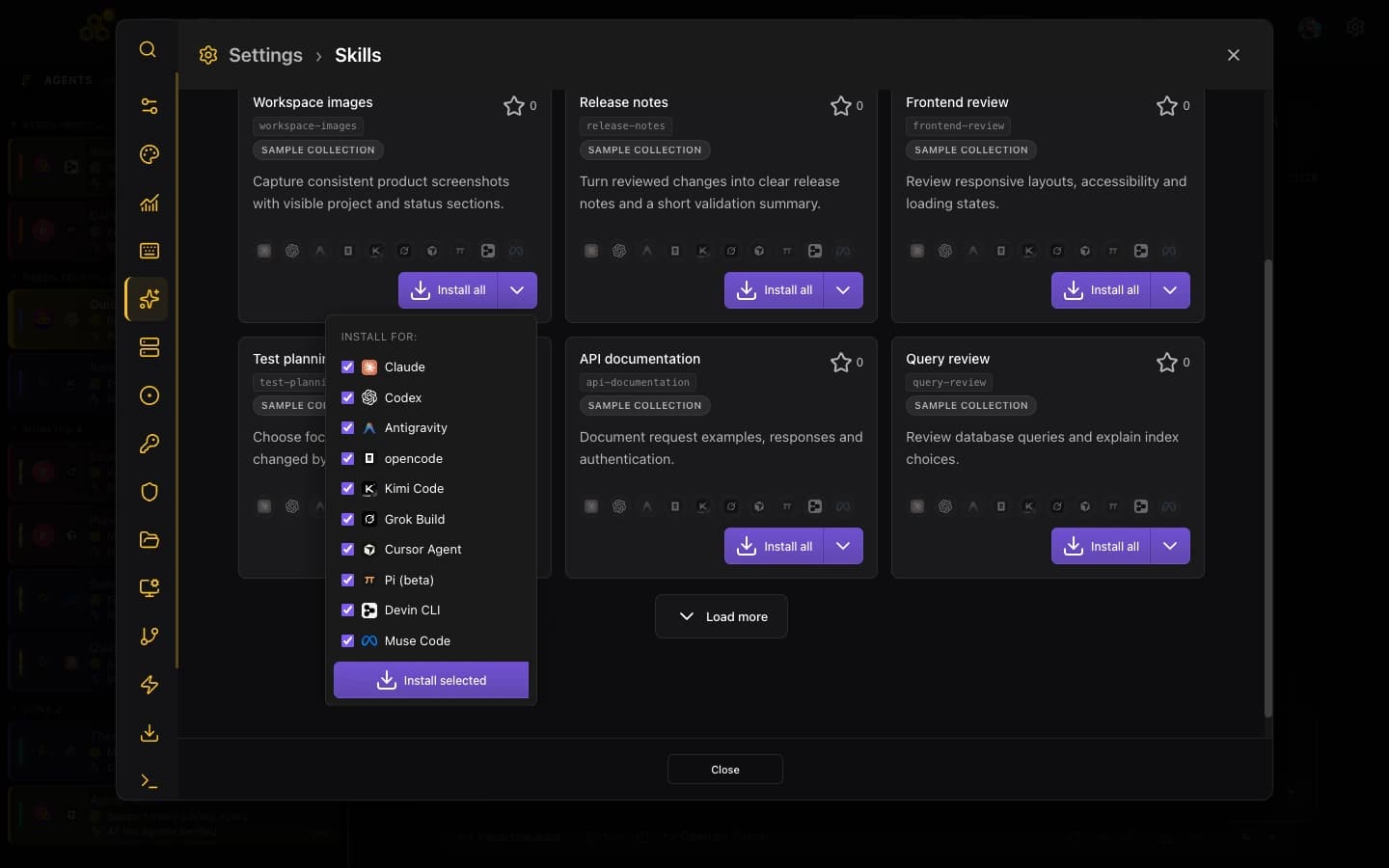
The practical flow looks like this:
- Open the Skills Marketplace in CodeAgentSwarm.
- Search for what you need, or sort by stars to see the popular ones.
- Open a skill to read its description and what it is for.
- Choose a target agent, or click Install all.
- Start a session and the agent can use the skill from then on.
If you are not sure which agent you will use a skill with, pick Install all. Having it available everywhere means you never have to return and install it again for another CLI.
Where Claude Code skills are stored
When you install a skill to Claude, CodeAgentSwarm writes it into your Claude Code skills directory at ~/.claude/skills/. Each skill lives in its own folder there, with its SKILL.md and any supporting files alongside it.
Because they are plain files on disk, nothing is hidden or magic. You can open the folder, read the SKILL.md, tweak it, or delete a skill you no longer want. The marketplace just saves you the manual copying.
Installing to another supported agent works the same way. Each CLI has its own skills location, and CodeAgentSwarm puts the files where that agent expects them. That is the point of the multi-target install: one source, written to the right place for each tool.
Because skills are just folders, they play nicely with version control. If you keep a dotfiles repo, you can track your installed skills there and carry your setup between machines.
One skill library across all ten agents
This is the reason the marketplace matters more inside CodeAgentSwarm than it would as a standalone catalogue. CodeAgentSwarm is built to run several CLI agents in parallel, across Claude Code, Codex CLI, Antigravity CLI, OpenCode, Kimi Code, Grok Build, Cursor Agent, Muse Code, Pi and Devin CLI.
If your skills only worked with one agent, you would end up with one good toolbox and empty ones for your other agents. The multi-target install fixes that. Find a useful skill once, install it everywhere, and every agent in your swarm has the same capability.
For example, a "generate a release changelog" skill installed to all ten means it does not matter which terminal handles the release. Every supported agent gets the same workflow.
If you want the bigger picture of running multiple CLI agents together, see this guide: How to Build an AI CLI Agent Swarm.
Skills vs MCP servers: when to use which
People sometimes mix up skills and MCP servers because both extend what an agent can do. They solve different problems, and you will usually want both.
A skill is knowledge and instructions, packaged. It teaches the agent how to do something (a workflow, a convention, a recipe) using the tools it already has. It is text and supporting files, installed locally.
An MCP server is a connection to an external capability or system: a database, an issue tracker, a browser, an API. It gives the agent new tools to call, not just instructions to follow.
A rough rule: if you want the agent to know how to do a task it could already attempt, reach for a skill. If you want the agent to reach into a system it cannot touch otherwise, reach for an MCP server. To pick MCP servers, see this guide: The Best MCP Servers for Claude Code.
Creating and sharing your own skill
Once you have used a few installed skills, you will probably want to make your own for the workflows specific to your projects.
A skill is just a folder with a SKILL.md file. The SKILL.md describes what the skill does, when the agent should use it, and the steps or rules to follow. Add any scripts, templates or reference files the skill needs into the same folder.
- Create a folder for your skill inside the skills directory (for Claude, that is ~/.claude/skills/).
- Write a SKILL.md that explains the purpose, the trigger ("use this when..."), and the steps.
- Drop in any helper files the skill relies on.
- Start a session and try it. Refine the SKILL.md until the agent uses it the way you want.
To share a skill, you can publish it to the public catalogue the marketplace mirrors, or simply commit the folder to a repo your team clones. Either way, the format is the same, so anything you build is portable across all ten supported agents.
Start by copying a skill you already installed and editing it. Reading a working SKILL.md is the fastest way to learn the format before writing one from scratch.
FAQ
What are Claude Code skills?
A Claude Code skill is a reusable capability you give the agent. It is a SKILL.md file describing what the skill does and when to use it, plus a folder of supporting files (scripts, templates, references). Once installed, Claude Code can pick up the skill automatically when a task matches it, instead of you retyping the same instructions every session.
How do I install a Claude Code skill?
Open the Skills Marketplace inside CodeAgentSwarm, search or sort by stars to find a skill, open it, and click Install. Choose Claude, Codex, Antigravity, OpenCode, Kimi Code, Grok Build, Cursor Agent, Muse Code, Pi, Devin CLI or Install all. The files are written to the right place automatically.
Where are Claude Code skills stored?
Skills installed to Claude live in your Claude Code skills directory at ~/.claude/skills/, with each skill in its own folder next to its SKILL.md. They are plain files, so you can open, edit, version control or delete them. Every supported agent has its own skills location, and CodeAgentSwarm writes the files where each one expects them.
Can I use the same skill with all supported agents?
Yes. Choose Claude, Codex, Antigravity, OpenCode, Kimi Code, Grok Build, Cursor Agent, Muse Code, Pi, Devin CLI or Install all. Choosing Install all puts the same skill into every supported CLI agent at once.
How do I create my own skill?
Make a folder inside your skills directory (for Claude, ~/.claude/skills/) and add a SKILL.md that explains what the skill does, when to use it, and the steps to follow. Include any scripts or templates the skill needs in the same folder. Start a session to test it and refine the SKILL.md until the agent behaves the way you want. The easiest start is to copy an installed skill and edit it.
How many skills are in the marketplace?
The marketplace mirrors a large public catalogue with tens of thousands of skills. You can search by keyword to narrow things down and sort by stars to see the ones people rely on most.
What is the difference between a skill and an MCP server?
A skill is packaged knowledge and instructions: it teaches the agent how to do a task with the tools it already has. An MCP server connects the agent to an external system (a database, a browser, an API) and gives it new tools to call. They complement each other, and you will usually use both.