
Muse Wonder for Coding: Use Meta’s New Model Without Lock-In
By CodeAgentSwarm · Updated November 14, 2026
What Meta released on October 12

Meta’s announcement introduces two models for agent work. Meta stresses two abilities: active memory, which carries relevant details across conversations, and active focus, which keeps the agent working toward a goal when a task gets hard. For coding, the useful claim is the second one: try another approach, recover from errors and finish the task.
| Model | Where you can use it | What to know |
|---|---|---|
Muse Wonder (muse-wonder-1.0) | Meta Model API and Muse Code | Standard data tier only. 1,048,576-token context window. On November 14, 2026, Meta’s catalog still labels it preview and recommends Muse Spark 1.3 for new work. |
| Muse Wonder Full | Muse Code subscriptions only | Not served through the API. Engadget reports it is part of the $50 Power Usage and $200 Maximum Usage plans. |
Muse Spark 1.3 (muse-spark-1.3) | Meta Model API and Muse Code | Earlier, cheaper model. Also offered as a Contributor variant. |
Meta compares both models with Claude Fable 5.1, GPT-6 Astra and Claude Opus 5.5. The next section shows the coding results.
Muse Wonder benchmarks for coding
The Muse Wonder model card includes a scorecard. Every model ran at maximum reasoning effort. Meta chose the benchmarks, and some competitor runs are its own best-effort tests, so read these numbers as the vendor’s view.
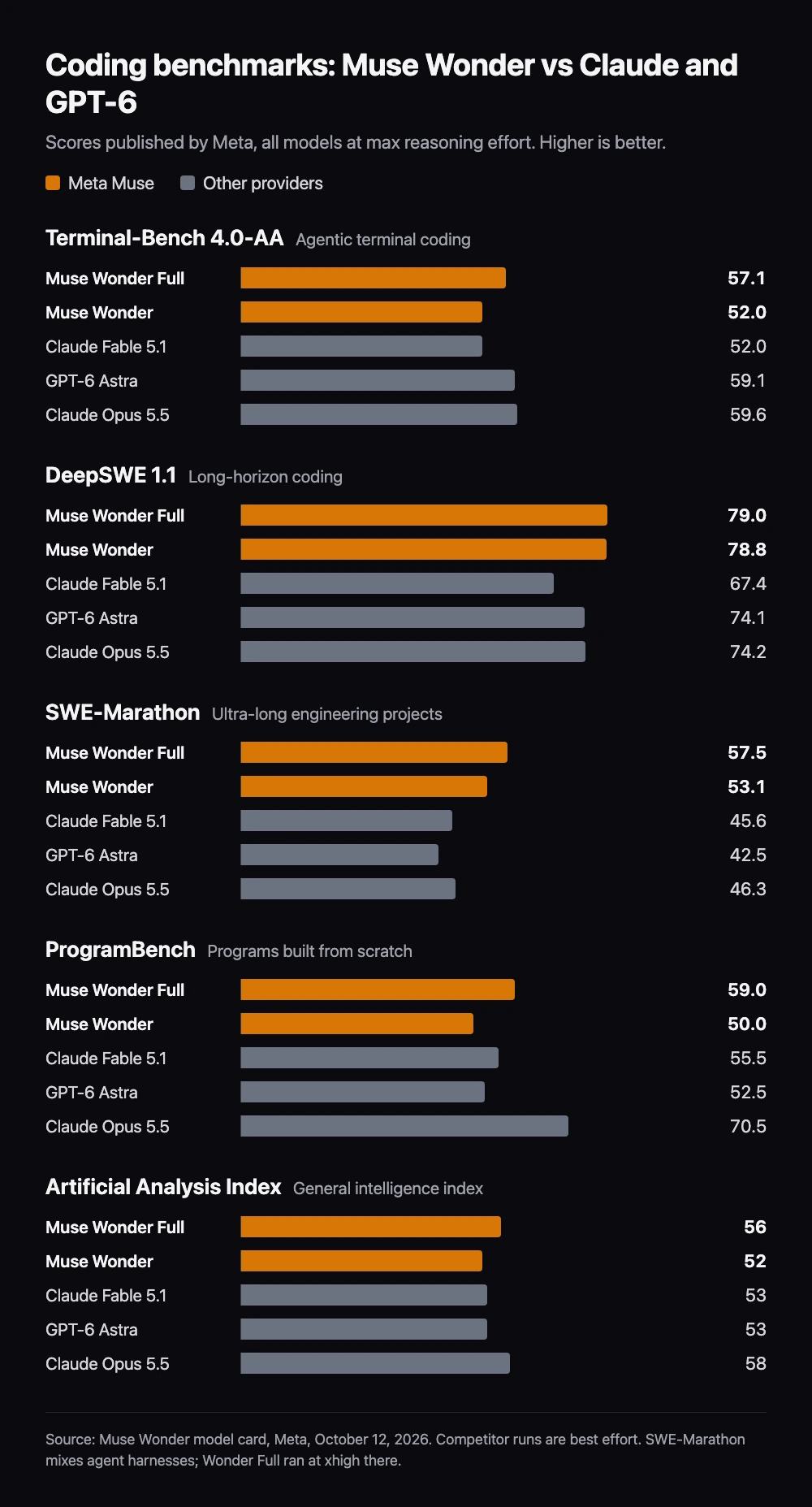
| Benchmark | Wonder Full | Wonder | Fable 5.1 | GPT-6 Astra | Opus 5.5 |
|---|---|---|---|---|---|
| Terminal-Bench 4.0-AA | 57.1 | 52.0 | 52.0 | 59.1 | 59.6 |
| DeepSWE 1.1 | 79.0 | 78.8 | 67.4 | 74.1 | 74.2 |
| SWE-Marathon | 57.5 | 53.1 | 45.6 | 42.5 | 46.3 |
| ProgramBench | 59.0 | 50.0 | 55.5 | 52.5 | 70.5 |
| MemoryBench | 85.5 | 85.6 | 79.0 | 81.4 | 81.5 |
| Artificial Analysis Index | 56 | 52 | 53 | 53 | 58 |
For coding, the picture is mixed. Muse Wonder leads on long tasks: 78.8 on DeepSWE 1.1 against 74.2 for Opus 5.5, and 53.1 on SWE-Marathon against 46.3. It trails Opus 5.5 on Terminal-Bench 4.0 (52.0 against 59.6) and on ProgramBench, which rebuilds programs from scratch (50.0 against 70.5).
The Artificial Analysis Index is the one independent number, and it has moved since the model card. On November 14, 2026, Artificial Analysis lists Muse Wonder with 44 points at max effort on its re-scaled Intelligence Index v5.0.1, 35th of 80 models, and Wonder Full with 50. No model wins every row, so test the leaders on your own repository.
What Muse Wonder costs
The Model API price list gives these rates in US dollars per one million tokens. Wonder’s uncached input costs 3.2 times Spark’s, and its output costs 4.7 times.
| Token category | Muse Wonder 1.0 | Muse Spark 1.3 |
|---|---|---|
| Uncached input | $4.00 | $1.25 |
| Cached input | $0.20 | $0.15 |
| Output | $20.00 | $4.25 |
Take a small task that uses 200,000 uncached input tokens and 20,000 output tokens. With Wonder it costs 0.2 × 4 + 0.02 × 20 = $1.20. With Spark it costs 0.2 × 1.25 + 0.02 × 4.25 = $0.335. That is arithmetic for one stated workload, not a forecast. A stronger model can still be cheaper per finished task if it needs fewer attempts.
Muse Code subscriptions are a separate path. Meta lists Everyday Usage, High Usage, Power Usage and Maximum Usage plans, and says benefits can vary by region. Check the price shown in your own onboarding. The models, pricing and privacy guide explains how a subscription credential differs from an API key.
Start a coding task with Muse Wonder
Install and sign in to Muse Code first. The first-task guide covers both. Then start a session in your project and select Wonder explicitly:
cd /path/to/your/project
muse --model muse-wonder-1.0 --reasoning-effort high
Inside a running session, open /models to switch. Muse Code 1.4.5 and later also accept /model muse-wonder-1.0. If your plan includes Wonder Full, look for it in /models. Meta’s model catalog does not list an ID for it, so this guide does not print one.
The model list depends on your account and on Meta’s rollout. On October 13, 2026, our test account with Muse Code 1.4.6 still listed only muse-spark-1.3. Check /models before you put the Wonder ID in a script.
Find why the CSV export test fails for dates before 1970.
Explain the call path before editing.
Make one fix and run the existing targeted test.
Report the diff, the test result and any open assumption.
A prompt like this one has a clear finish line. That makes it easy to compare Wonder with the model you use today.
Use Muse Wonder inside CodeAgentSwarm
CodeAgentSwarm runs Muse Code as one of its agents from version 2.4.0, on macOS, Windows and Linux. It does not replace the CLI or sell model access: it starts the official muse program with your own Meta account. In Chat view, the model menu shows the models that your Muse account returns. When Wonder appears in that list, you select it like any other model.
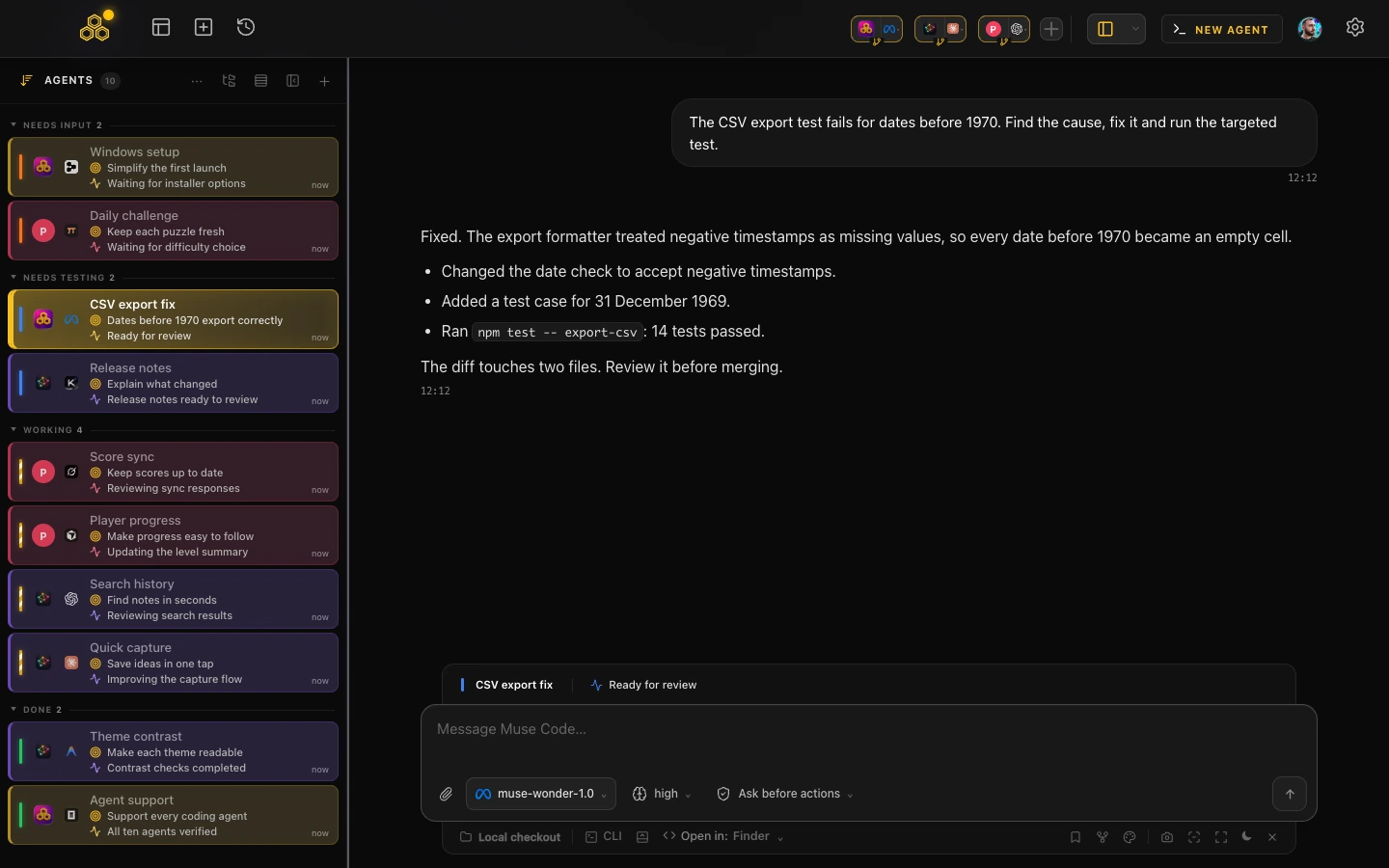
- Install Muse Code and sign in once in a normal terminal.
- In CodeAgentSwarm, click New Agent and choose Muse Code.
- Open the model menu in the Chat composer and select
muse-wonder-1.0if your account lists it. - Set the reasoning level next to it. Higher levels use more tokens.
New Muse sessions start with muse-spark-1.3 unless you choose another model, and CodeAgentSwarm never switches you to Contributor without asking. The Terminal view runs the same CLI, so /models works there too.
Today’s best model will not stay the best
New frontier models now arrive often. Today Muse Wonder may be the best fit for your work. Next month it may be a new Claude, GPT or Gemini model. If your tools only speak to one provider, every change means starting again with another setup and an empty history.
CodeAgentSwarm works on top of the official CLIs: Claude Code, Codex CLI, Antigravity CLI, OpenCode, Kimi Code, Grok Build, Cursor Agent, Muse Code, Pi and Devin CLI. Projects, task board, notifications and searchable history stay the same whichever agent you choose. Each provider keeps its own login and billing.
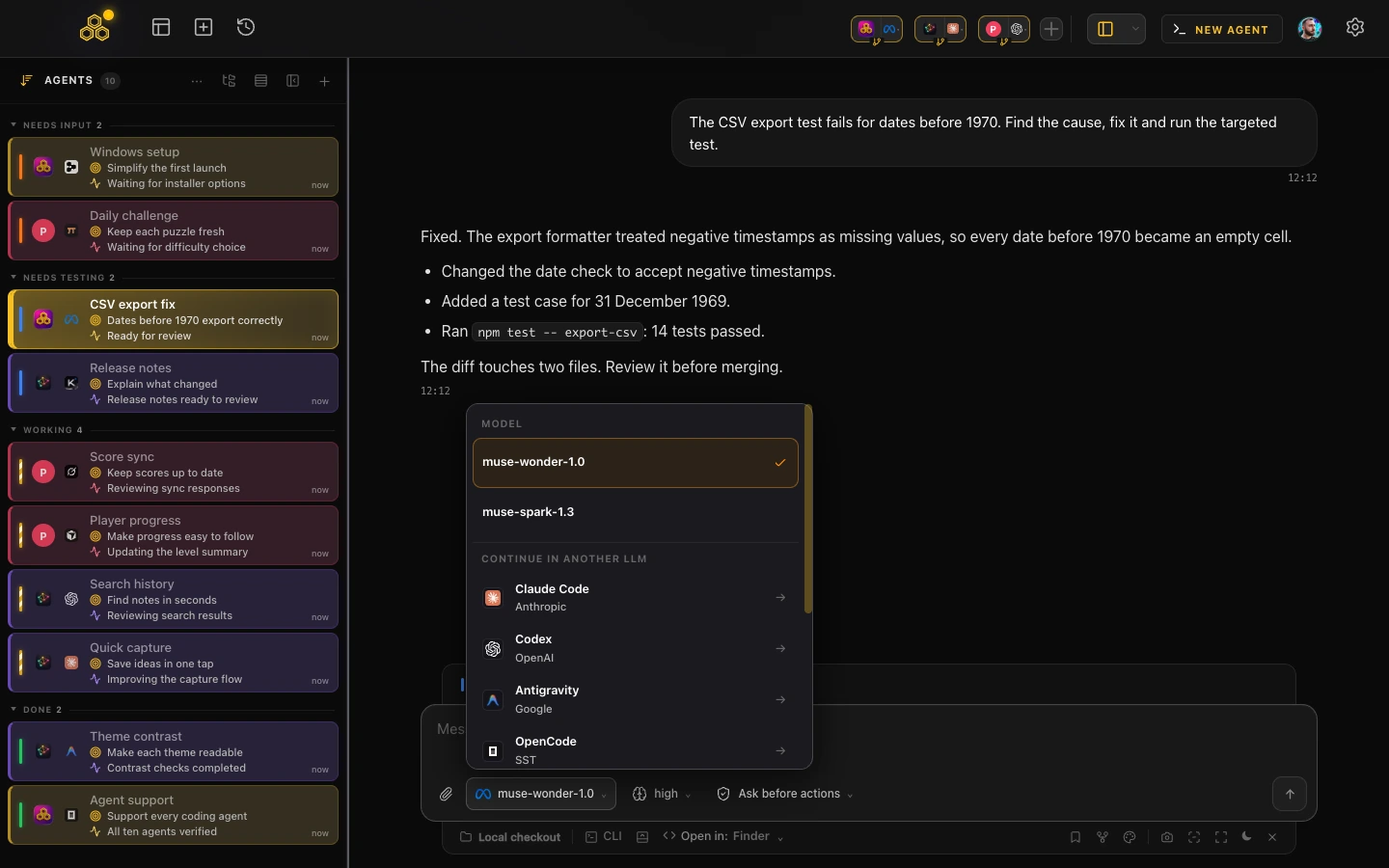
The same menu has a Continue in another LLM section. Pick Claude Code or Codex there, for example, and CodeAgentSwarm opens a new session with that agent. It passes a short summary of the original request, your latest instructions and key checkpoints, plus the full transcript as a local reference. The Muse conversation stays as it was. Use this to get a second review of a Muse diff, or to keep working when one provider reaches its usage limit.
Compare Wonder with the model you use now
Run the same task twice from the same commit: once with Muse Wonder and once with your current agent. Use separate Git worktrees so the edits do not collide. CodeAgentSwarm can create a worktree for each session.
- Is the fix correct, and did the targeted test pass?
- How long did your review take?
- How many tokens or how much plan usage did the whole task consume, including failed attempts?
Keep the winner for that kind of task, and test again when the next model ships. For the data terms behind each Muse model, read Muse Code models, pricing and privacy. To run several agents at once, see the AI CLI agent swarm guide.
FAQ
What is Muse Wonder?
Muse Wonder is Meta’s new frontier model for agents, released on October 12, 2026. It is available through the Meta Model API and Muse Code with the model ID muse-wonder-1.0.
What is the difference between Muse Wonder and Muse Wonder Full?
Wonder is available through the API and Muse Code. Wonder Full is the larger version and is only available to Muse Code subscribers. Meta does not serve Full through the API.
Is Muse Wonder better than Claude Opus 5.5 for coding?
It depends on the task. In Meta’s scorecard, Muse Wonder beats Opus 5.5 on DeepSWE 1.1 (78.8 against 74.2) and SWE-Marathon (53.1 against 46.3), but trails it on Terminal-Bench 4.0 (52.0 against 59.6) and ProgramBench (50.0 against 70.5). Test both on your own repository.
How much does Muse Wonder cost?
On the Meta Model API it costs $4.00 per million uncached input tokens, $0.20 per million cached input tokens and $20.00 per million output tokens, checked on November 14, 2026.
Can I use Muse Wonder in CodeAgentSwarm?
Yes, from CodeAgentSwarm 2.4.0, when your Muse account offers the model. Choose muse-wonder-1.0 in the Chat model menu, or use /models in the Terminal view. Access and billing stay with your Meta account.
Does CodeAgentSwarm tie me to Muse?
No. CodeAgentSwarm runs the official CLIs of several providers, including Claude Code, Codex CLI and Muse Code. You can start another agent at any time or continue a conversation in another LLM from the Chat model menu.